
 View on Asset Store (opens in new tab)
Package details
- Latest version
- 1.0.0
- Last updated
- First released
- Unity version
- 6000.3.3 or later
- Package size
- 66 KB
- Files
- 2
- Views in the past week
- 5
Price tracking
- Last checked
- Tracked since
- Lowest recorded
- $7.50 on
Keywords

Multi-Build Profile Tool
Multi-Build Profile Tool is a powerful Editor tool that simplifies the build process by allowing you to configure and build multiple Build Profiles simultaneously. Save hours!
Affiliate link · Purchases support this site
Price history
Last 6 months
USDAsset preview
1 / 2
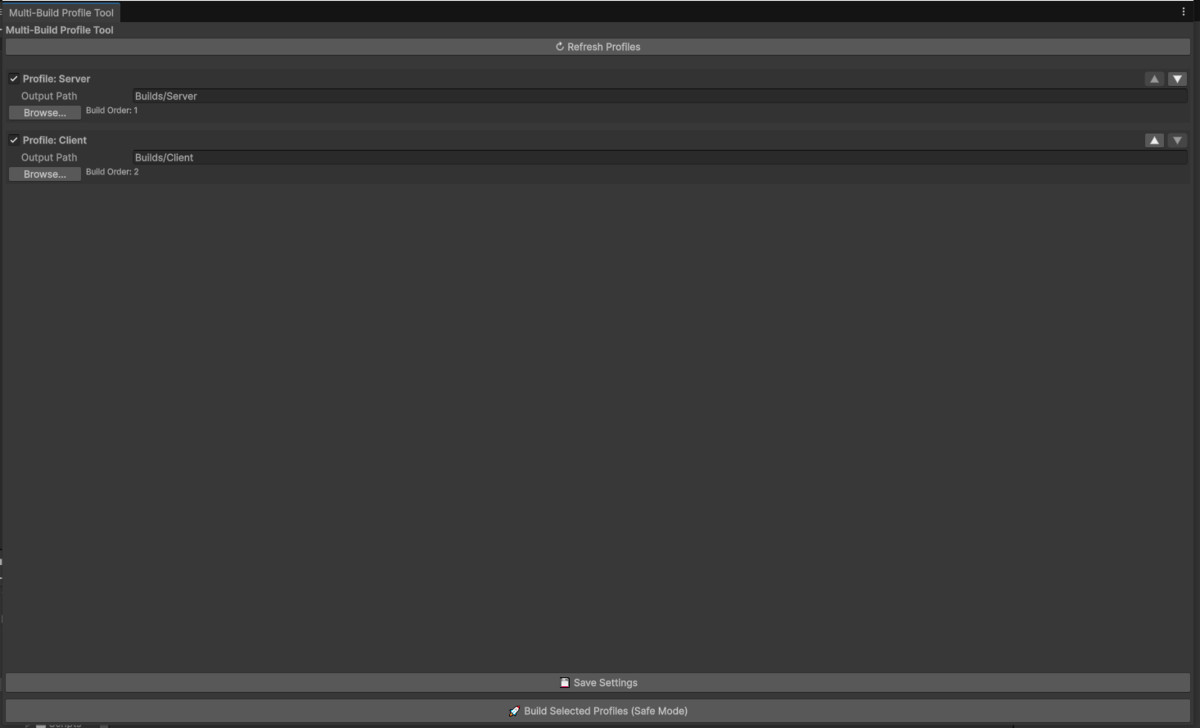
Multi-Build Profile Tool screenshot 1

About this asset
Multi-Build Profile Tool is an Editor utility designed to simplify and automate multi-platform builds using the Build Profiles system.
Instead of manually switching profiles and rebuilding one platform at a time, this tool allows you to batch build multiple Build Profiles sequentially from a single window — saving time, reducing errors, and improving production workflows.
Ideal for:
• Indie developers shipping to multiple platforms
• CI-style local build workflows
• Multiplayer game development where multiple servers need to be built as well as clients.
Built on Build Profiles API and designed to be lightweight, safe, and editor-friendly.
From the publisher's Asset Store listing.
Technical details
Features:
• Automatically detects all Build Profiles in the project
• Enable or disable profiles individually
• Custom output path per build profile
• Configurable build order with drag controls
• Batch build execution with progress reporting
• Safe Mode build process with assembly reload locking
• Persistent settings saved using EditorPrefs
• No runtime dependencies (Editor-only tool)
Workflow:
1. Create Build Profiles using Build Profiles window
2. Open Tools → Build → Multi-Build Profile Tool
3. Select profiles, configure output paths and order
4. Click “Build Selected Profiles”
5. All builds execute sequentially and safely
This tool does not modify your Build Profiles and works entirely within the editors environment.
Compatibility
| Unity version | Built-in | URP | HDRP | Custom |
|---|---|---|---|---|
| 6000.3.3f1 | Compatible | Compatible | Compatible | Compatible |
As listed on the Asset Store.