
 View on Asset Store (opens in new tab)
Package details
- Latest version
- 1.0.0
- Last updated
- First released
- Unity version
- 2022.3.62 or later
- Package size
- 6.0 MB
- Files
- 38
- Favorites
- 1
- Views in the past week
- 9
Price tracking
- Last checked
- Tracked since
- Lowest recorded
- $9.99 on
Keywords

PolyFlow Pipeline
The ultimate 3D workflow tool for Unity. Batch validate models, automate import settings, auto-match materials, and bake game-ready prefabs with colliders in seconds. Streamline your pipeline today.
Affiliate link · Purchases support this site
Price history
Last 6 months
USDAsset preview
1 / 2
PolyFlow Pipeline screenshot 1

About this asset
🚀 Stop wasting time on manual model setup!
PolyFlow Pipeline is an all-in-one editor utility designed to automate the tedious parts of your 3D asset workflow. Whether you are dealing with hundreds of environment props or complex architectural models, PolyFlow ensures every asset enters your project clean, optimized, and ready to use.
Built for Environment Artists, Level Designers, and Solo Developers who want a professional project structure without the headache of manual configuration.
CORE FEATURES
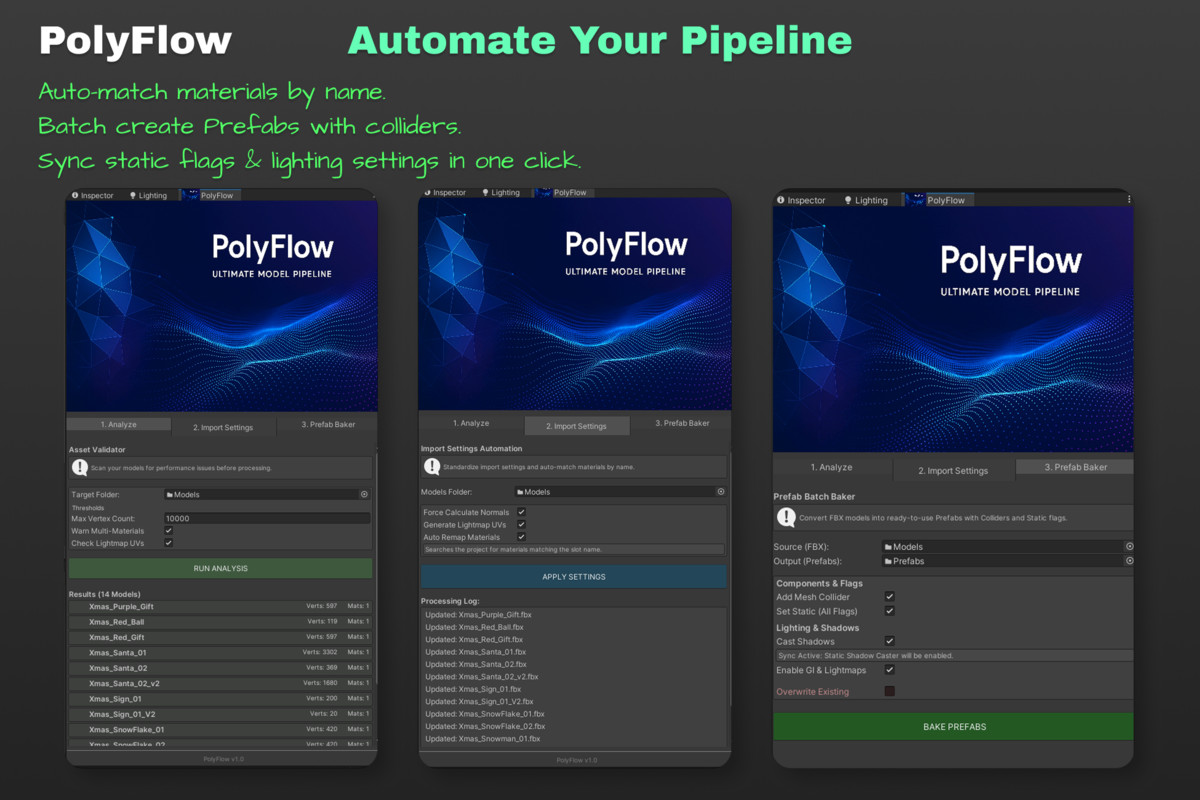
- Asset Validator (Health Check)
Before using models, know their cost. Scan entire folders to detect performance killers:
• Flag high-poly models (customizable vertex threshold)
• Detect multi-material usage (draw call optimization)
• Check Lightmap UV generation status
• Detect Read/Write enabled meshes (memory overhead)
• Naming checks (e.g., spaces) - Smart Import Processor
Standardize your import settings with one click:
• Auto-Match Materials: searches your project for materials matching FBX material slot names and remaps them automatically
• Force Calculate Normals for smooth shading
• Generate Lightmap UVs - Prefab Baker (Batch Processing)
Convert raw FBX files into game-ready Prefabs instantly:
• Auto Colliders: add Mesh Colliders to renderers
• Static Flags: set batching, navigation, GI and other static flags
• Shadow Sync: sync “Cast Shadows” with “Static Shadow Caster” for consistent lighting/baking
• Optional safe mode to prevent overwriting existing prefabs
WHY POLYFLOW?
• Plug & Play: no complex setup required
• Editor Only: zero runtime performance cost
• Safe Workflow: options to prevent overwriting existing work
Take control of your polygon flow with PolyFlow Pipeline.
From the publisher's Asset Store listing.
Technical details
Features:
• Editor Window Dashboard (Dockable)
• Batch Model Analysis Tool
• Automated Import Settings Applier
• Material Auto-Remapping System (Name-based matching)
• Bulk Prefab Creator from FBX/OBJ
• Automatic Component Assignment (Mesh Colliders)
• Recursive Static Flag Setter
• Lighting & Shadow Settings Sync
Compatibility:
• Compatible with Unity 2020.3 and higher.
• Works with Built-in, URP, and HDRP pipelines (as it manipulates standard MeshRenderers and Importers).
• No external DLLs or dependencies required.
• Full C# Source Code included.
Compatibility
| Unity version | Built-in | URP | HDRP |
|---|---|---|---|
| 2022.3.62f3 | Compatible | Compatible | Compatible |
As listed on the Asset Store.