
 View on Asset Store (opens in new tab)
Package details
- Latest version
- 1.3.1
- Last updated
- First released
- Unity version
- 6000.3.13 or later
- Package size
- 54 KB
- Files
- 17
- Favorites
- 1
- Views in the past week
- 2
Price tracking
- Last checked
- Tracked since
- Lowest recorded
- $9.99 on
Keywords
qs.Texture Grade
- Price drop
qs.Texture Grade is a Unity extension for professional, non-destructive color grading on any Texture2D. Features a real-time preview with levels, lift/gamma/gain, HSL, contrast, and curves.
Lowest recorded price
Buy on Asset Store (opens in new tab)Affiliate link · Purchases support this site
Price history
Last 6 months
USDAsset preview
1 / 3
qs.Texture Grade screenshot 1
About this asset
Take full control of your texture's appearance directly within the Unity Editor with qs.Texture Grade.
This extension provides a comprehensive suite of color grading tools that allow artists and developers to fine-tune textures without ever leaving Unity.
Whether you need to tweak the color balance of a single asset or ensure color consistency across your entire project, qs.Texture Grade offers a streamlined, non-destructive workflow that integrates seamlessly into your pipeline.
### Key Features:
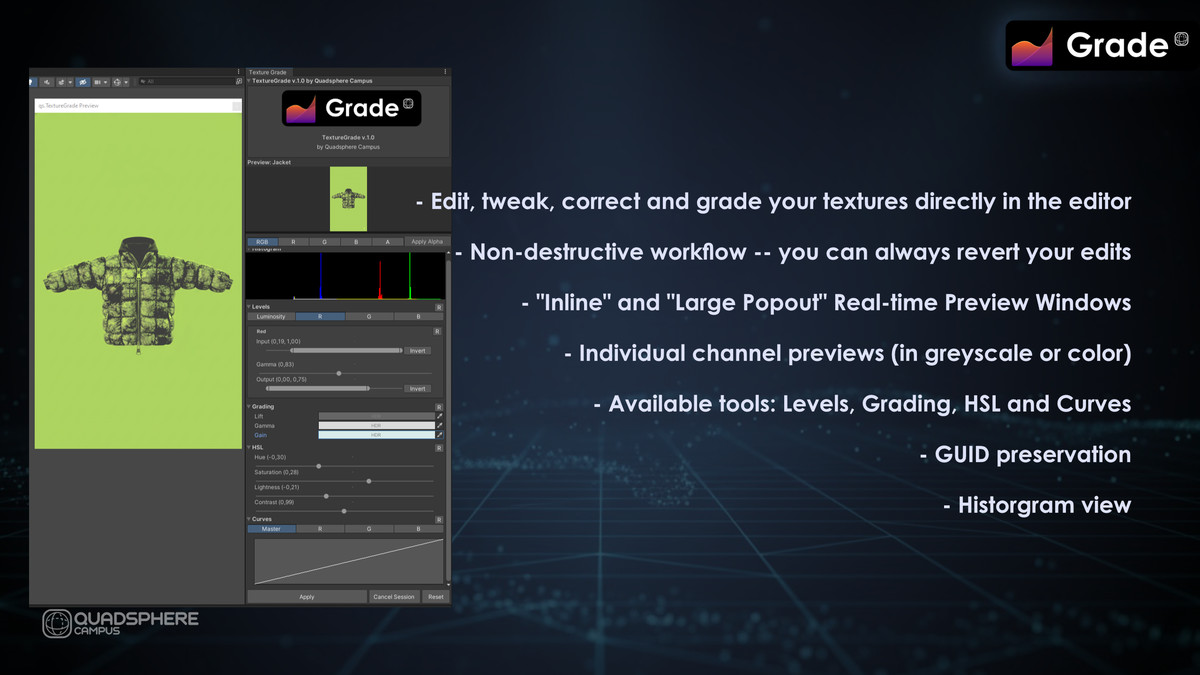
* **Non-Destructive Workflow:** Your original textures are always safe. qs.Texture Grade creates a backup of your texture when you start an editing session. You can apply your changes, cancel the session, or revert to the original at any time.
* **Real-time Preview:** See the results of your adjustments instantly. The interactive preview window shows your changes as you make them, allowing for precise control over the final look.
* **Live Histogram:** Analyze the tonal range of your texture with a built-in histogram that updates in real-time. View the combined RGB channels or inspect Red, Green, and Blue channels individually.
* **Levels Control:** Adjust the shadows, mid-tones, and highlights with precision. You can control input/output levels and gamma for Luminosity (all channels) or for R, G, and B channels independently.
* **Professional Color Grading:**
* **Lift, Gamma, Gain:** Use familiar color wheels to adjust the dark, mid, and bright tones of your image.
* **HSL & Contrast:** Fine-tune the Hue, Saturation, and Lightness of your texture, and adjust the overall contrast.
* **Advanced Curve Editor:** Get ultimate control with a full curve editor. Adjust the master curve or manipulate the Red, Green, and Blue channels individually for precise color correction.
* **Seamless Integration:**
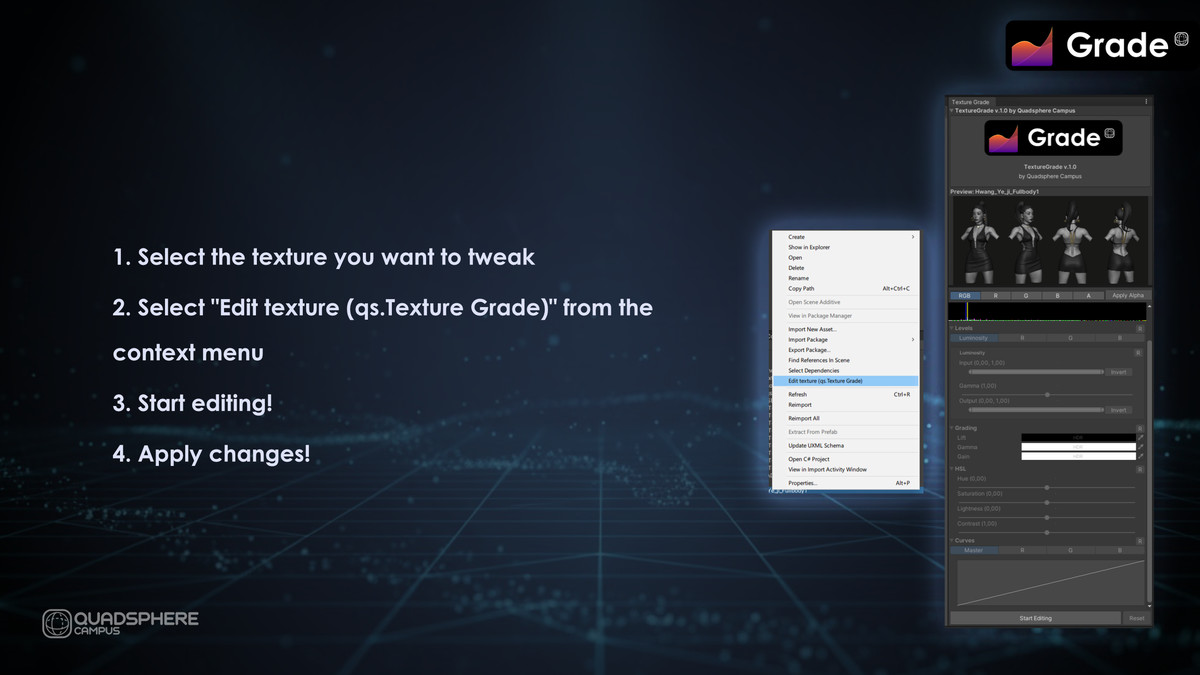
* Access the tool from the `Assets` context menu for any `Texture2D` or from the `Tools/qs.TextureGrade` menu.
* Settings are saved in a convenient `.grade.asset` file right next to your texture, making it easy to manage and version control.
**qs.Texture Grade** is the perfect tool for any Unity developer looking to enhance their visuals and streamline their texture workflow.
From the publisher's Asset Store listing.
Technical details
## Technical Details
* Full source code included.
* Non-destructive editing workflow.
* Supports any `Texture2D` asset that Unity can import.
* Works with all rendering pipelines (Built-in, URP, HDRP).
* Processing is done via a custom high-performance shader.
* Settings are stored in custom ScriptableObject assets (`.grade.asset`).
* Requires Unity 2020.3 or newer.
Compatibility
| Unity version | Built-in | URP | HDRP |
|---|---|---|---|
| 6000.3.13f1 | Not listed | Compatible | Not listed |
As listed on the Asset Store.