
 View on Asset Store (opens in new tab)
Package details
- Latest version
- 1.4.1
- Last updated
- First released
- Unity version
- 6000.0.78 or later
- Package size
- 1.1 MB
- Files
- 54
- Favorites
- 14
- Views in the past week
- 26
Price tracking
- Last checked
- Tracked since
- Lowest recorded
- Free on
Keywords

Kronnect Hub
Kronnect Hub is the an editor tool for Kronnect asset users, providing centralized setup, validation, and automatic fixes.
Affiliate link · Purchases support this site
Price history
Last 6 months
USDAsset preview
1 / 3
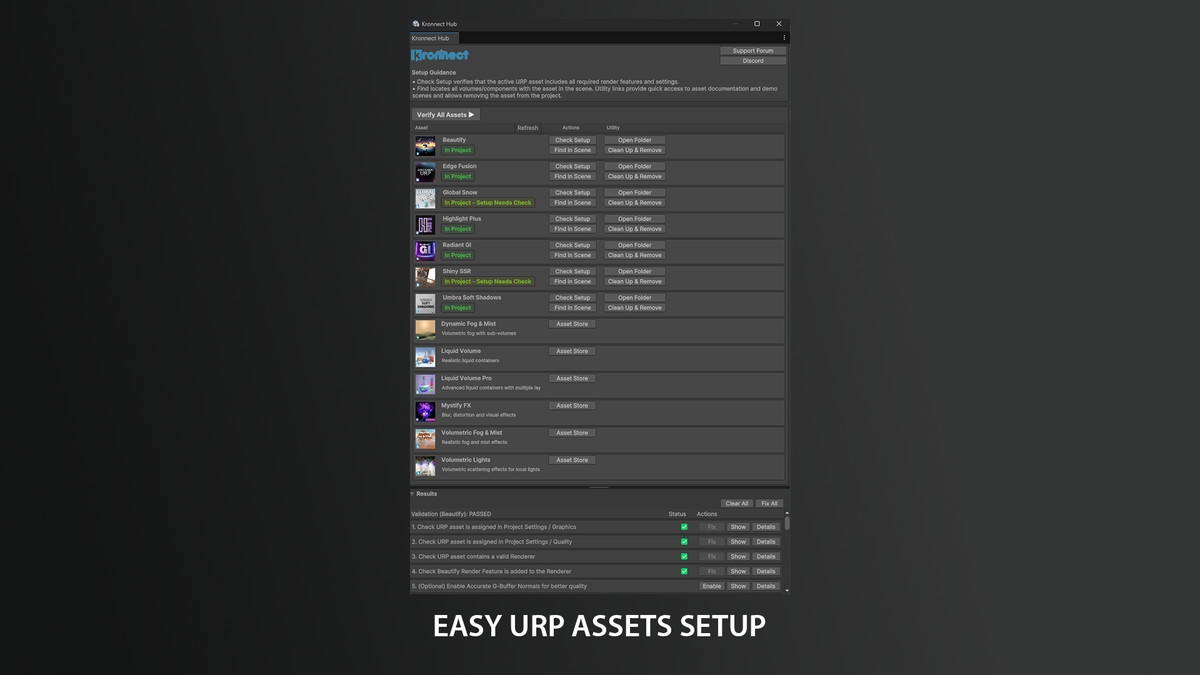
Kronnect Hub screenshot 1

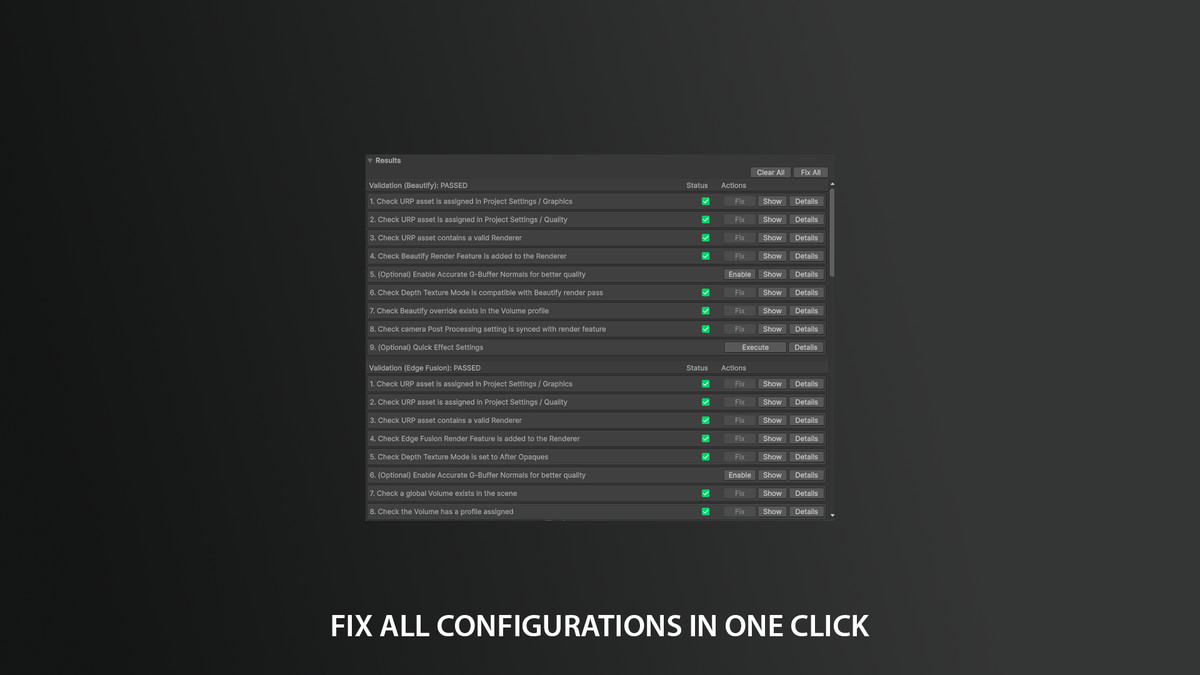
About this asset
What is Kronnect Hub?
Kronnect Hub is a Unity Editor window that simplifies managing and configuring Kronnect visual effects assets. It validates URP setup, detects missing render features and settings, and can fix common configuration issues automatically.
Kronnect Hub does NOT include any visual effects assets. The assets themselves are NOT part of Kronnect Hub, they must already be present in your project, and each one is purchased separately on the Unity Asset Store. Kronnect Hub is only a management and configuration tool that works with the Kronnect assets you own and have imported into your project.
Key Features:
- Setup Verification: Checks that your active URP asset includes all required render features, volume components, and settings for each installed Kronnect asset.
- Always Up To Date: When performing a check, the tool will also inform if a new version is available.
- One-Click Fixes: Automatically fixes common setup issues with a single click.
- Find in Scene: Locates all volumes and components using a specific asset across your scenes.
- Bulk Validation: Verify all installed assets at once with "Verify All Assets".
- Asset Management: Import assets from cache, bundles, open asset folders, and can also clean up/remove assets from your project.
- Quick Access: Direct links to documentation, demo scenes, and Asset Store pages for each asset
How to Use It:
Open the tool from the menu Window / Kronect / Hub. Click "Validate All Assets" or "Check Setup" in any of the listed assets (must be present in your project). Follow instructions in the Results panel.
Supported Assets:
Kronnect Hub currently supports the following assets:
- Beautify - Advanced post-processing effects.
- Dynamic Fog & Mist - Volumetric fog with sub-volumes.
- Edge Fusion - Smooth surface contacts.
- Global Snow - Dynamic snow coverage.
- Highlight Plus - Advanced object highlighting.
- Liquid Volume - Realistic liquid containers.
- Liquid Volume Pro - Advanced liquid containers with multiple layers.
- Mystify FX - Blur, distortion and visual effects.
- Radiant GI - Real-time global illumination.
- Shiny SSR - Screen-space reflections.
- Umbra Soft Shadows - Soft shadows and contact shadows.
- Volumetric Fog & Mist - Realistic fog and mist effects.
- Volumetric Lights - Volumetric scattering effects for local lights
Requirements:
- One or more assets from the list above.
- Universal Render Pipeline (URP). This tool is exclusively designed for URP and won't work with built-in pipeline or HDRP.
Save time on setup and troubleshooting, and keep your Kronnect assets properly configured with Kronnect Hub!
📖 Documentation | 💬 Support | 🎬 YouTube | 🏢 Publisher Page
Kronnect is dedicated to high-quality Unity assets with continuous updates and responsive support.
From the publisher's Asset Store listing.
Compatibility
| Unity version | Built-in | URP | HDRP |
|---|---|---|---|
| 6000.0.78f1 | Not listed | Compatible | Not listed |
As listed on the Asset Store.