
 View on Asset Store (opens in new tab)
Package details
- Latest version
- 1.2
- Last updated
- First released
- Unity version
- 6000.3.10 or later
- Package size
- 3.9 MB
- Files
- 7
- Favorites
- 9
- Views in the past week
- 13
Price tracking
- Last checked
- Tracked since
- Lowest recorded
- Free on
Keywords
Screenshot+
Screenshot+ is a lightweight yet extensible screenshot capture system for Unity, supporting standard and high-quality supersampled captures with automatic UI hiding and clear success or error feedback
Affiliate link · Purchases support this site
Price history
Last 6 months
USDAsset preview
1 / 1
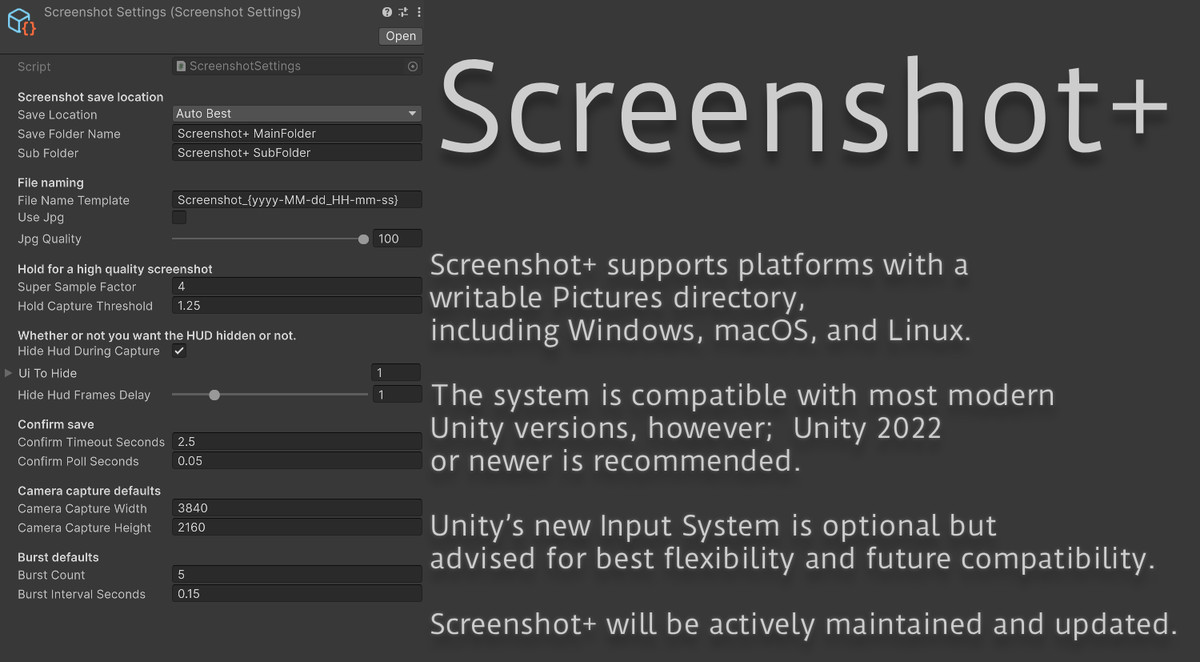
Screenshot+ screenshot 1
About this asset
Screenshot+ is a lightweight, extensible screenshot capture system for Unity, designed for developers, artists, and studios who need clean, reliable, and professional in-game screenshots.
Whether you’re capturing marketing material, documenting development progress, creating promotional shots, or giving players a built-in screenshot feature, Screenshot+ provides full control with minimal setup and zero external dependencies.
Features:
Standard & High-Quality Supersampled Screenshots ☑️
Capture standard screenshots instantly, or hold the capture input to generate ultra-sharp supersampled images using a configurable resolution multiplier.
Multiple Capture Modes ☑️
Screenshot+ supports standard screen capture, high-quality supersampling, camera-based captures, fixed-resolution output, and burst capture for rapid sequences.
Optional HUD / UI Auto-Hiding ☑️
Automatically hide selected UI elements during capture, making Screenshot+ ideal for trailers, promotional images, and cinematic presentations.
Built-In Capture Feedback ☑️
Clear success or error popup notifications ensure you always know whether a screenshot was saved correctly.
Configurable Settings Asset ☑️
All behavior is driven by a dedicated settings asset, allowing easy reuse, tuning, and of course; clean project organization.
Editor Integration ☑️
Includes editor menu actions and inspector utilities for quick testing, capture triggering, and easy access to the save directory.
Input System Support ☑️
Compatible with Unity’s new Input System, with optional support for classic input workflows.
Cross-Platform Saving ☑️
Screenshots are saved automatically using platform-appropriate paths, supporting Windows, macOS, and Linux.
Usage:
0. Import the Screenshot+ package into your project.
1. Add the ScreenshotSystem component to a GameObject.
2. Create and assign a ScreenshotSettings asset.
3. Configure capture behavior in the Inspector.
By default, screenshots are saved to:
Users/Pictures/<YourFolderName>/Screenshot_YYYY-MM-DD_HH-MM-SS.png
Recommended Unity Version:
Unity 2022 or higher!
Works on both Input Systems!
But the latest one is always recommended!
Have feature ideas? Need help?
You're welcome to join my Discord!
From the publisher's Asset Store listing.
Technical details
- Runtime screenshot capture system for Unity.
- Standard and high-quality supersampled screenshot capture.
- Camera-based screenshot capture with configurable resolution.
- Fixed-resolution output is independent of screen size.
- Burst capture mode for rapid screenshot sequences, if needed.
- Optional automatic HUD / UI hiding during capture.
- Dedicated settings asset for clean configuration and reuse.
- Real-time capture confirmation with success or error feedback.
- Editor integration with menu actions and Inspector utilities.
- Extensible API with capture events and callbacks.
- Input System support (new Input System recommended).
- Cross-platform saving with automatic platform-safe paths.
- Built-in support for Windows, macOS, and Linux.
Compatibility
| Unity version | Built-in | URP | HDRP |
|---|---|---|---|
| 6000.3.10f1 | Compatible | Compatible | Compatible |
As listed on the Asset Store.