
 View on Asset Store (opens in new tab)
Package details
- Latest version
- 1.0
- Last updated
- First released
- Unity version
- 6000.2.13 or later
- Package size
- 636 KB
- Files
- 50
- Views in the past week
- 6
Price tracking
- Last checked
- Tracked since
- Lowest recorded
- $14.00 on
Keywords

Hierarchy Pro Lite
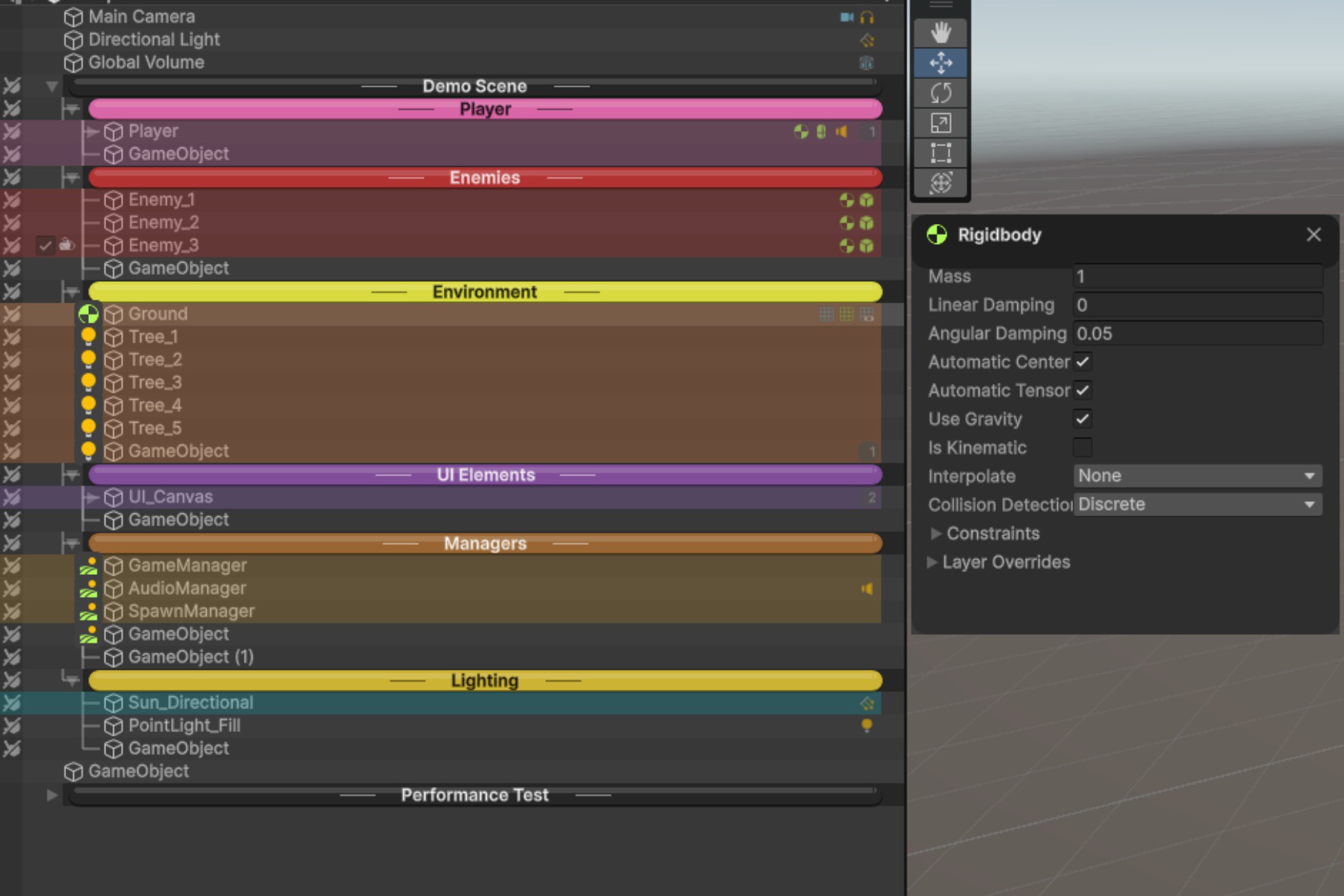
Organize your Unity hierarchy with colors, separators, icons, favorites, search, and bookmarks. Find any object instantly. Zero runtime overhead. Works with all render pipelines.
Affiliate link · Purchases support this site
Price history
Last 6 months
USDAbout this asset
Hierarchy Pro Lite is an editor productivity tool, not game content. It enhances Unity's Hierarchy window to help
you organize and navigate scenes faster.
Is it customizable?
Yes, fully:
- Create your own color rules (by name, tag, layer, component)
- Define custom icon mappings
- Choose from 4 separator styles
- 3 view modes (Default, Professional, Minimal)
- Save/load presets for different workflows
- Per-object overrides via HierarchyLabel component
- Import/export settings as JSON for team sharing
Genre/project suitability:
Works with any project type:
- 2D or 3D games
- VR/AR applications
- Architectural visualization
- Simulations
- Mobile, console, or PC
- Any render pipeline (Built-in, URP, HDRP)
Who benefits most:
- Projects with 100+ scene objects
- Teams needing consistent organization
- Developers managing multiple scenes
- Anyone tired of scrolling through cluttered hierarchies
What it's NOT:
- Not a runtime asset (no scripts in builds)
- Not art, audio, or game content
- Not tied to any specific genre or template
Bottom line: If you use Unity's Hierarchy window, this tool makes it better—regardless of what you're building.
From the publisher's Asset Store listing.
Technical details
● Key Features
Visual Organization
- Color-coded row backgrounds with automatic rules
- 4 separator styles (Classic, Bubble, Underline, Left-Aligned)
- Component icons with click-to-edit
- Tree lines in Professional view mode
- Prefab status indicators (overrides, variants, missing)
- Zebra striping (alternating row colors)
- Depth-based coloring (Rainbow, Gradient, Monochrome)
Productivity Tools
- Favorites system with persistent stars (F5)
- Bookmarks with hotkeys (Ctrl+1-9)
- Advanced search by name, tag, layer, component
- Selection history navigation (Alt+Left/Right)
- Batch rename with patterns ({name}, {index}, {parent})
- Object statistics (vertex/triangle counts)
- Save/load view presets
Quick Access
- Alt+Click instant style popup
- Visibility toggle (eye icon)
- Lock toggle (padlock icon)
- Child count, tag, and layer badges
Configuration
- Project Settings integration
- JSON import/export for teams
- Per-object control via HierarchyLabel component
- 3 view modes (Default, Professional, Minimal)
Performance
- Tested with 5000+ objects
- 0ms hierarchy repaint
- Editor-only (zero runtime overhead)
- All render pipelines supported
Compatibility
| Unity version | Built-in | URP | HDRP | Custom |
|---|---|---|---|---|
| 6000.2.13f1 | Compatible | Compatible | Compatible | Compatible |
Hierarchy Pro Lite is 100% render pipeline agnostic because
1. Editor-Only Code - All scripts are in Editor folders, meaning zero runtime overhead and no interference with
rendering
2. No Shaders - Uses only Unity's built-in EditorGUI/GUI drawing methods
3. No Materials
4. No Runtime Components - The HierarchyLabel component stores data only; it doesn't render anything
As listed on the Asset Store.