
 View on Asset Store (opens in new tab)
Package details
- Latest version
- 1.1.0
- Last updated
- First released
- Unity version
- 6000.2.12 or later
- Package size
- 3.0 MB
- Files
- 2
- Favorites
- 13
- Views in the past week
- 15
Price tracking
- Last checked
- Tracked since
- Lowest recorded
- $9.99 on
Keywords

Skinned Mesh Separator
Split skinned character meshes by bone — no Blender required. Extract heads, arms, or any custom region in seconds. Built for modular characters, FPS rigs, LODs, and gameplay effects.
Affiliate link · Purchases support this site
Price history
Last 6 months
USDAsset preview
1 / 7

Skinned Mesh Separator screenshot 1



About this asset
Stop bouncing between Unity and your DCC tool just to split a mesh.
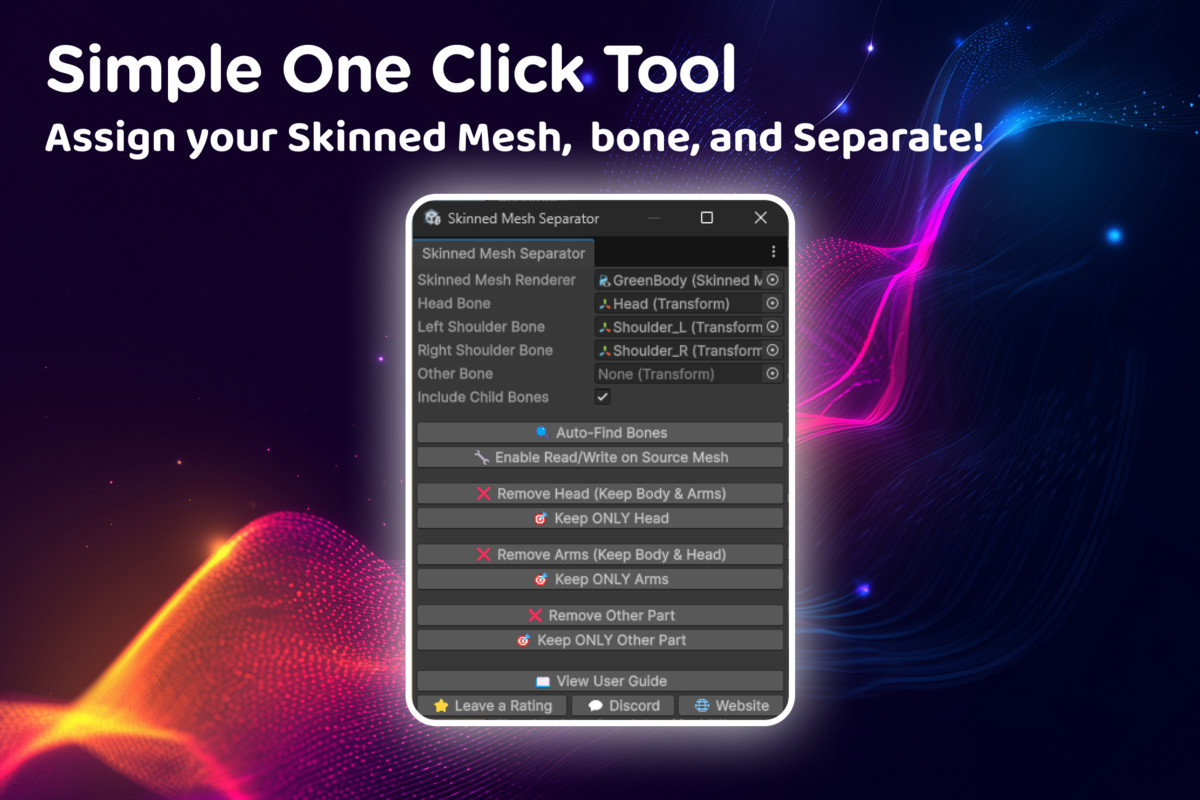
Skinned Mesh Separator is an editor window tool that extracts mesh sections from any SkinnedMeshRenderer, based on bone influence — directly inside Unity. Select a bone, click extract, and get a clean new mesh asset. That's it.
No modelling experience required. No external software. No destructive changes to your original character.
What it does
Select any bone (or set of bones) from a SkinnedMeshRenderer and extract only the vertices influenced by those bones into a separate mesh asset. The original character is untouched.
Preset extractions — one click:
- Head only
- Everything except the head
- Arms only
- Everything except arms
- Any custom bone or region
Child bone inclusion — optionally include child bones in any extraction (eyebrows, fingers, accessories, jaw bones).
Automatic Read/Write toggle — enables the source mesh's Read/Write flag directly from the tool window, no import settings hunting required.
Works with any rig — humanoid, generic, creature, custom bone hierarchies, and multi-mesh rigs.
Common use cases:
Modular character systems — Isolate body regions to show/hide under armour or clothing layers.
First-person games — Generate a headless or armless body mesh aligned to a camera rig, without re-exporting from your DCC.
LOD creation — Build simplified upper or lower body meshes for performance budgets.
Gameplay effects — Produce pre-separated body parts for damage systems, dismemberment, prosthetics, or gore effects.
Procedural/runtime mesh switching — Use extracted meshes as swappable SkinnedMeshRenderer components at runtime.
Limitations
- Editor-only tool — not intended for runtime mesh manipulation
- Does not auto-close open geometry after extraction (topology is unpredictable at cut edges). Extracted meshes are clean and fully usable for masking, hiding, and clothing systems
Package contents
- Full C# editor window source (commented)
- Documentation and usage guide
- Discord Support Channel
Supported Unity versions: 2020.3 LTS and above, tested through Unity 6.x
No modelling experience required. No external DCC tool needed. Just select, click, and done.
From the publisher's Asset Store listing.
Technical details
Supported Unity Versions
- Unity 2020.3 LTS and above
- Tested with Unity 2021, 2022, 2023, and 6.x
Supported Mesh Types
- SkinnedMeshRenderer meshes
- Humanoid, Generic, and Custom rigs
- Meshes with any vertex count
- Meshes imported from FBX, OBJ, Blender, Maya, etc.
Features Included
- Editor Window Tool
- Bone selector fields
- Custom bone extraction
- Region inverse extraction
- Source mesh Read/Write toggle button
- Automatic asset creation for extracted meshes
- Child-bone selection toggle
Limitations
- Editor-only tool — not intended for runtime mesh manipulation
- Does not auto-close open geometry after extraction (topology is unpredictable at cut edges). Extracted meshes are clean and fully usable for masking, hiding, and clothing systems
Package Contents
- Full C# editor window source (commented)
- Documentation and usage guide
Supported Unity versions: 2020.3 LTS and above, tested through Unity 6.x
Compatibility
| Unity version | Built-in | URP | HDRP | Custom |
|---|---|---|---|---|
| 6000.3.10f1 | Compatible | Compatible | Compatible | Compatible |
| 6000.2.12f1 | Compatible | Compatible | Compatible | Compatible |
As listed on the Asset Store.