
 View on Asset Store (opens in new tab)
Package details
- Latest version
- 2.2.0
- Last updated
- First released
- Unity version
- 6000.6.1 or later
- Package size
- 364 KB
- Files
- 46
- Favorites
- 18
- Views in the past week
- 23
Price tracking
- Last checked
- Tracked since
- Lowest recorded
- Free on
Keywords
RTween - High Performance Tweening System
High-performance tweening system with 40+ animations, 30+ easing functions, visual animator, and zero GC allocation. Mobile-optimized with shake/punch effects.
Affiliate link · Purchases support this site
Price history
Last 6 months
USDAsset preview
1 / 4
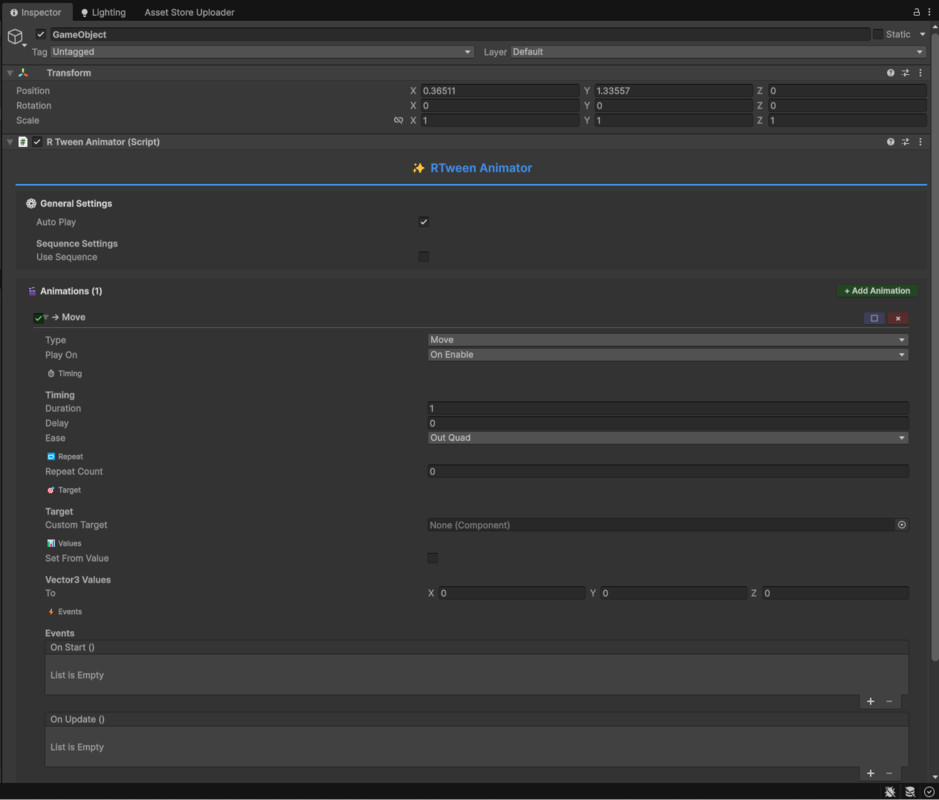
RTween - High Performance Tweening System screenshot 1

About this asset
RTween – Professional Tweening System for Unity
Transform your Unity projects with RTween, a high-performance animation system built for modern developers. Create smooth UI transitions, dynamic gameplay effects, and cinematic camera movements with zero hassle.
Why RTween?
✅ No Coding Required
Use the Visual Animator component to design complex animations directly inside the Inspector.
Add the component, configure animations, set triggers, and you’re done — no scripts needed.
✅ Blazing Fast Performance
- Zero garbage collection at runtime
- Optimized for Android, iOS, Quest VR
- Supports 100+ simultaneous tweens with no frame drops
- Built-in performance monitoring
✅ 40+ Animation Types
- Transform: Position, rotation, scale (local & world)
- UI: RectTransform, anchored position, size delta, alpha
- Visuals: Color/alpha for Image, Text, TMP, SpriteRenderer, Materials
- Camera: FOV & orthographic size
- Audio: Volume & pitch
- Light: Intensity & color
- Custom: Animate any float with callback
✅ 30+ Professional Easing Functions
- Quad, Cubic, Quart, Quint, Sine, Expo, Circ
- Back, Elastic, Bounce
- In / Out / InOut modes
- Linear for mechanical motion
Advanced Features
🔁 Sequences
Chain, delay, overlap and schedule tweens precisely.
💥 Shake & Punch Effects
- Camera shake for impacts
- Position, rotation & scale shake
- Punch for UI & hit reactions
- Built-in presets
🔄 Repeat Modes
- Restart
- Yoyo
- Incremental
- Infinite loop supported
📣 Event Callbacks
- OnStart
- OnUpdate
- OnComplete
Developer Tools
🔍 RTween Debugger Window
- View active tweens in real-time
- Performance stats
- Pause, resume, kill tweens
- Memory-leak detection
🎛 Custom Inspector
- Foldable animation entries
- Live preview
- Duplicate / Delete with confirmation
- Runtime test controls
Clean & Simple API
Move:
RTween.Move(transform, Vector3.up * 5, 1f)
.SetEase(EaseType.OutBack)
.OnComplete(() => Debug.Log("Done!"));
Fade UI:
RTween.Alpha(canvasGroup, 0f, 0.5f)
.SetDelay(0.5f);
Sequence:
RTween.Sequence()
.Add(RTween.Scale(obj, Vector3.one * 2, 0.5f))
.Wait(0.3f)
.Add(RTween.Rotation(obj, Quaternion.Euler(0,180,0), 0.5f))
.Play();
Camera Shake:
RTweenEffects.QuickCameraShake(Camera.main, intensity: 0.5f);
Mobile Optimized
- Zero allocations
- Minimal CPU usage
- Automatic cleanup
- Battery efficient
- Stable on low-end devices
Best Use Cases
- UI transitions
- Gameplay juice & polish
- Camera motion
- Character movement
- Particle / procedural effects
- Mobile / VR / AR projects
- Prototyping
Comparison
Feature RTween Advantage
- DOTween Simpler, visual animator, Unity 6 ready
- LeanTween More easing + tools
- iTween Type-safe, zero GC, modern
Includes
- 40+ animation types
- Visual animator
- 30+ easing
- Sequences
- Effects
- Debugger
- Example scenes
- Unity 6 support
- Mobile optimized
Coming Soon
- Curve based easing
- Spline paths
- Timeline integration
- Visual scripting
- Advanced sequence editor
- More effect presets
Support
- Email (24h)
- GitHub documentation
- Discord (coming)
- Video tutorials
- Regular updates
Get Started in 5 Minutes
- Import RTween package
- Write:RTween.Move(transform, Vector3.up, 1f)
- Press Play
- Done ✅
Or use Visual Animator – zero code.
Technical Info
- Modern C#
- IntelliSense ready
- Assembly Definitions
- No dependencies
- Works with Built-in, URP, HDRP
- IL2CPP compatible
- All platforms supported
- Full source included
Ready to level up your animations?
Get RTween and start animating in minutes.
From the publisher's Asset Store listing.
Technical details
- High-performance tweening engine with zero garbage collection
- Works smoothly on Android, iOS, PC, Console, WebGL, VR & AR
- Visual Animator component – create animations without writing code
- Supports 40+ animation (tween) types
- Supports 30+ professional easing functions (In, Out, InOut)
- Transform animation: position, rotation, scale (local & world)
- UI animation: RectTransform, anchors, size, CanvasGroup alpha
- Color & alpha tweening for Image, Text, TextMeshPro, SpriteRenderer & Materials
- Camera animations: Field of View & Orthographic Size
- Audio tweening: volume & pitch
- Light tweening: intensity & color
- Custom value tweening with callback support
- Sequence system for chaining, delaying & combining tweens
- Shake & Punch effects for camera, UI & gameplay feedback
- Multiple loop modes: Restart, Yoyo, Incremental & Infinite
- Built-in Debugger to view and manage active tweens in real-time
- Clean & simple fluent API
- Automatic cleanup when objects are destroyed
- Optimized for Unity 6 and Mobile devices
- Fully compatible with Built-in, URP & HDRP
- No external dependencies
- Full source code included
- Beginner-friendly and production-ready
- Active development with planned future updates
Compatibility
| Unity version | Built-in | URP | HDRP | Custom |
|---|---|---|---|---|
| 6000.6.1f1 | Compatible | Compatible | Compatible | Compatible |
Make sure the TextMeshPro package is installed.
As listed on the Asset Store.