
 View on Asset Store (opens in new tab)
Package details
- Latest version
- 1.0
- Last updated
- First released
- Unity version
- 6000.2.12 or later
- Package size
- 720 KB
- Files
- 11
- Views in the past week
- 2
Price tracking
- Last checked
- Tracked since
- Lowest recorded
- $5.99 on
Keywords
MCE Project Management Tool
- Price drop
Lowest recorded price
Get 60% off on Asset Store (opens in new tab)Affiliate link · Purchases support this site
Price history
Last 6 months
USDAsset preview
1 / 2
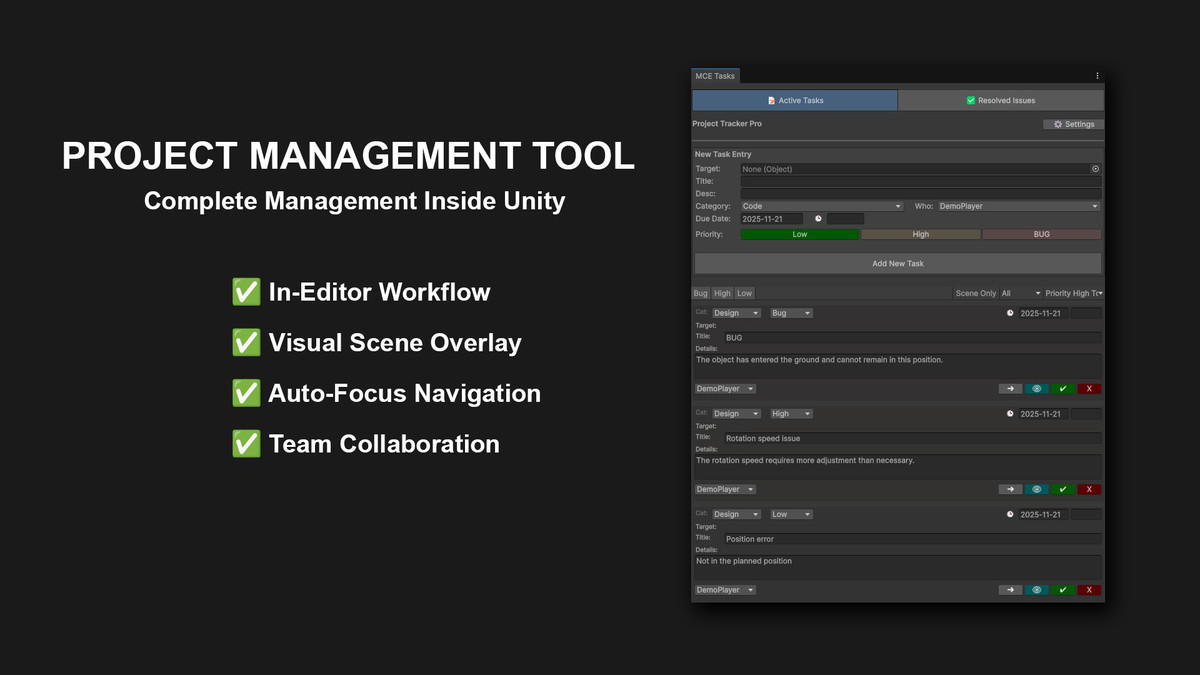
MCE Project Management Tool screenshot 1
About this asset
🛑 STOP SWITCHING APPS. START FINISHING GAMES. 🎮
Transform your Unity Editor into a powerful project management hub. 🛠️ MCE Project Management Tool allows you to track bugs, manage tasks, and assign jobs to your team members directly inside the scene view. No more Alt-Tab to Trello or Jira. Keep your focus where it matters: Your Game.
✨ KEY FEATURES:
- 🎥 SMART VIEW ALIGNMENT (AUTO-FOCUS) Never get lost looking for a bug again. When you create a task, the tool automatically saves your exact Scene View camera angle. Clicking the arrow button teleports you instantly to that exact position and rotation.
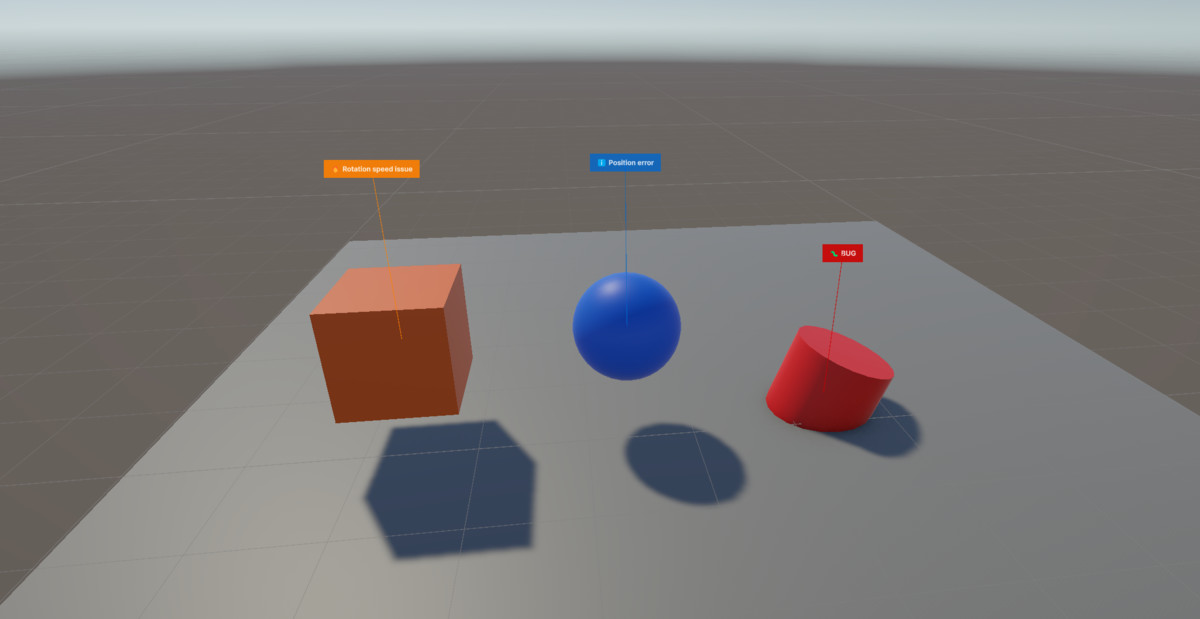
- 🌍 VISUAL SCENE OVERLAY Forget abstract lists. Tasks assigned to game objects display a floating interactive label directly in the Scene View. See exactly where your bugs are spatially while navigating your level.
- 🗂️ SCENE-BASED FILTERING Working on a multi-scene project? The intelligent filter automatically shows only the tasks related to your current active scene, keeping your list clean and focused.
✅ COMPLETE TASK LIFECYCLE
- 🃏 Card Layout: A clean, modern, and responsive interface.
- 🏷️ Categories: Organize by department (Code, Art, Design, UI, Audio, QA).
- 🎨 Priority System: Color-coded buttons (Low, High, Bug) for instant visual feedback.
- 👥 Team Assignment: Assign tasks to specific team members (e.g., "John", "Sarah").
- 📅 Due Dates & Time: Set precise deadlines with the integrated calendar and clock system.
📜 HISTORY & ARCHIVE Mark tasks as "Resolved" with a satisfying green checkmark. They are moved to a dedicated history tab, preserving the completion date and the solver's name for future reference. Even if the target object is deleted, the archive remembers it.
From the publisher's Asset Store listing.
Technical details
🛠️ TECHNICAL DETAILS:
- 🔌 Plug & Play: No setup required. Just import and go.
- ⚡ Zero Runtime Overhead: This is an Editor-only tool. It does not add any code or performance cost to your final game build.
- 💾 Data Safety: All data is stored safely in ScriptableObjects within the Resources folder.
🚀 Boost your productivity today with MCE Project Management Tool.
Compatibility
| Unity version | Built-in | URP | HDRP | Custom |
|---|---|---|---|---|
| 6000.2.12f1 | Compatible | Compatible | Compatible | Compatible |
This is an Editor-only productivity tool. It is fully compatible with all render pipelines (Built-in, URP, and HDRP) as it functions independently of the project's rendering settings and does not contain custom shaders or materials.
As listed on the Asset Store.