
 View on Asset Store (opens in new tab)
Package details
- Latest version
- 1.0b
- Last updated
- First released
- Unity version
- 6000.2.8 or later
- Package size
- 246.2 MB
- Files
- 123
- Favorites
- 14
- Views in the past week
- 18
Price tracking
- Last checked
- Tracked since
- Lowest recorded
- $19.99 on
Keywords

Asteroids Belt Pro
- Price drop
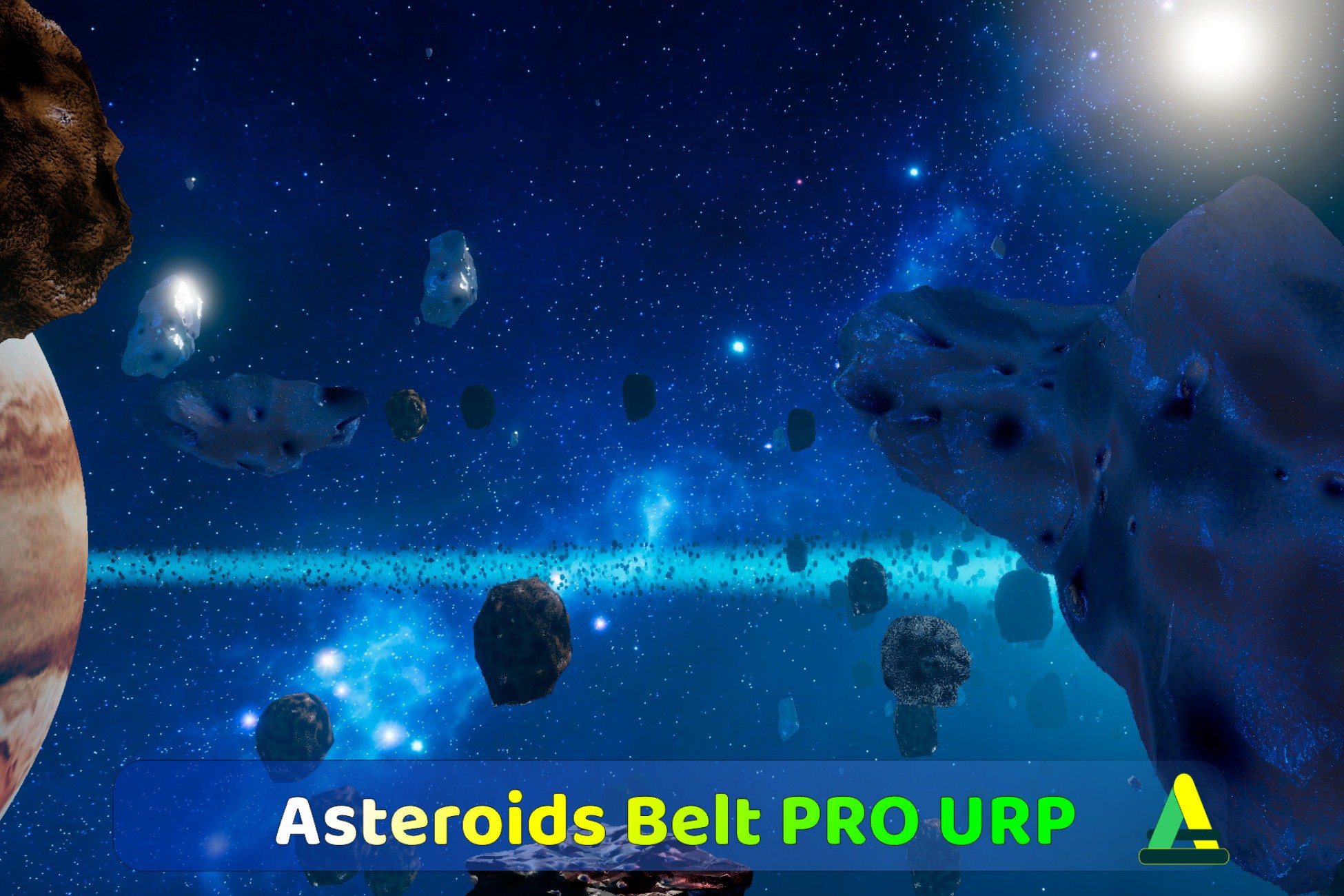
High-performance asteroid belt system for URP. 5,000-10,000+ asteroids at hight FPS via GPU compute shaders. Procedural surfaces, tessellation, orbital physics. Forward+ compatible. PC/console target.
Lowest recorded price
Get 20% off on Asset Store (opens in new tab)Affiliate link · Purchases support this site
Price history
Last 6 months
USDAsset preview
1 / 10

Asteroids Belt Pro screenshot 1




About this asset
Transform a single sphere mesh into tens of thousands of unique, photorealistic asteroids—all rendered in 1-2 draw calls. Asteroids Belt Pro eliminates the performance bottleneck of traditional asteroid rendering through a GPU-only compute pipeline that runs physics, transformations, and procedural generation entirely on your graphics card.
Space games need asteroid belts. But traditional approaches force you to choose:
- Hand-place hundreds of asteroids manually = weeks of tedious work
- Instantiate thousands of GameObjects = frame rate death
- Use particle systems = no real physics, no collisions, fake visuals
- Buy pre-made asteroid packs = limited count, still performance issues
You need a system that renders 5,000-10,000 asteroids at 100 FPS without melting your GPU. You need every asteroid to look unique without manually placing them. You need physically accurate Keplerian orbital motion without writing compute shaders yourself.
Asteroids Belt Pro uses DrawMeshInstancedIndirect with GPU compute shaders to render massive asteroid fields in 1-2 draw calls per material variant. One 100-triangle sphere mesh becomes 10,000 unique asteroids through:
GPU-Accelerated Architecture:
- Orbital physics computed entirely on GPU (Keplerian motion with eccentricity, inclination)
- Matrix generation on GPU (forward + inverse transforms for correct lighting)
- Zero CPU overhead per frame—all calculations happen in compute shaders
- DrawMeshInstancedIndirect = single draw call handles thousands of asteroids
One Mesh, Infinite Variety:
Use a single sphere mesh with one material to generate thousands of visually distinct asteroids. Or assign multiple material variants—each spawns its own unique population with custom meshes. The system automatically manages GPU buffers and coordinates rendering across all materials with minimal draw calls.
Procedural Generation Per-Instance:
Every asteroid is unique through GPU-driven variation:
- Ellipsoid deformation (stretch asteroids along X/Y/Z axes independently)
- Dual-layer procedural noise (Perlin + Value noise with per-instance frequency variation)
- Fibonacci-distributed craters (0-200 craters per asteroid with randomized size/depth)
- Material system (smooth rock-to-metal transitions via noise-based masking)
- Color variations (brightness, hue shifts, tint ranges—all per-instance)
- Scale randomization based on radial distance from orbit center
Hardware Tessellation with Smart LOD:
Tessellation multiplies geometry detail without decimating performance:
- Distance-based LOD (4 levels: very close, close, medium, far)
- Hard tessellation cap at 8 (prevents exponential performance loss)
- Progressive feature culling (AO, detail noise, additional lights disabled at distance)
- Adaptive octave reduction (Perlin/Value noise layers drop as distance increases)
- Shadow LOD (reduced displacement in shadow pass to eliminate flickering)
Physically Accurate Orbital Motion:
Asteroids follow Keplerian orbits computed on GPU every frame:
- Elliptical orbit support (major/minor radius, eccentricity, inclination)
- Gravity-based velocity (inner asteroids orbit faster than outer ones)
- Self-rotation with angular velocity variation
- Spawn region control (inner/outer bounds, upper/lower height limits)
- Size distribution curve (asteroids scale based on radial position)
Volumetric Dust Cloud:
Integrated raymarched fog renders inside the asteroid belt bounds:
- Elliptical torus volume (matches orbit geometry automatically)
- Main directional light scattering (Henyey-Greenstein phase function)
- Additional point/spot light contribution with soft shadows
- Dual-gradient density falloff (smooth fade at inner/outer boundaries)
- Distance-based camera fade (fog disappears as camera moves away)
- Blur passes for god rays effect
- Half-resolution rendering with upscale for performance
Visual Orbit Editing:
Scene View gizmos display orbit bounds in real-time—always visible, even when manager isn't selected. Drag handles to adjust major/minor radius, inner/outer bounds, vertical heights. Changes apply immediately. Color-coded visualization: green (major axis), yellow (minor axis), cyan (outer bound), magenta (inner bound), blue gradient (vertical extents).
Preset System:
Save/load complete asteroid belt configurations via Editor window:
- One-click preset loading
- Automatic material validation
- Fog settings included
- Custom preset creation from any configured belt
- Share presets across projects
Perfect for space games, sci-fi environments, and cinematic sequences requiring massive-scale asteroid fields with AAA visual quality.
From the publisher's Asset Store listing.
Technical details
Core System
- GPU-Only Compute Pipeline – All physics, matrices, and transformations calculated on GPU via compute shaders
- DrawMeshInstancedIndirect – 1-2 draw calls per material variant regardless of asteroid count (5,000-10,000+ at 100 FPS)
- Zero CPU Overhead – No per-frame CPU work after initial spawn (GPU handles everything)
- Keplerian Orbital Physics – Physically accurate elliptical orbits with eccentricity, inclination, and gravity-based velocity
- Multi-Material Support – Assign multiple material variants with unique meshes; system manages GPU buffers automatically
Procedural Generation
- Per-Instance Variations – Every asteroid unique through GPU-driven randomization (ellipsoid deform, noise frequency, crater count/depth, colors)
- Dual-Layer Noise – Perlin + Value noise with independent frequency/octave/amplitude control
- Fibonacci Crater Distribution – 0-200 procedurally placed craters per asteroid with size/depth/rim parameters
- Material System – Smooth rock-to-metal transitions via noise-based masking with separate PBR properties
- Ellipsoid Deformation – Per-instance XYZ axis stretching transforms spheres into irregular shapes
Rendering & Shaders
- Hardware Tessellation – Distance-based tessellation with hard cap at 8 (prevents performance collapse)
- 4-Level LOD System – Progressive feature culling (octaves, AO, detail noise, additional lights) based on camera distance
- PBR Materials – Metallic/smoothness with URP Forward+ reflection probe support
- Ambient Occlusion – Crater AO + crevice AO for realistic surface darkening
- Triplanar Detail Mapping – High-frequency texture overlay without UVs
- Shadow LOD – Reduced displacement in shadow pass eliminates flickering
Volumetric Fog
- Raymarched Elliptical Torus – Fog conforms to asteroid belt bounds automatically (elliptical cross-section)
- Physically-Based Scattering – Henyey-Greenstein phase function for main directional light
- Additional Light Support – Point/spot lights contribute to fog with soft shadow sampling
- Dual-Gradient Density – Smooth inner/outer boundary fade with customizable falloff curves (Linear/Smooth/Sharper/Softer)
- Performance Optimizations – Half-resolution rendering, blur passes for god rays, distance-based camera fade
Workflow & Tools
- Visual Orbit Editing – Scene View gizmos with draggable handles (always visible, real-time updates)
- Preset Manager – Save/load complete belt configurations via Editor window with one-click application
- Automatic Validation – Material GPU Instancing checks, render feature detection, diagnostic reports
- Dynamic Camera Clipping – Auto-adjust near/far planes to match belt bounds (improves depth precision, reduces fog jitter)
Technical
- GPU Buffer Management – Automatic lifecycle (AsteroidData, InstanceData, RenderMatrices, InverseMatrices, Args buffers)
- Frustum Culling – GPU-based conservative culling skips off-screen asteroids
- URP Integration – Four shader passes (ForwardLit, ShadowCaster, DepthOnly, DepthNormals) for full URP compatibility
- Modular Shader Architecture – Organized HLSL includes (Core, Features, Geometry, Noise) for easy customization
- Unity 6 RenderGraph – Full support for Unity 6's modern rendering pipeline
Platform Support
- Supported: PC, Console (DirectX 11+, Vulkan, Metal)
- Render Pipelines: Universal Render Pipeline (URP) only
- Unity Version: Unity 6 (6000.2+)
Compatibility
| Unity version | Built-in | URP | HDRP |
|---|---|---|---|
| 6000.2.8f1 | Not listed | Compatible | Not listed |
As listed on the Asset Store.