
 View on Asset Store (opens in new tab)
Package details
- Latest version
- 1.0
- Last updated
- First released
- Unity version
- 6000.2.6 or later
- Package size
- 3.1 MB
- Files
- 18
- Favorites
- 15
- Views in the past week
- 9
Price tracking
- Last checked
- Tracked since
- Lowest recorded
- $16.00 on
Keywords
BT-DestructX 2D: Intelligent Multi-Algorithm Fragmentation & Destruction System
Instantly shatter any 2D sprite with 5+ intelligent algorithms (Voronoi, Slice, Grid). Creates dynamic, physics-based destruction effects.
Affiliate link · Purchases support this site
Price history
Last 6 months
USDAsset preview
1 / 7
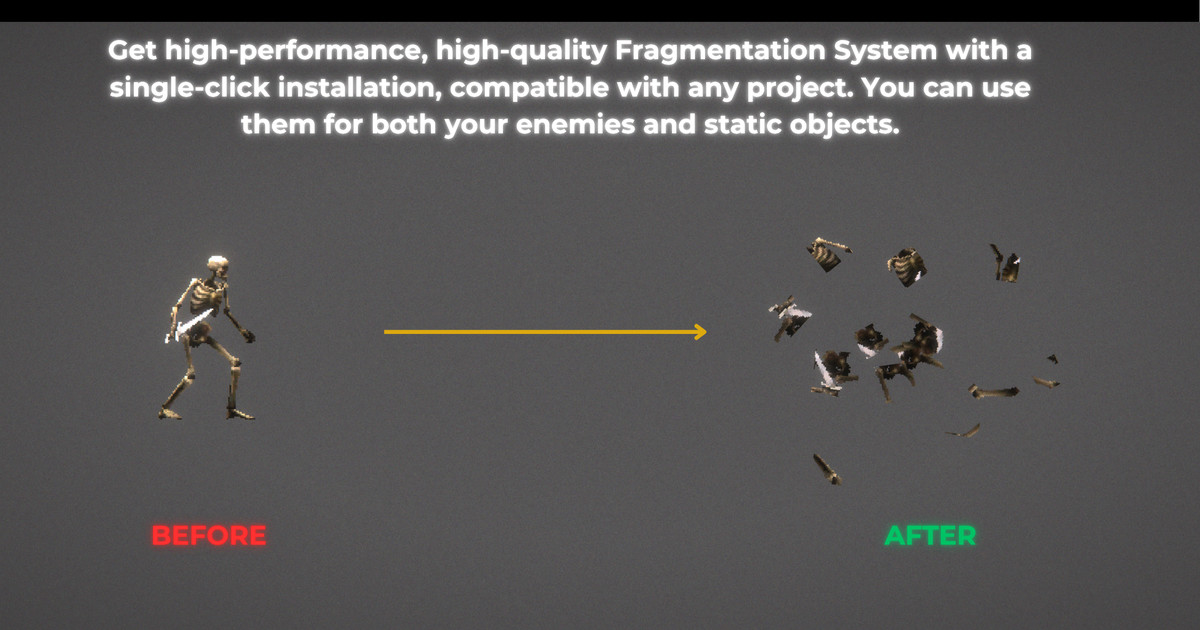
BT-DestructX 2D: Intelligent Multi-Algorithm Fragmentation & Destruction System screenshot 1

About this asset
Elevate Your Game's Impact with Advanced 2D Destruction
Stop using simple particle effects for destruction. BT-DestructX 2D gives you the power to dynamically shatter any sprite into real, physics-based fragments. This system provides the intelligent, multi-algorithm approach seen in high-end 2D titles, allowing you to create satisfying destruction for any object from brittle glass and splintered wood to shattering rock.
🎯 Core Fragmentation Engine
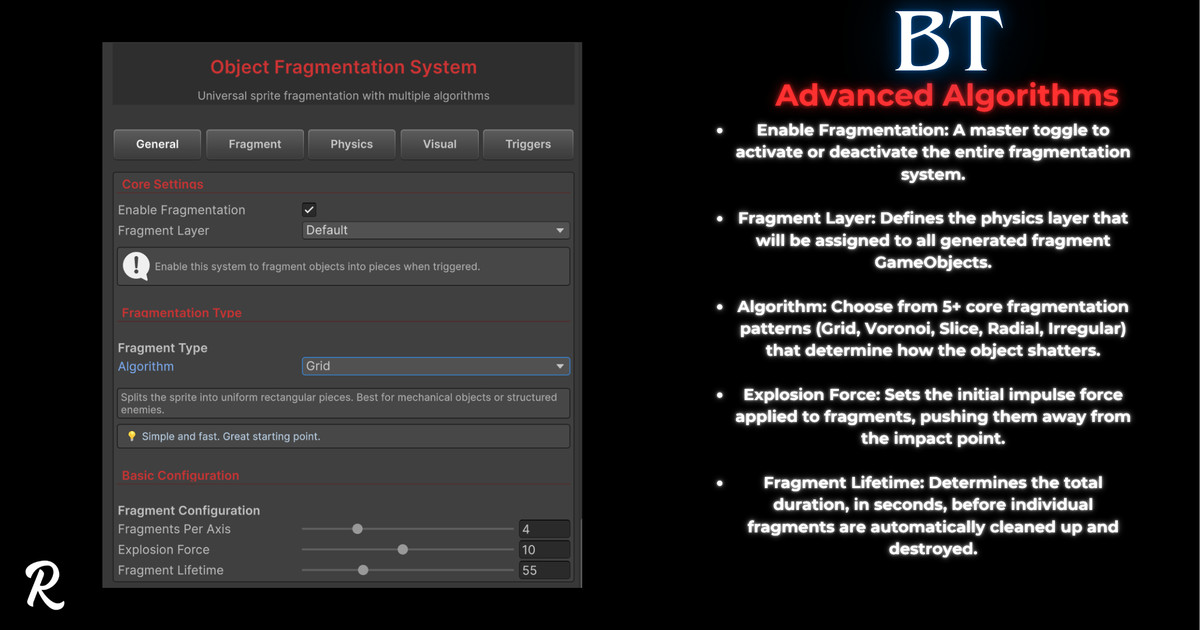
- Intelligent Multi-Algorithm System: Go beyond simple grids. Choose from 5 distinct algorithms to match your object's material:
Voronoi: Creates natural, cell-like patterns perfect for rock, glass, and organic surfaces.
Slice: Shatters objects along parallel lines, ideal for blade cuts or directional impacts.
Radial: Explodes objects outward from a center point, perfect for explosions.
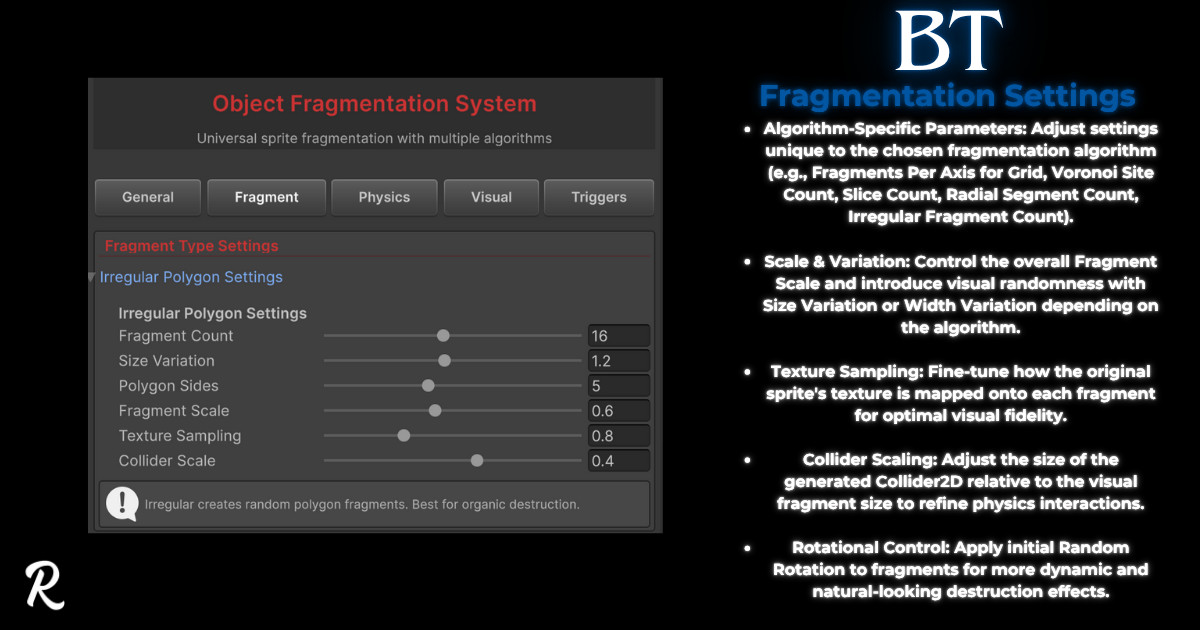
Irregular Polygon: Generates randomized, chunky fragments for a chaotic look.
Grid: A classic, uniform fragmentation for mechanical or simple objects. - Impact-Aware Slicing: Automatically detects the impact direction to orient Slice fragments dynamically.
- Smart Texture Sampling: Each fragment is created from the original sprite's texture, ensuring visual consistency.
- Optimized Collider Generation: Automatically generates a BoxCollider2D and Rigidbody2D for every fragment, ready for physics simulation.
🚀 Dynamic Physics & Interaction
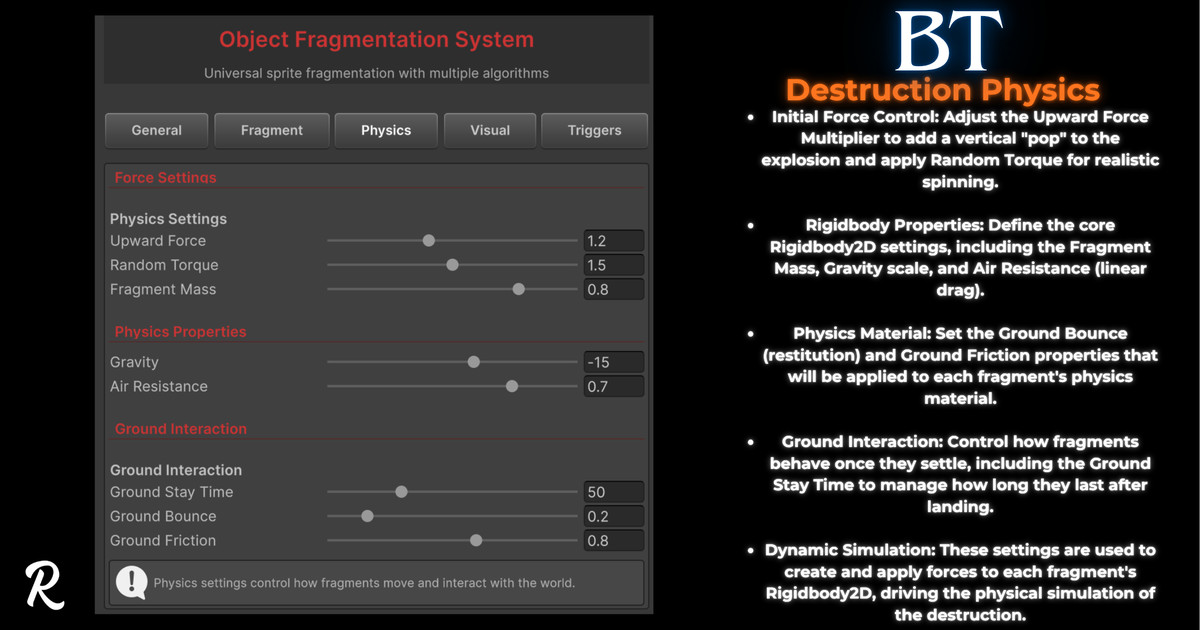
- Advanced Force Control: Fine-tune the physics of every shatter. Control the base Explosion Force, add an Upward Force Multiplier for a satisfying "pop," and apply Random Torque for realistic rotation.
- Full Physics Customization: Set the Mass, Gravity, and Air Resistance for all fragments to simulate different material weights.
- "Settle & React" System: Fragments don't just disappear. They can settle on ground layers, become isKinematic to save performance, and then realistically react by re-enabling physics if the "Player" tag touches them.
- Intelligent Ground Interaction: Fragments have adjustable Ground Bounce and Ground Friction. They also feature an anti-penetration check to prevent them from getting stuck inside ground colliders.
🎨 Visual Lifecycle & Effects
- Automatic Lifecycle Management: Define a Fragment Lifetime to ensure fragments are automatically cleaned up and destroyed.
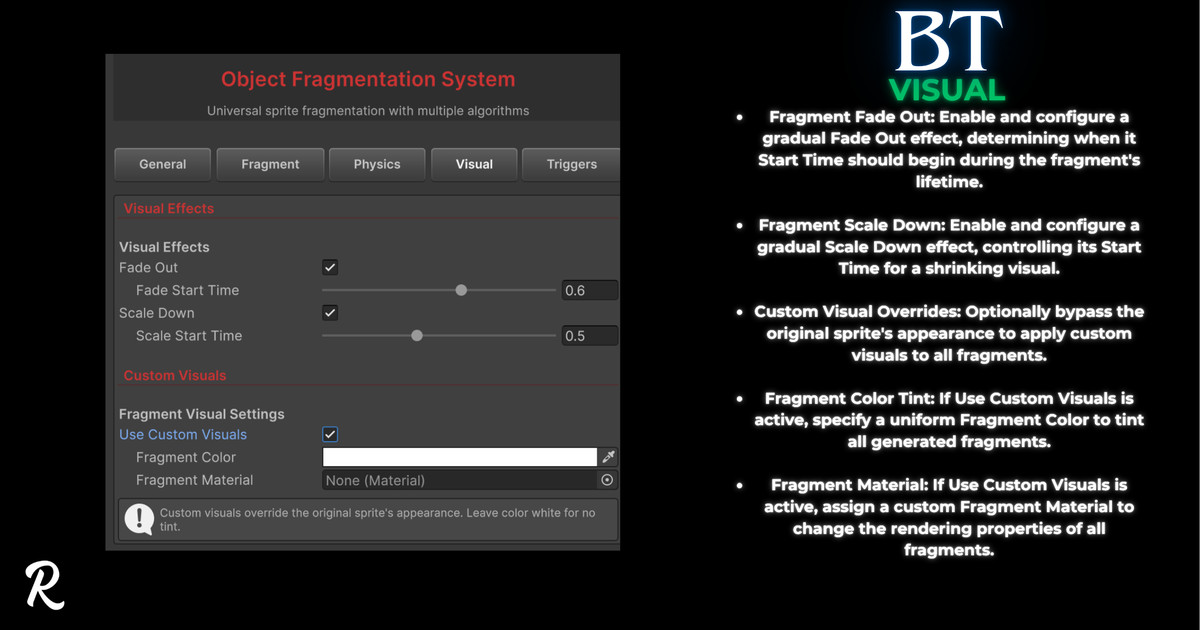
- Configurable Fade & Scale: Enable smooth Fade Out and Scale Down effects. These can be configured to start after a delay, or specifically when the fragment has landed on the ground.
- Custom Visual Overrides: Easily override the original sprite's appearance. Tint all fragments with a uniform Fragment Color or apply a custom Fragment Material for stylized effects like "ghost" or "hologram" destruction.
🎮 Easy Integration & Control
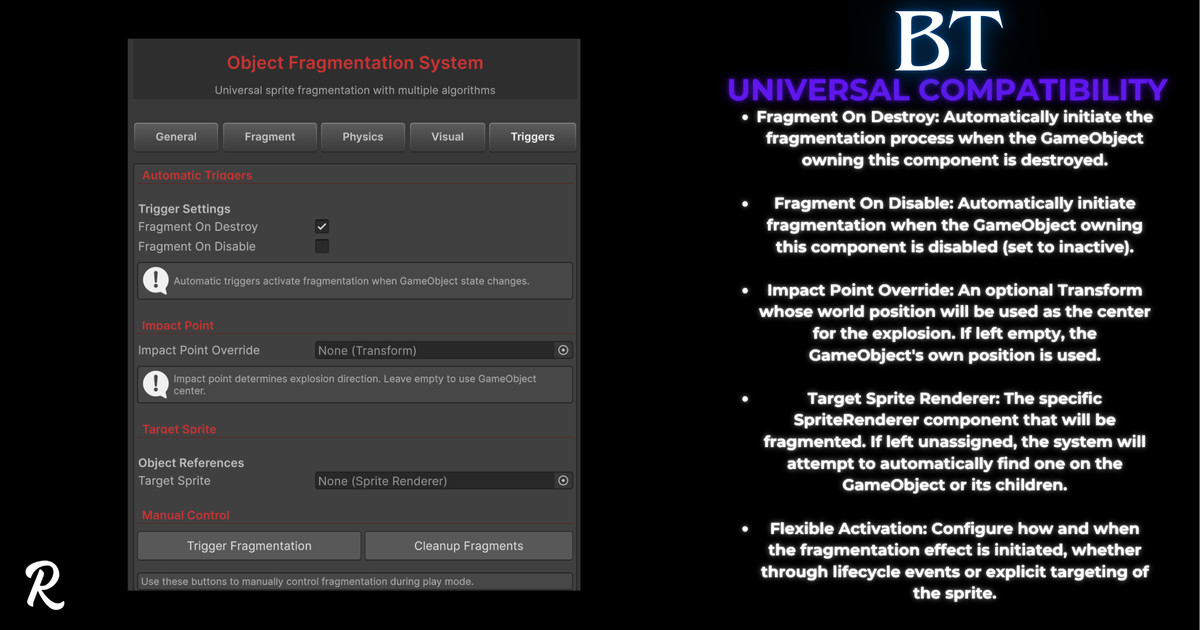
- Flexible Trigger System: No coding required for simple setups. Automatically trigger fragmentation when the object is OnDestroy or OnDisable.
- Full Scripting API: Manually trigger fragmentation with TriggerFragmentation(). You can even pass in a precise Vector2 impactPoint to make the explosion originate from an exact pixel—perfect for bullet hits.
- Clean, Tabbed Inspector: A professional, easy-to-use custom editor organizes all settings into logical tabs (General, Fragment, Physics, Visual, Triggers) for a rapid workflow.
- Runtime Control: Enable or disable the entire fragmentation system at runtime with a single API call (SetFragmentationEnabled).
🛡️ What You Get
- Full C# Source Code
- 5 Fragmentation Algorithms in one powerful component.
- Comprehensive documentation.
From the publisher's Asset Store listing.
Technical details
- 5 Intelligent Fragmentation Algorithms: Includes Grid, Irregular Polygon, Voronoi, Slice, and Radial fragmentation patterns.
- Dynamic Impact-Aware Slicing: The Slice algorithm can automatically use the impact direction to determine its angle.
- Full Physics Control: Exposes detailed settings for fragment Rigidbody2D properties, including Mass, Gravity, Air Resistance, Bounce, and Friction.
- Advanced Force Application: Customize explosion physics with settings for Explosion Force, an Upward Force Multiplier, and Random Torque.
- Automatic & Manual Triggers: Start fragmentation automatically via OnDestroy or OnDisable, or manually call TriggerFragmentation() from your own scripts.
- Precise Impact Point API: Manually specify a Vector2 impact point to ensure the explosion originates from the exact location of a projectile or hit.
- Smart Fragment Lifecycle: Each fragment runs an independent FragmentBehavior script that manages its own lifetime, visual effects (fade/scale), and physics state.
- "Settle & React" Physics: Fragments can settle on "Ground" layers (becoming kinematic to save performance) and re-activate their physics if touched by an object tagged "Player".
- Anti-Penetration Logic: Includes a check to help prevent fragments from getting stuck inside ground colliders upon high-velocity impact.
- Visual Customization: Option to override the original sprite's appearance, applying a custom Color tint or Material to all generated fragments.
- Tabbed Custom Inspector: A clean, professional custom editor organizes all settings into logical tabs (General, Fragment, Physics, Visual, Triggers) for a fast workflow.
Compatibility
| Unity version | Built-in | URP | HDRP | Custom |
|---|---|---|---|---|
| 6000.2.6f2 | Compatible | Compatible | Compatible | Compatible |
As listed on the Asset Store.