
 View on Asset Store (opens in new tab)
Package details
- Latest version
- 2.23
- Last updated
- First released
- Unity version
- 2022.3.62 or later
- Package size
- 11.0 MB
- Files
- 330
- Favorites
- 660
- Views in the past week
- 442
Price tracking
- Last checked
- Tracked since
- Lowest recorded
- $95.00 on
Keywords

RayFire 2
RayFire is an advanced destruction plugin that allows you to infinitely fracture, demolish, slice 3D Objects - both at runtime or in the editor.
Affiliate link · Purchases support this site
Price history
Last 6 months
USDAsset preview
1 / 23
RayFire 2 screenshot 1




















About this asset
RayFire is an advanced destruction plugin that allows you to infinitely fracture, demolish, slice 3D Objects - both at runtime or in the editor.
RayFire also provides Advanced Dynamic Simulation Control over your objects and demolished fragments including activation, dynamic clustering and damage. It allows you to shoot, explode and apply complex forces, record simulations in the editor and play them back in runtime and much more.
AI Ready. Provides 8 skills.
Full support for fast Enter Play Mode (no Domain Reload).
Scene Validator with more than 70 rules to find and fix basic setup mistakes.
If destruction is part of your game, you just found what you were looking for.
From the publisher's Asset Store listing.
Technical details
Feature list:
Simulation Types:
- Dynamic. The object will be affected by gravity, will start to fall down and can possibly be affected by other simulated objects.
- Sleeping. The object will freeze in the air until the first collision, after which it will start to behave as a dynamic object.
- Inactive. The object will freeze in air and will not be affected by gravity. It can be affected by other simulated objects but it will not start to fall down until it is activated. After activation, the object will start to behave like a dynamic object.
- Kinematic. The object will affect other objects but will not itself be affected by any other object. It can be activated and start to behave like a dynamic object.
Object Types:
- Mesh. Simulate an object using the mesh in its Meshfilter.
- Nested Cluster. Simulate object using all the meshes of its children as one solid concave object. At demolition, the Nested Cluster will detach every child and start to simulate them on their own. If a child is a root for other children with meshes after demolition, it will be considered a Nested Cluster as well.
- Connected Cluster. Simulate object using all of its children’s meshes as one solid concave object. At demolition, the Connected Cluster will detach fragments at the contact point while the rest of the fragments will remain a solid cluster. At every demolition, the cluster checks itself for connectivity and if it detects that some groups of fragments are not connected anymore, they will start to simulate as separate Connected Clusters.
Demolition Types:
- Runtime. Demolishes the object at runtime relative to the collision point. Supports Windows, Mac OS X, Linux, iOS and Android platforms.
- Reference. Swap the demolished object for a predefined reference which can be another scene object, cluster, prefab or FBX asset. Can be used on any platform.
- Precache. Prepare fragment meshes in Awake or manually and create fragments at demolition.
- Prefragment. Prepare fragments in Awake or manually and keep them deactivated until demolition.
Fragment Types:
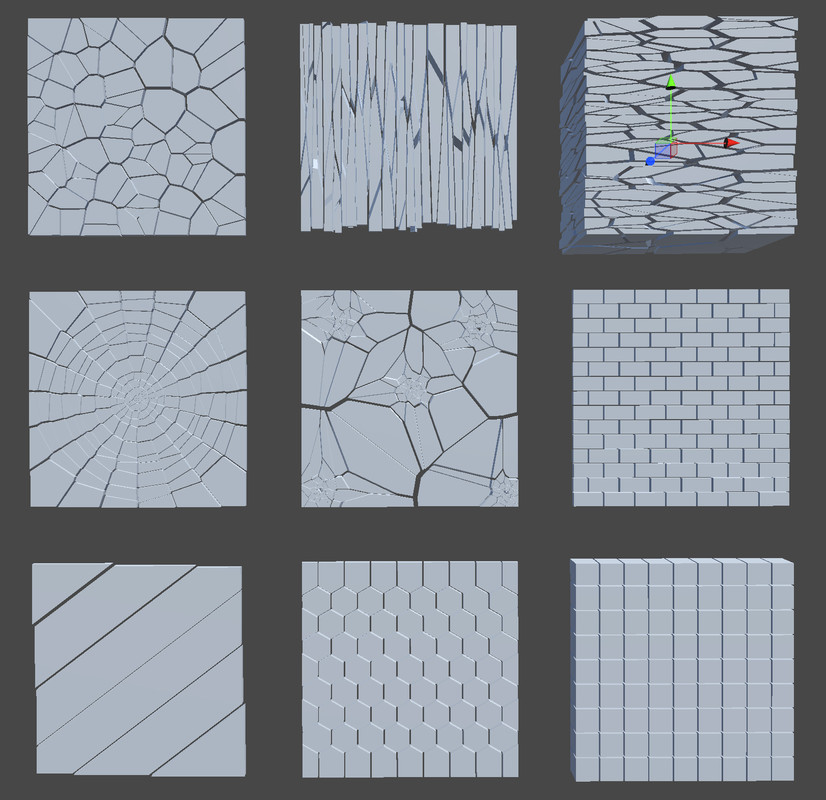
- Voronoi.
- Splinters.
- Slabs.
- Radial.
- Hexagon.
- Custom. Creates voronoi fragments based on point cloud generated by you.
- Slice.
- Bricks.
- Voxels.
- Tetrahedron.
Fragments clustering.
Allows you to glue fragments together and produce complex high-poly concave fragments with custom shapes.
Forces:
- Bomb. Explode objects relative to a point in space.
- Wind. Affect rigid objects like a Turbulent wind.
- Vortex. Affect rigid body objects like a Vortex
Helper components:
- Connectivity. Establish connectivity for Inactive and Kinematic objects and activate them when they lose connection with Unyielding objects.
- Gun. Allows you to shoot objects to either physically affect them, generate debris, dust, impact flash, apply damage, demolish them, or all of the above.
- Blade. Allows for slicing objects at Runtime.
- Debris & Dust. Automatic Debris and Dust particle generation for demolished and activated objects.
- Activator. Activates Inactive and Kinematic objects and turns them into Dynamic objects.
- Combine. Combines all child meshes into one single mesh.
- Recorder. Record a dynamic simulation into an animation clip for playing as an animation at Runtime. The objects are Kinematic with the ability to turn them back to Dynamic objects.
- Snapshot. Save demolished/simulated objects in Runtime and Load in Editor mode to be used for environment modelling purposes.
Other features:
- Recording & Playback. Allow to record and then playback objects simulation and demolition.
- Collapse. Allow for demolishing complex pre-fragmented structures and considers connectivity among fragments.
- Runtime Caching. Allows for distributing the runtime demolition process over time and demolishing hi-poly objects into hundreds of fragments without FPS drop in Runtime.
- Multi Material fragmentation. Allows for fragmenting objects with several different materials and applies a defined material to the inner surface.
- Reset & Reuse. Allows for demolishing an object once and then resetting and reusing already cached fragment meshes or fragments.
- Export to Unity asset. Allows for exporting fragment meshes into Unity assets.
Compatibility
| Unity version | Built-in | URP | HDRP | Custom |
|---|---|---|---|---|
| 2022.3.62f2 | Compatible | Compatible | Compatible | Compatible |
As listed on the Asset Store.