
 View on Asset Store (opens in new tab)
Package details
- Latest version
- 1.2.1
- Last updated
- First released
- Unity version
- 2022.3.62 or later
- Package size
- 1003 KB
- Files
- 54
- Favorites
- 4
- Views in the past week
- 10
Price tracking
- Last checked
- Tracked since
- Lowest recorded
- $24.99 on
Keywords

Project View Plus | Project Window Customizer for Unity
- Price drop
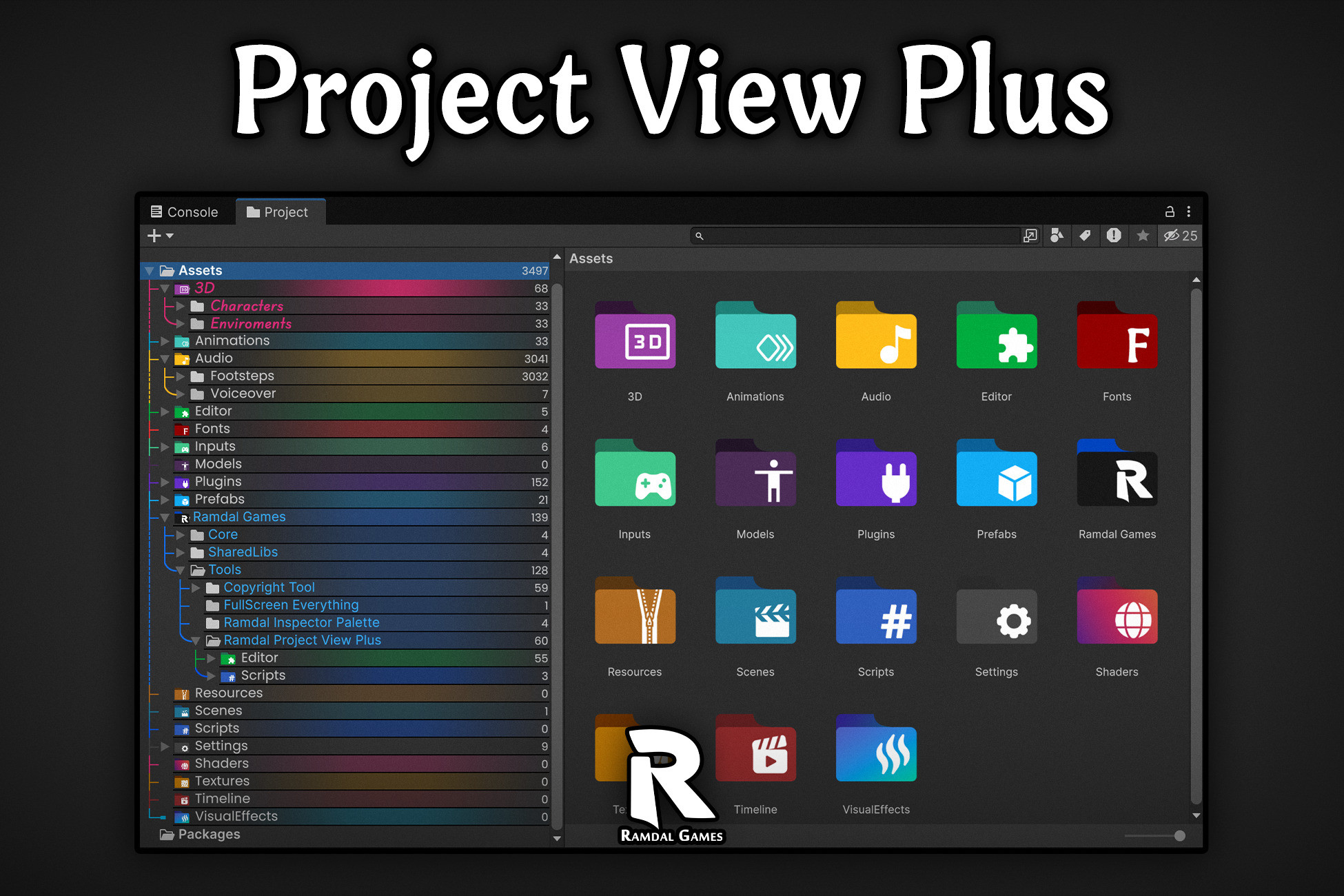
Stylize your Project window with custom icons, colors, advanced label styling, hierarchy trees, and file counters. Make large projects easier to organize, scan, and navigate effortlessly.
Lowest recorded price
Get 38% off on Asset Store (opens in new tab)Affiliate link · Purchases support this site
Price history
Last 6 months
USDAsset preview
1 / 11

Project View Plus | Project Window Customizer for Unity screenshot 1


About this asset
Ramdal Project View Plus is a powerful Unity Editor extension that transforms the Project window into a fully customizable workspace. Organize, style, and navigate your project faster with advanced visual customization designed for projects of any size.
This tool provides the visual clarity needed to find any asset in milliseconds. It is lightweight, highly optimized for performance, and works ready out of the box just import it and you're good to go.
Unlimited Customization
- Total Creative Freedom Tailor every visual aspect of your project window to fit your specific workflow or aesthetic.
- Endless Choices Combine styles, colors, and layouts to create a truly unique and professional environment.
Core Features
- Folder Styling Replace default icons with custom ones and apply vibrant color tints. Set a universal theme or use Per-Folder Overrides to make critical directories stand out.
- Advanced Label Styling Take full control of typography. Adjust font types, styles, sizes, and alignments. Includes pixel-perfect offsets and dedicated colors for Selection, Hover, and Inactive states.
- Hierarchy Tree View Trace folder depth instantly with stylized visual guides. Choose from multiple branch styles and customize line colors to match your favorite editor theme.
- Visual Organizers Eliminate eye strain with Zebra Stripes (alternating row backgrounds) and Separator Lines to clearly group and define your project structure.
- File Extensions & Counters Instantly identify file types (e.g., .cs, .png, .prefab) and see the exact number of assets and track density inside every folder all the time.
- No Code Required Everything is manageable in a single place. Control every feature through an intuitive settings asset no scripting, no complex setup.
Performance & Compatibility
- Lightweight & Optimized Engineered for speed, low impact on Editor performance even with thousands of assets.
- Ready Out of the Box No setup or coding needed. Import and instantly start styling.
From the publisher's Asset Store listing.
Technical details
Unlimited Customization
- Total Creative Freedom Tailor every visual aspect of your project window to fit your specific workflow or aesthetic.
- Endless Choices Combine styles, colors, and layouts to create a truly unique and professional environment.
Folder Styling
- Custom Icons & Tinting Replace default icons and apply custom colors.
- Global & Per-Folder Overrides Set a universal look or style each folder individually
Label Styling
- Interaction Colors Set specific colors for Selection, Hover, and Inactive states.
- Typography Control Adjust Font type, style, size, alignment, and pixel-perfect offsets.
- Flexible Scope Apply label styles globally or override them on a folder-by-folder basis.
- File Extensions Instantly see file types (e.g., .cs, .png, .prefab) directly in the project view for faster identification.
Hierarchy Tree View
- Stylized Branching Visual depth guides with multiple switchable styles.
- Dynamic Visuals Fully customizable line colors to match your editor theme.
Visual Organizers
- Zebra Stripes Alternating row backgrounds to improve asset scanning speed.
- Separators Horizontal lines to clearly define and group your project structure.
File Counter
- Instant Totals See the exact number of files and track asset density inside every folder all the time.
No Code Required
- Single-Place Management Control every single feature from one intuitive settings window.
- Zero Scripting Get a professional, organized look without writing a single line of code.
Compatibility
| Unity version | Built-in | URP | HDRP | Custom |
|---|---|---|---|---|
| 6000.5.0f1 | Compatible | Compatible | Compatible | Compatible |
| 6000.4.1f1 | Compatible | Compatible | Compatible | Compatible |
| 6000.3.8f1 | Compatible | Compatible | Compatible | Compatible |
| 6000.0.69f1 | Compatible | Compatible | Compatible | Compatible |
| 2022.3.62f3 | Compatible | Compatible | Compatible | Compatible |
- Tested and guaranteed to work from Unity 2021.3 LTS up to the Latest Unity Supported Version.
- Compatible with all three render pipelines.
- Zero build performance impact.
As listed on the Asset Store.