
 View on Asset Store (opens in new tab)
Package details
- Latest version
- 1.0.0
- Last updated
- First released
- Unity version
- 6000.3.1 or later
- Package size
- 188 KB
- Files
- 6
- Views in the past week
- 2
Price tracking
- Last checked
- Tracked since
- Lowest recorded
- $6.99 on
Keywords

Capture Easy
Capture Easy is a powerful yet simple Unity Editor tool that allows you to take high-quality screenshots and record gameplay videos directly from the Unity Editor without any hassle.
Affiliate link · Purchases support this site
Price history
Last 6 months
USDAsset preview
1 / 1
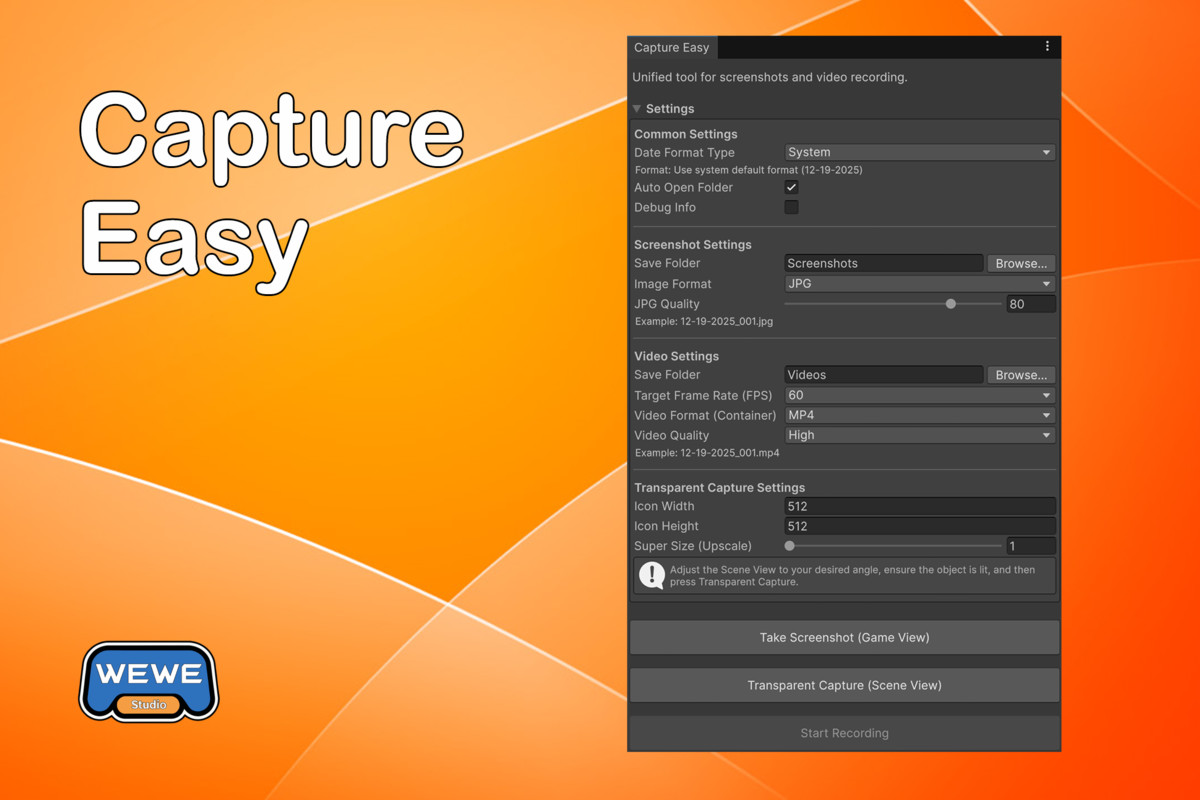
Capture Easy screenshot 1
About this asset
Capture Easy
The easiest way to capture screenshots and record videos in Unity Editor!
Capture Easy is a powerful yet simple Unity Editor tool that allows you to take high-quality screenshots and record gameplay videos directly from the Unity Editor without any hassle. With just one click, you can get the best results instantly — no complicated setup required.
Turn any 3D model into a professional 2D sprite/icon in seconds.
Stop wasting time removing backgrounds in Photoshop. Capture Easy allows you to take Transparent Background Screenshots directly from your Scene View.
- WYSIWYG: What you see in the Scene View is what you get.
- Alpha Channel: Exports clean PNGs with transparent backgrounds.
- High Res: Supports up to 4x Super Size upscaling for crisp 4K assets.
- Perfect for: Inventory icons, character portraits, UI elements, and marketing materials.
Features:
Screenshot Capture
- Instant Screenshot: Capture the current Game view with a single click
- Multiple Formats: Support for PNG and JPG formats
- Quality Control: Adjustable JPG quality (10-100%)
- Quick Hotkey: Take screenshots instantly via menu hotkey
- Auto Numbering: Automatically increment file numbers to avoid overwriting
Transparent Background Capture
- Transparent Screenshots: Capture objects with transparent background from Scene View
- Scene View Based: Uses the current Scene View camera angle and perspective
- Customizable Size: Adjustable width, height, and super size (upscale) settings
- Alpha Channel Support: Saves as PNG format with full alpha channel support
- Perfect for Icons: Ideal for creating game icons, UI elements, or promotional materials
Video Recording
- Game View Recording: Record your gameplay directly in Play mode
- Multiple Formats: Support for MP4, WEBM, and MOV formats
- Frame Rate Options: Choose from 24, 30, 60, or 120 FPS
- Quality Settings: Low, Medium, or High quality options
- Quick Toggle: Start/stop recording with a simple hotkey
- Powered by Unity Recorder: Uses Unity's official Recorder package for professional results
Customization
- Flexible Date Formats: System default, YYYY-MM-DD, MM-DD-YYYY, DD-MM-YYYY, or custom format
- Custom Save Locations: Choose separate folders for screenshots and videos
- Auto Open Folder: Automatically reveal captured files in your file explorer
- Debug Mode: Optional debug logging for troubleshooting
From the publisher's Asset Store listing.
Technical details
- Unity 2020.3 or later
- Unity Recorder Package (for video recording feature)
Compatibility
| Unity version | Built-in | URP | HDRP |
|---|---|---|---|
| 6000.3.1f1 | Compatible | Compatible | Compatible |
As listed on the Asset Store.