
 View on Asset Store (opens in new tab)
Package details
- Latest version
- 1.0.3
- Last updated
- First released
- Unity version
- 6000.0.58 or later
- Package size
- 4.0 MB
- Files
- 2
- Favorites
- 12
- Views in the past week
- 11
Price tracking
- Last checked
- Tracked since
- Lowest recorded
- $25.00 on
Keywords

Asset Importer PRO
- Price drop
Import assets up to 5-10× faster! Asset Importer PRO lets you batch-import packages from the Asset Store in parallel, dramatically speeding up your workflow.
Lowest recorded price
Get 58% off on Asset Store (opens in new tab)Affiliate link · Purchases support this site
Price history
Last 6 months
USDAsset preview
1 / 3
Asset Importer PRO screenshot 1

About this asset
Tired of that irritatingly slow, one-by-one import process in the Package Manager? We all know the pain: click import, wait for it to slowly finish, wait for the recompile... then repeat. For every single asset, For every single Project.
If you want to import multiple packages, you have to sit in front of your PC and babysit the entire process. Now just imagine doing this for tens or hundreds of packages, across all the games you've worked on, or all the games you will work on. You'd be wasting literally hours and days just importing stuff.
This tool is the solution.
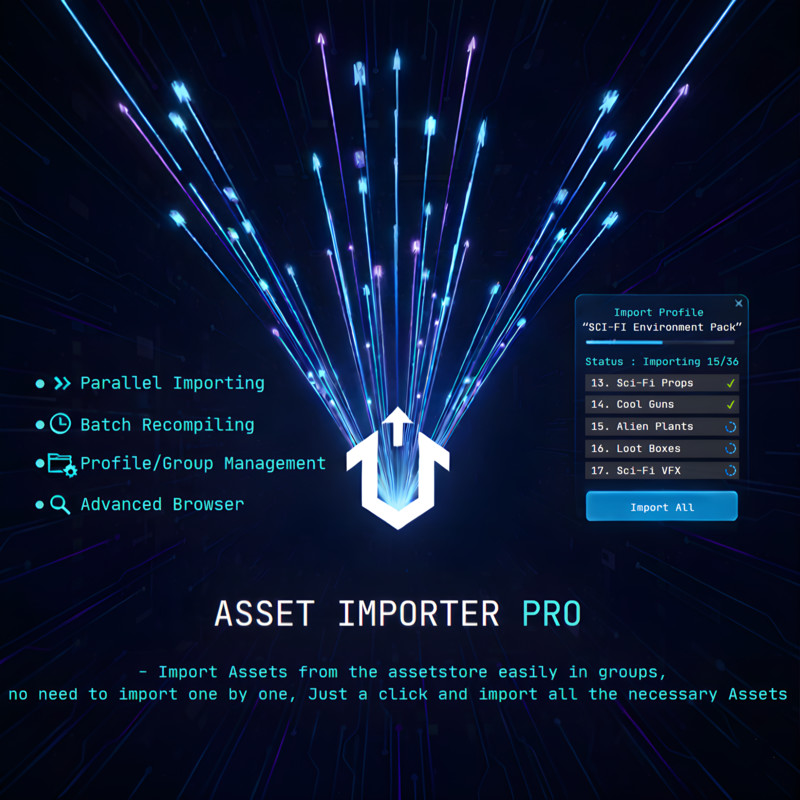
It shows you the complete list of assets you own and lets you automate importing them. The best part? It imports them in batches, parallelly! You just click "Import All," go grab a coffee, and in a while, your project is ready.
The Biggest Time-Saver: Skip Endless Recompiles!
This tool has a "Delayed Recompile Mode." It prevents the editor from recompiling after every single asset. Instead, it imports your entire batch and triggers massively fewer domain reloads, often just one single recompile at the very end. This significantly cuts down on the stop-and-start waiting, helping to dramatically speed up your total import process.
Organize Your Assets with Profiles & GroupsYou can also create Profiles and group together multiple packages according to their category or use. Stop searching for your favorite assets every time!
For example:
Profile 1 : Environment
- Group: Rocks Pack
- Item 1 : Stylized Rocks
- Item 2 : Weirdly Shaped Rocks
- Group: Grass Packs
- Item 1 : Stylized Grass Pack
- Item 2 : Stylized Alien Grass
- Group: Trees Pack
- Item 1 : Stylized Trees Pack
- Item 2 : Stylized Alien Trees
Profile 2 : Weapons
- Group: Maces
- Item 1 : Maces Pack 1
- Item 2 : Free Maces Pack
- Group: Swords
- Item 1 : Sword Pack 1
- Item 2 : Free Swords Pack
- Item 3 : Fantasy Swords Pack
Profile 3 : Props
- Group: Vehicles
- Item 1 : Spaceships
- Item 2 : Cars
- Item 3 : Stylized Cars
- Group: Roadside Items
- Item 1 : Lamppost Pack
- Item 2 : Firehydrants
- Item 3 : Flowerpots
Just build your perfect setup once, and import it into any new project with one click.
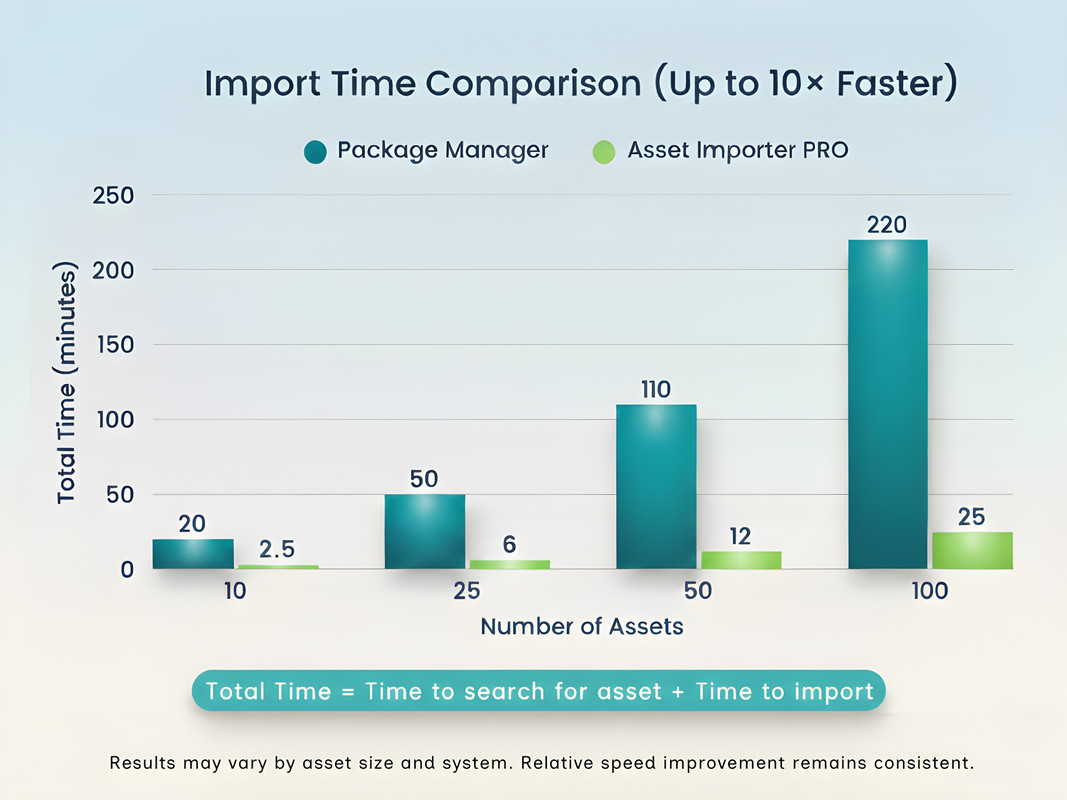
Here's some statistics :
(Note: these timings may vary if the assets to be imported are quite big in size)
Normal Search for package and importing, for each package,
For 10 packages : 18-25 mins
For 25 packages : 45-60 mins
For 100 packages : 3-4hrs
Using this Tool, (After arranging into groups as needed the first time)
For 10 packages : 2-2.5 mins
For 25 packages : 5-6 mins
For 100 packages : 20-30 mins
You can see how much time you can save, for each project, for each game you build.
Join my discord for any support : https://discord.gg/z2ub2ZECBZ
Or mail me for any info : [email protected]
From the publisher's Asset Store listing.
Technical details
Key Features:
- True Parallel Importing: Imports multiple .unitypackage files at the same time to max out your import speed.
- Delayed Recompile Mode: The #1 time-saver! Imports all assets first, then recompiles only once at the end.
- Powerful Profile System: Create, save, export, and import endless profiles for your different projects.
- Drag & Drop Groups: Easily organize your profiles by dragging assets into custom groups.
- Unified Asset Browser: See ALL your "My Assets" and "Registry" packages in one advanced, searchable, sortable, and filterable lists.
- Batch Download: You can also download any packages you own in batches before you import.
- One-Click Import: Just click "Import All Missing" on a profile and the tool handles the rest.
Supported OS:
- Windows, Linux, macOS
Supported Unity Versions:
- Unity 6000.0, 6000.1, 6000.2, 6000.3
Compatibility
| Unity version | Built-in | URP | HDRP | Custom |
|---|---|---|---|---|
| 6000.0.58f2 | Compatible | Compatible | Compatible | Compatible |
As listed on the Asset Store.