
 View on Asset Store (opens in new tab)
Package details
- Latest version
- 2.2.0
- Last updated
- First released
- Unity version
- 6000.0.70 or later
- Package size
- 452 KB
- Files
- 268
- Favorites
- 2
- Views in the past week
- 8
Price tracking
- Last checked
- Tracked since
- Lowest recorded
- $9.99 on
Keywords

Reactive SO
ScriptableObject-based reactive architecture for Unity. Unified patterns for events, state, collections, and entity management with GPU integration and comprehensive editor tools.
Affiliate link · Purchases support this site
Price history
Last 6 months
USDAsset preview
1 / 5

Reactive SO screenshot 1



About this asset
A ScriptableObject-based reactive architecture for Unity.
Systems communicate through shared ScriptableObject assets instead of direct references. This decoupled design keeps your code loosely coupled, configuration contained in the Inspector, and every state change observable.
Built For
- Teams wanting clear boundaries between systems
- Projects needing observable, debuggable state
- Developers preferring GameObjects over full ECS
- Anyone who values runtime visibility into their code
Observability
Observability is central to Reactive SO.
These tools are included to support it:
- Unified Monitor Window - Real-time logs for events, variables, sets, and entities
- Asset Browser - Browse and search all Reactive SO assets project-wide
- Dependency Analyzer - Detect unused assets and unassigned references
- RES Table View - Spreadsheet-style entity data editing
See changes as they happen, visualize dependencies, and spot unused ScriptableObjects or missing references at a glance.
RES (Reactive Entity Sets) uses NativeArray internally, but you can inspect its contents directly in the Inspector to verify current state.
Event Channels
Publish and subscribe to events through ScriptableObject assets.
- 12 built-in types: Void, Int, Float, Long, Double, Bool, String, Vector2, Vector3, Quaternion, Color, GameObject
- Caller tracking shows which method raised each event with zero runtime overhead
- Raise test events directly from the Inspector
Variables
Shared values that notify listeners on change.
- 11 built-in types with automatic change notification
- GPU Sync pushes values to shader global properties (Int, Float, Vector2, Vector3, Color, Bool)
- Edit values at runtime in the Inspector
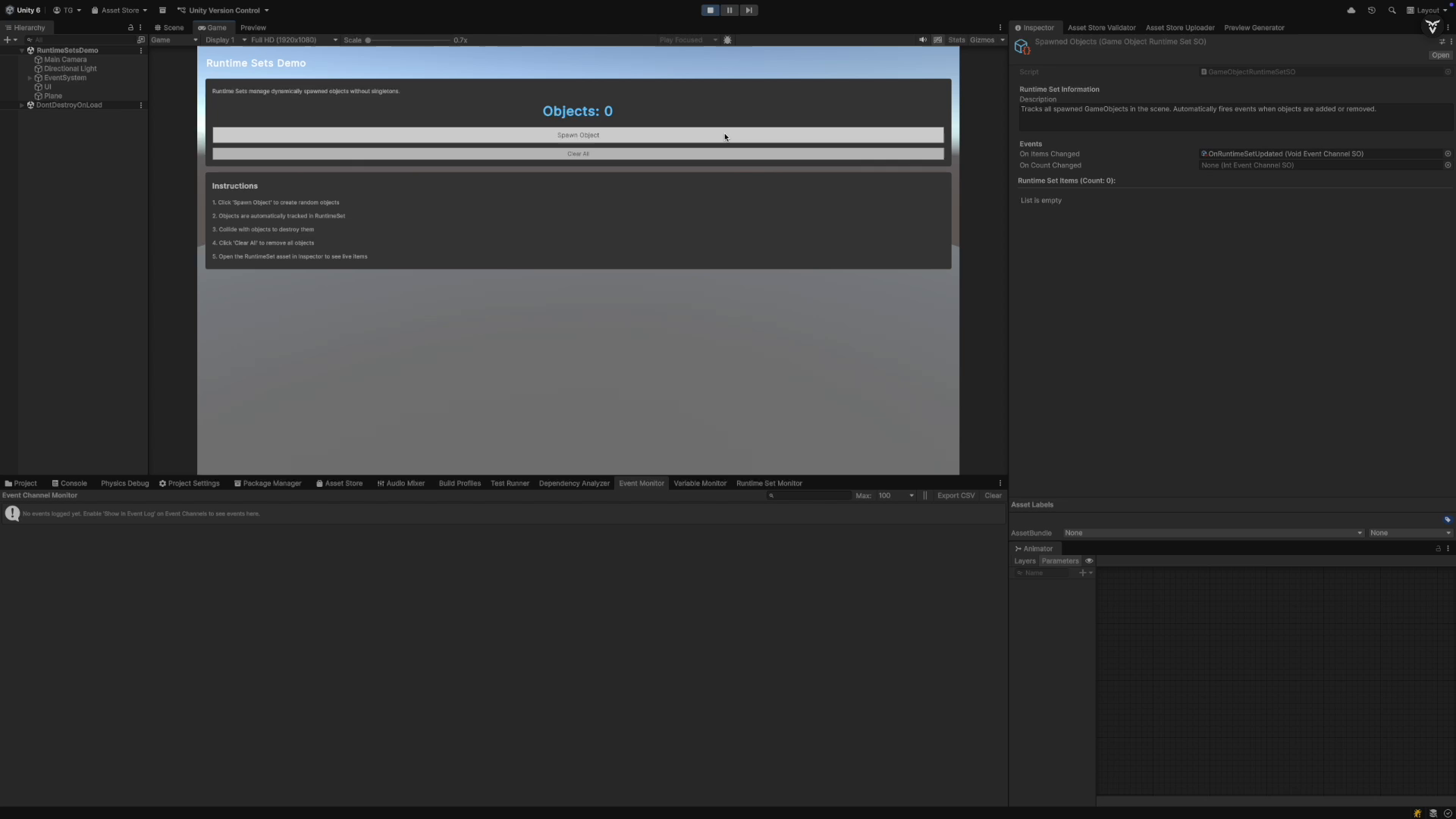
Runtime Sets
Dynamically track GameObjects and components during gameplay.
- Built-in support for GameObject and Transform
- Events fire on add and remove
- Click-to-ping from Inspector to Hierarchy
Reactive Entity Sets (Experimental)
A data store for centralized state management of up to tens of thousands of entities.
- O(1) access, insert, and delete
- Job System integration with double buffering
- Snapshot API for state capture and restoration
- Keep your GameObject workflow or integrate as needed
ActionSO
Command pattern as ScriptableObject assets.
- Define reusable actions as assets
- Wire them in the Inspector
- Manual execution button in Play Mode
R3 Integration
Convert Event Channels and Reactive Entity Sets to Observable streams.
Auto-detected when R3 is installed.
From the publisher's Asset Store listing.
Technical details
Event Channels
- 12 built-in types (Void, Int, Float, Long, Double, Bool, String, Vector2, Vector3, Quaternion, Color, GameObject)
- Generic base class (EventChannelSO<T>) for custom types
- Zero-overhead caller tracking using compile-time attributes
- Custom Inspector with subscriber list and manual event triggers
Variables System
- 11 built-in types (Int, Float, Long, Double, Bool, String, Vector2, Vector3, Quaternion, Color, GameObject)
- Generic base class (VariableSO<T>) for custom types
- Automatic event firing on value change using EqualityComparer<T>
- GPU Sync - Automatic sync to shader global properties via Shader.SetGlobal~() (6 types: Int, Float, Vector2, Vector3, Color, Bool)
- Runtime value editing and Reset to Initial button in Inspector
Runtime Sets System
- Generic base class (RuntimeSetSO<T>) for any type
- Built-in GameObject and Transform types with custom editors
- Automatic event firing when items added/removed
- Click-to-ping functionality in Hierarchy from Inspector
Reactive Entity Sets (Experimental)
- Generic base class (ReactiveEntitySetSO<TData>) for unmanaged struct data
- Job System integration via ReactiveEntitySetOrchestrator with double buffering
- NativeArray/NativeSlice access for Burst-compiled Jobs
- Snapshot API for state capture and restoration
- Events: onItemAdded, onItemRemoved, onDataChanged, onSetChanged
- ReactiveEntity<TData> base MonoBehaviour for automatic lifecycle management
ActionSO
- Base class (ActionSO) for parameterless actions
- Generic base class (ActionSO<T>) for actions with parameters
- Monitor Window integration with CallerInfo tracking
- Custom Inspector with Manual Execute button (Play Mode)
R3 Integration (Optional)
- AsObservable() for Event Channels
- ObserveAdd/Remove/DataChanged/SetChanged for Reactive Entity Sets
- Automatic detection via asmdef versionDefines
Editor Tools
- Unified Monitor Window - Tabbed real-time logging for Events, Variables, Runtime Sets, and RES
- Asset Browser Window - Browse, search, filter all Reactive SO assets with drag-and-drop support
- Dependency Analyzer - Scan Scenes/Prefabs for unused assets and unassigned fields
- RES Table View - Spreadsheet-style entity data inspection with inline editing
Technical Specs
- Unity 6000.0 (Unity 6.0) or newer
- No external dependencies (R3 integration is optional)
- Complete C# source code included
- Assembly Definition files for clean project separation
- Full XML documentation and Inspector tooltips
- 4 sample scenes (BasicDemo, RuntimeSetsDemo, MoteDemo, TinyHistoryDemo)