
 View on Asset Store (opens in new tab)
Package details
- Latest version
- 2.1
- Last updated
- First released
- Unity version
- 6000.0.35 or later
- Package size
- 794 KB
- Files
- 32
- Favorites
- 4
- Views in the past week
- 8
Price tracking
- Last checked
- Tracked since
- Lowest recorded
- $9.99 on
Keywords

Nebula PRO: One-Click LOD Optimizer & Scene Performance Heatmap
- Price drop
Optimize LODs & identify bottlenecks for Quest 2/3, PS5 & Mobile in seconds. Analyze scene compliance for 9 platforms. Full URP, HDRP & Built-in support.
Lowest recorded price
Get 60% off on Asset Store (opens in new tab)Affiliate link · Purchases support this site
Price history
Last 6 months
USDAsset preview
1 / 3
Nebula PRO: One-Click LOD Optimizer & Scene Performance Heatmap screenshot 1
About this asset
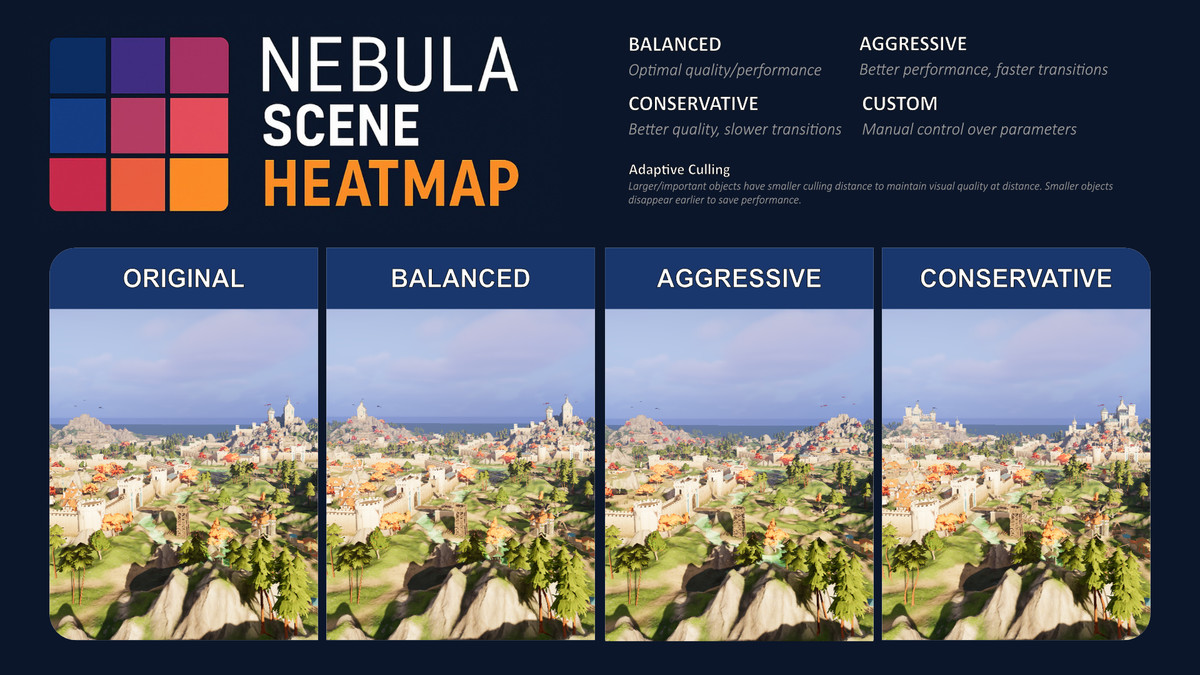
Save hours of manual tweaking with our new one-click LOD transition optimizer.
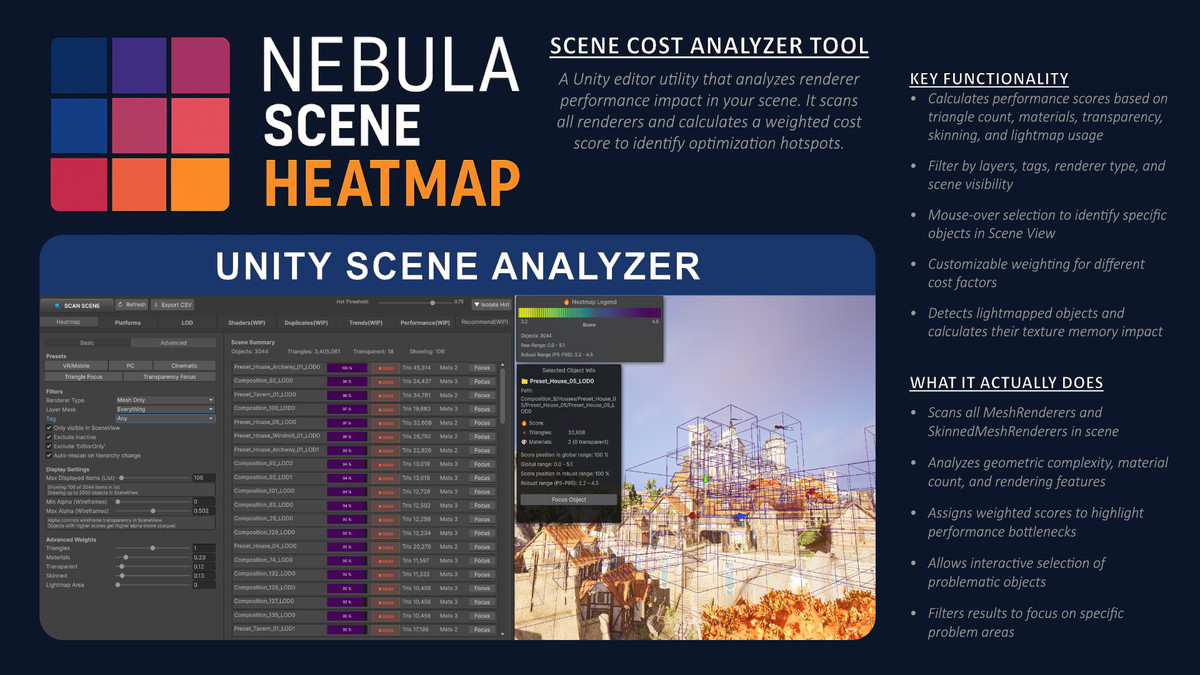
Nebula Scene Heatmap Pro helps you identify and analyze performance hotspots in your Unity scenes.
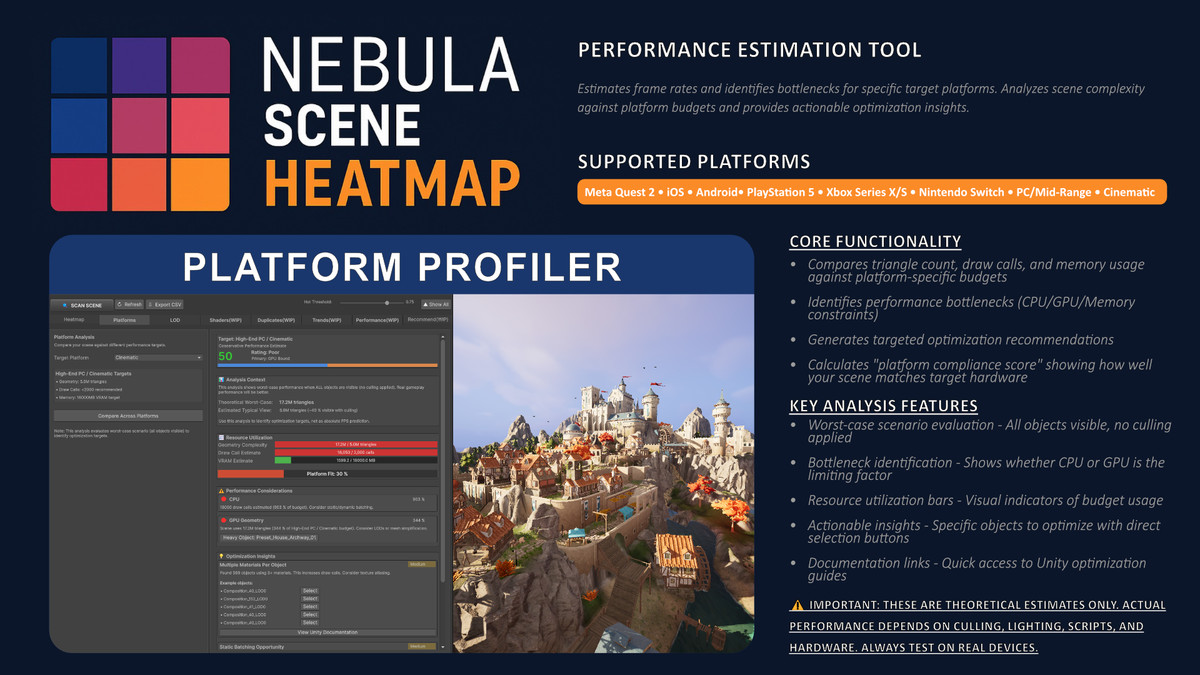
With a single scan, it analyzes your scene geometry, materials, and renderer complexity, providing visual feedback through a color-coded heatmap in the Scene View. The tool includes platform-aware performance estimation to help you understand how your scene performs on target hardware like VR headsets, mobile devices, consoles, or PC.
Includes an intuitive tab-based Editor Window with customizable weights, platform-specific presets, LODGroup transition optimization, and live isolation of costly renderers.
Developed by: Nebula Developers Lab
Tested on: Unity 6000.9.35f1 (Built-in Render Pipeline)
Compatible with all pipelines (Built-in, URP, HDRP)
From the publisher's Asset Store listing.
Technical details
Key Features:
- LOD Analysis & Optimization - Analyze LOD groups and optimize transition distances
- Scene Performance Heatmap - Visualize geometry and material complexity
- Platform Performance Analysis - Estimate scene compliance for 9 target platforms
- Bottleneck Identification - Pinpoint GPU geometry, CPU draw calls, and memory issues
- Optimization Insights - Actionable recommendations with direct object references
- Conservative Estimation - Worst-case analysis accounting for all visible objects
- Platform Presets - VR/Mobile, Quest 2, iOS, Android, PS5, Xbox, PC, Cinematic
- Resource Utilization Tracking - Triangles, draw calls, and estimated memory
- Compliance Scoring - 0-100% platform fit assessment
What It Does NOT Do:
- ❌ No automatic scene modifications (except LOD distance adjustments)
- ❌ No real-time continuous analysis
- ❌ No LOD generation or mesh simplification
- ❌ No runtime performance profiling
Perfect For:
- Technical artists preparing scenes for multiple platforms
- Developers needing quick scene complexity assessment
- Teams targeting performance-sensitive platforms (VR/Mobile)
- Artists wanting to understand the performance impact of their assets
Workflow:
- Scan your scene
- View heatmap visualization of renderer complexity
- Switch to Platform Analysis tab
- Select target hardware (Quest 2, PS5, etc.)
- Review bottlenecks and optimization insights
- Use object references to manually optimize
Important:
This tool provides conservative worst-case estimates assuming all objects are visible (no culling). Real gameplay performance will be better with proper camera setup and occlusion culling.
LOD Analysis Features:
- Automatically respects Unity's Quality Settings (MaxLOD, LOD Bias)
- Identifies suboptimal LOD transitions and reduction percentages
- Calculates optimal transition distances based on object importance and triangle counts
- Platform-aware optimization presets (Conservative, Balanced, Aggressive)
- One-click application of optimized LOD distances
- Validation of LOD ordering and prevention of overlaps
- Detection of geometry gaps in LOD chains
Compatibility:
- Unity 2022.3 or newer (tested on 6000.9.35f1)
- Built-in Render Pipeline (default)
- Windows / macOS Editor
Support:
For questions or feedback, join the Nebula Developers Lab community on Discord.
Link: - https://discord.gg/n6xf3sZtrx
Compatibility
| Unity version | Built-in | URP | HDRP |
|---|---|---|---|
| 6000.0.60f1 | Compatible | Compatible | Compatible |
| 6000.0.35f1 | Compatible | Compatible | Compatible |
As listed on the Asset Store.