
 View on Asset Store (opens in new tab)
Package details
- Latest version
- 1.0.1
- Last updated
- First released
- Unity version
- 6000.0.43 or later
- Package size
- 8.9 MB
- Files
- 31
- Views in the past week
- 6
Price tracking
- Last checked
- Tracked since
- Lowest recorded
- $5.00 on
Keywords

Where I Left Off - Productivity Editor Tool
- Price drop
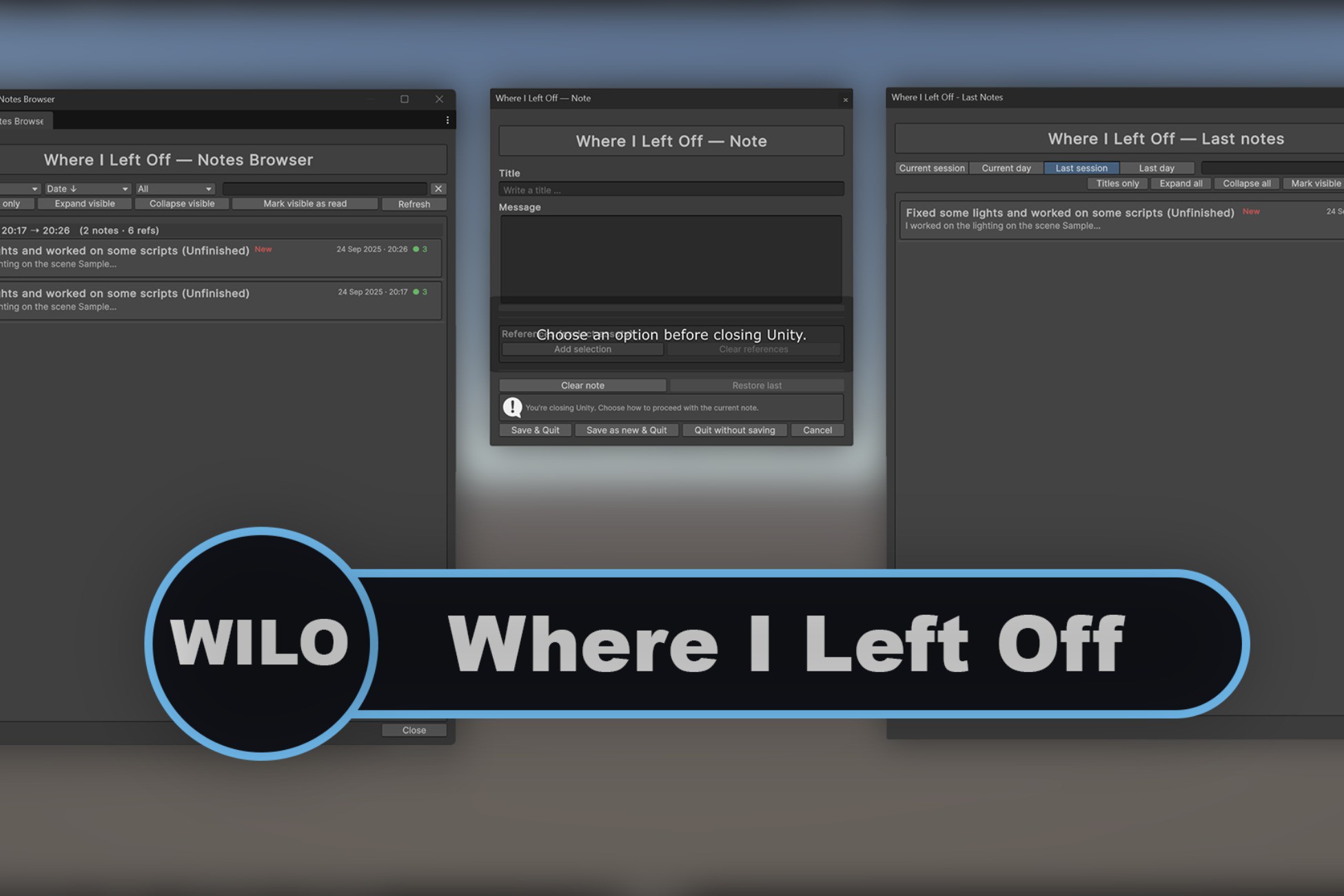
Where I Left Off is a lightweight Unity Editor tool that helps you instantly resume work by showing your last session’s notes, with a startup popup and a full Notes Browser.
Lowest recorded price
Get 67% off on Asset Store (opens in new tab)Affiliate link · Purchases support this site
Price history
Last 6 months
USDAsset preview
1 / 6

Where I Left Off - Productivity Editor Tool screenshot 1


About this asset
Where I Left Off (Wilo) is a Unity Editor utility that helps you keep track of what you were working on.
When closing Unity, you’ll be prompted to quickly leave a note with a title, message, and references to assets or scenes (optional). These notes can also be created manually at any time during your session.
When you reopen Unity, a startup popup will display your last session/day notes, complete with filters and badges to help you instantly recall what you were doing.
For long-term organization, you can use the Notes Browser (Tools > DevForge > Where I Left Off > Browser). This window lists all notes you’ve created, with search, filters, grouping by session/day, and quick asset references (Ping / Select / Reveal). Notes can be edited or deleted at any time.
Preferences allow you to enable/disable popups on startup or quit, so the tool fits your workflow.
From the publisher's Asset Store listing.
Technical details
- Startup Popup: Automatically shows notes from the last session or last day.
- Notes Browser: Sort, filter, and group notes by day or session.
- Titles-only mode: Compact view for scanning notes quickly.
- Reference badges: Show how many asset references a note has, with Ping / Select / Reveal actions.
- Keyboard shortcuts: Ctrl+F to focus search, Esc to clear.
- Persistence: Search, filters, and layout remembered per project.
- Editor-only: No runtime code, safe for builds.
Compatibility
| Unity version | Built-in | URP | HDRP |
|---|---|---|---|
| 6000.0.43f1 | Compatible | Compatible | Compatible |
As listed on the Asset Store.