
 View on Asset Store (opens in new tab)
Package details
- Latest version
- 1.0.0
- Last updated
- First released
- Unity version
- 6000.0.18 or later
- Package size
- 123 KB
- Files
- 3
- Favorites
- 2
- Views in the past week
- 4
Price tracking
- Last checked
- Tracked since
- Lowest recorded
- $4.99 on
Keywords

Bulk Animation Creator
Automates the process of turning sliced sprite sheets into animation clips in Unity.
Price $4.99
Buy on Asset Store (opens in new tab)
Affiliate link · Purchases support this site
Price history
Last 6 months
USDAsset preview
1 / 3
Bulk Animation Creator screenshot 1
About this asset
Normally, creating animations from sprite sheets requires you to manually select each texture, drag all the sprites into the Animation window, set frame rates, rename clips, and then optionally wire them into an Animator Controller — a process that’s slow and repetitive.
With this tool, you can:
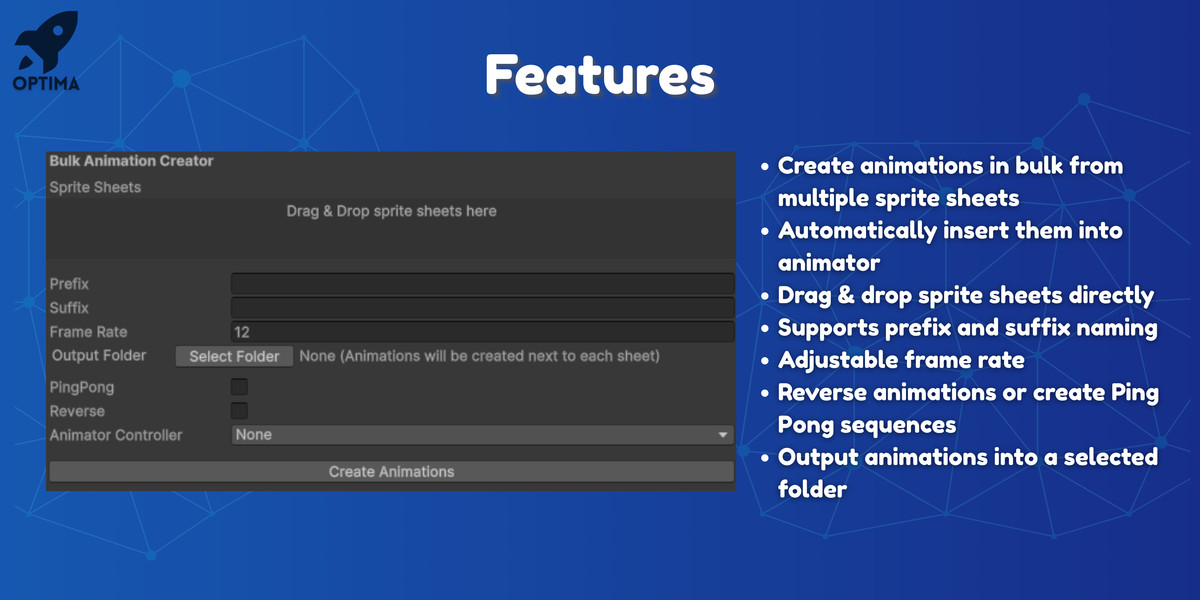
- Bulk-generate animation clips from one or many sprite sheets in a single click.
- Batch-apply settings like frame rate, clip naming with prefix/suffix, looping, ping-pong playback, and reverse playback.
- Choose output folder for all generated clips.
- Automatically create Animator Controllers:
None (just clips),
Single shared controller,
One controller per sprite sheet. - Drag & drop workflow with a clean Editor Window, or use the right-click “Create Animations” shortcut directly in the Project window.
From the publisher's Asset Store listing.
Technical details
- Unity Version Compatibility: Tested on Unity 2019.4 and above (works with Unity’s built-in Animation and Animator systems).
- Render Pipeline Compatibility: Works with all pipelines (Built-in, URP, HDRP) — since it only uses the Editor and Animation system.
- Dependencies: None — no third-party packages required.
- Platforms: Editor-only tool (not included in builds).
- Installation: Place scripts inside an Editor/ folder in your project.
- API Used: UnityEditor, AnimationUtility, AssetDatabase, AnimatorController API.
Compatibility
| Unity version | Built-in | URP | HDRP | Custom |
|---|---|---|---|---|
| 6000.0.18f1 | Compatible | Compatible | Compatible | Compatible |
As listed on the Asset Store.