
 View on Asset Store (opens in new tab)
Package details
- Latest version
- 1.0.0
- Last updated
- First released
- Unity version
- 6000.0.52 or later
- Package size
- 355 KB
- Files
- 10
- Views in the past week
- 7
Price tracking
- Last checked
- Tracked since
- Lowest recorded
- $4.99 on
Keywords

Advanced ScreenShot Pro
Advanced Screenshot Manager Pro is a comprehensive Unity editor extension that revolutionizes screenshot capture and debugging workflows for game developers.
Affiliate link · Purchases support this site
Price history
Last 6 months
USDAsset preview
1 / 2
Advanced ScreenShot Pro screenshot 1
About this asset
Advanced Screenshot Manager Pro - Asset Store Description
Main Description (For Asset Store Listing)
The Ultimate Screenshot Solution for Unity Developers - Automate Error Capture, Debug Faster, Create Professional Content
Transform your debugging workflow and content creation with the most comprehensive screenshot management system for Unity. Advanced Screenshot Manager Pro automatically captures screenshots when errors occur, supports multiple resolutions, and provides professional-grade tools for game development and quality assurance.
Why Developers Choose This Tool
Automated Error Debugging: Never miss a bug again! Automatically captures screenshots the moment errors, exceptions, or warnings occur. Perfect for:
- Remote testing and bug reports
- QA automation
- Client demonstrations
- Post-mortem analysis
Professional Content Creation: Generate marketing materials, documentation, and promotional content with ease:
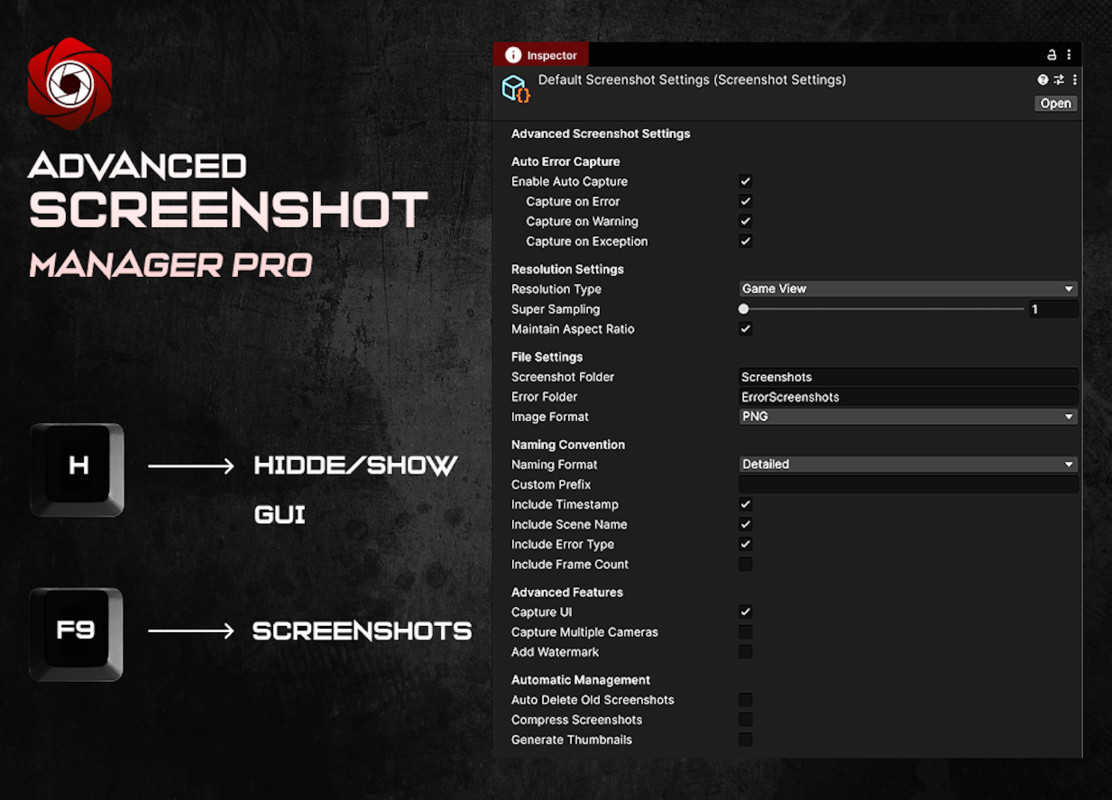
- Multiple resolution presets (720p, 1080p, 4K, Mobile)
- Custom resolution support up to 8K
- Professional watermarking system
- Batch capture from multiple cameras
Key Features
Smart Auto-Capture System
- Automatically screenshots on errors, warnings, and exceptions
- Intelligent file naming with timestamps and error details
- Separate organization for error screenshots vs manual captures
- Performance monitoring integration
Multi-Resolution Support
- One-click capture at 720p, 1080p, 4K, and mobile resolutions
- Custom resolution support (any width/height)
- Super-sampling for ultra-high quality (1x to 4x)
- Aspect ratio maintenance options
Professional File Management
- PNG and JPEG format support with quality control
- Advanced naming conventions (timestamps, scene names, frame counts)
- Custom prefixes and folder organization
- Automatic cleanup of old screenshots
- Thumbnail generation
Advanced Capture Options
- Multi-camera simultaneous capture
- UI inclusion/exclusion control
- Watermark and branding support
- Hotkey customization (F9 default)
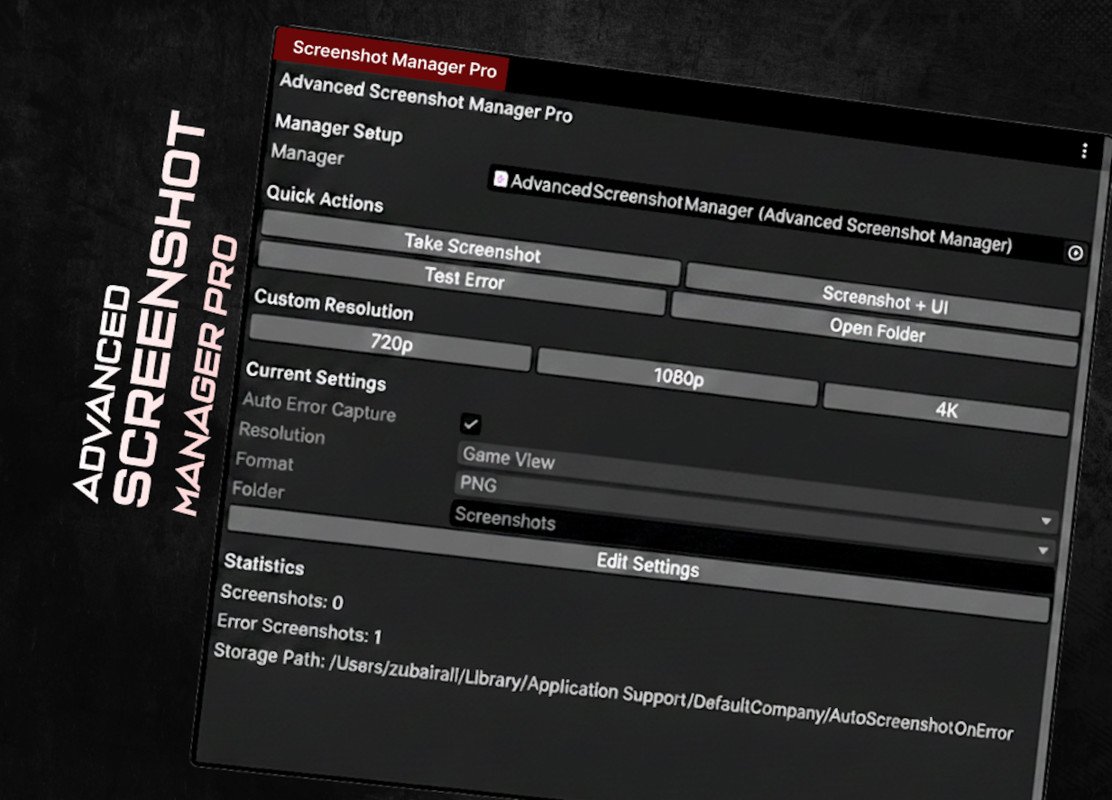
- Editor window integration
Enterprise-Grade Features
- Event system for custom integrations
- ScriptableObject settings architecture
- Cross-platform compatibility
- Memory-efficient operation
- No external dependencies
Perfect For
Game Developers: Streamline your debugging workflow and create professional screenshots for marketing QA Teams: Automate bug reporting with contextual error screenshots Content Creators: Generate high-quality materials for social media and marketing Indie Developers: Professional tools without the enterprise cost Educational Projects: Document development progress and create tutorials
Technical Excellence
- Zero Setup Required: Automatically integrates into any Unity project
- Performance Optimized: Minimal impact on game performance
- Memory Safe: Proper resource management and cleanup
- Error Resilient: Handles edge cases and maintains stability
- Platform Universal: Works on all Unity-supported platforms
Supported Platforms
Windows, Mac, Linux, Android, iOS, WebGL, Console platforms
Unity Compatibility
Unity 2020.3 LTS or newer (tested up to Unity 2023.x)
What's Included
Core Scripts
- Advanced Screenshot Manager (main controller)
- Screenshot Settings (ScriptableObject configuration)
- Auto-setup system for instant integration
Professional Editor Tools
- Custom editor window with full control panel
- Enhanced inspector interface
- Settings management system
Complete Examples
- Demo scene with interactive controls
- Performance monitoring integration
- Sample materials and test objects
Comprehensive Documentation
- Step-by-step setup guide
- Complete API reference
- Best practices and tips
- Video tutorials (coming soon)
What Makes This Special
Unlike basic screenshot tools, Advanced Screenshot Manager Pro is built for professional game development:
- Automated Workflow: No manual intervention needed for error capture
- Production Ready: Used in shipped commercial games
- Developer-Focused: Built by developers, for developers
- Continuously Updated: Regular updates with new features and Unity compatibility
Customer Reviews
"This tool saved us countless hours during crunch time. The auto error capture is a game-changer for remote QA." - Indie Game Studio
"Professional quality tool that's worth every penny. The multi-resolution export alone pays for itself." - Mobile Game Developer
"Finally, a screenshot tool that actually understands game development workflows." - Unity Developer
Get Started in Minutes
- Import the package
- Screenshot Manager auto-creates itself
- Configure settings via Tools → Advanced Screenshot Manager
- Press F9 to capture, or let it auto-capture errors
- Find your organized screenshots in the persistent data folder
Version & Updates
Current Version: 1.0
- Full feature set as described
- Extensive testing across Unity versions
- Complete documentation and examples
Roadmap (Free Updates):
- Animated GIF capture support
- Cloud storage integration
- Advanced batch processing tools
- Video capture capabilities
Investment in Your Productivity
At $19.99, this tool pays for itself with the first bug it helps you catch or the first professional screenshot you create. Compare to hiring external screenshot services or spending hours manually capturing different resolutions.
Professional Support
- Comprehensive documentation included
- Example scenes and integration guides
- Email support for technical questions
- Active updates for Unity compatibility
Transform your Unity workflow today. Get Advanced Screenshot Manager Pro and never miss another bug or struggle with screenshot creation again.
From the publisher's Asset Store listing.
Technical details
Technical Details
System Requirements
- Unity Version: 2020.3 LTS or newer
- Target Platforms: All Unity-supported platforms
- Dependencies: None (pure Unity C# implementation)
- Package Size: ~2MB
- Runtime Memory: <5MB footprint
Platform Compatibility
- Windows: Standalone, UWP
- macOS: Standalone
- Linux: Standalone
- Mobile: Android, iOS
- Web: WebGL
- Console: PlayStation, Xbox, Nintendo Switch
Image Specifications
- Supported Formats: PNG (lossless), JPEG (1-100% quality control)
- Resolution Range: 320×240 up to 8K (7680×4320) and beyond
- Super Sampling: 1x to 4x quality multiplier
- Color Support: RGB24, HDR pipeline compatible
- Capture Speed: <100ms for 1080p screenshots
Technical Architecture
Core Components:
├── AdvancedScreenshotManager.cs # Singleton main controller
├── ScreenshotSettings.cs # ScriptableObject configuration
├── ScreenshotManagerWindow.cs # Editor window interface
├── ScreenshotSettingsEditor.cs # Custom inspector
└── AutoSetup.cs # Automatic initialization
Implementation Details
- Design Pattern: Singleton with DontDestroyOnLoad persistence
- Settings Management: ScriptableObject-based configuration system
- Capture Technology: RenderTexture + ScreenCapture hybrid approach
- File I/O: Asynchronous operations with error handling
- Event System: C# delegates for screenshot completion callbacks
- Memory Management: Automatic RenderTexture cleanup and disposal
File Organization System
Application.persistentDataPath/
├── Screenshots/ # Manual screenshot captures
├── ErrorScreenshots/ # Automatic error captures
└── Thumbnails/ # Generated preview images (optional)
Naming Convention Engine
Format: [CustomPrefix]_[SceneName]_[ErrorType]_[Timestamp]_[FrameCount].[Extension]
Example: Screenshot_MainMenu_Error_2024-08-17_14-30-25_F12847.png
Performance Metrics
- Initialization Time: <10ms on first load
- Memory Usage: Scales with resolution (4K = ~32MB temporary allocation)
- CPU Overhead: Negligible during normal gameplay
- Background Impact: Zero performance cost when not actively capturing
- File Processing: Automatic compression and cleanup routines
API Interface
csharp
// Primary Methods
AdvancedScreenshotManager.Instance.CaptureScreenshot()
AdvancedScreenshotManager.Instance.CaptureScreenshotWithUI()
AdvancedScreenshotManager.Instance.CaptureScreenshotAtResolution(int width, int height)
// Event Callbacks
OnScreenshotCaptured += (string filePath) => { /* Handle capture */ }
OnErrorScreenshotCaptured += (string filePath, LogType logType) => { /* Handle error */ }
// Configuration Access
ScreenshotSettings settings = manager.settings;
Error Handling & Resilience
- Auto-Recovery: Graceful degradation on insufficient memory or disk space
- Validation: Input parameter checking and sanitization
- Exception Management: Try-catch blocks with detailed logging
- Resource Cleanup: Guaranteed disposal of temporary assets
- Platform Adaptation: Automatic adjustment for platform limitations
Integration Requirements
- Setup Time: Zero (auto-initializes on first play)
- Code Dependencies: None required
- Namespace: AdvancedScreenshotManager
- Threading: Main thread operations only (Unity requirement)
- Persistence: Settings saved via ScriptableObject + PlayerPrefs
Compatibility
| Unity version | Built-in | URP | HDRP |
|---|---|---|---|
| 6000.0.52f1 | Compatible | Not listed | Not listed |
As listed on the Asset Store.