
 View on Asset Store (opens in new tab)
Package details
- Latest version
- 1.0
- Last updated
- First released
- Unity version
- 6000.0.57 or later
- Package size
- 525 KB
- Files
- 3
- Favorites
- 1
- Views in the past week
- 3
Price tracking
- Last checked
- Tracked since
- Lowest recorded
- $4.99 on
Keywords

Sprite Atlas Analyzer
SpriteAtlasAnalyzer is a lightweight tool that allows you to easily identify sprites that are not included in any atlas or are duplicated across multiple atlases.
Affiliate link · Purchases support this site
Price history
Last 6 months
USDAsset preview
1 / 3
Sprite Atlas Analyzer screenshot 1
About this asset
When working on a project with a large number of sprites, it's essential to pack them into Sprite Atlases to improve rendering performance. However, as your project grows, and especially if you're organizing sprites across multiple atlases, it becomes easy to overlook some sprites or accidentally include the same sprite in more than one atlas.
SpriteAtlasAnalyzer helps you detect and resolve these issues efficiently.
The tool includes two main features:
🔍 Search Sprites Not Included
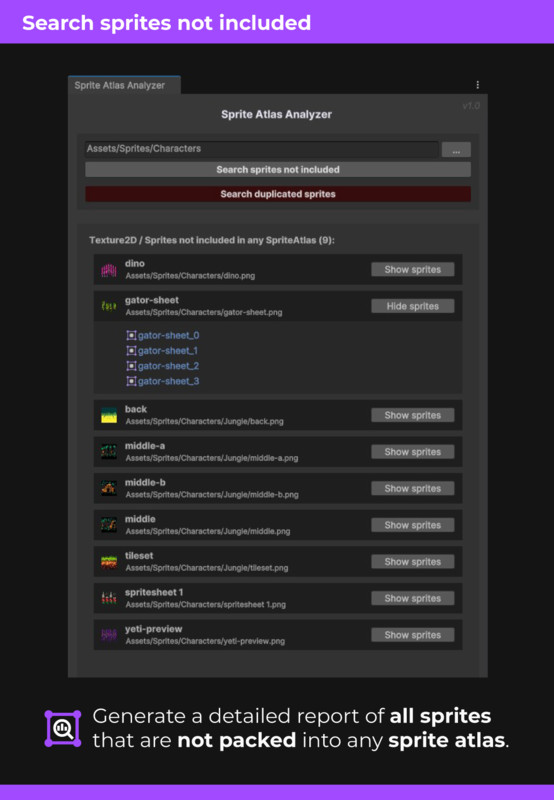
This feature scans all Texture2D assets and their associated sprites within a specified folder (including subfolders), and generates a detailed report listing all sprites that are not packed into any Sprite Atlas in the project.
Each texture is listed with its associated sprites. You can expand each entry to view its individual sprites by clicking the "Show Sprites" button.
📦 Search Duplicated Sprites
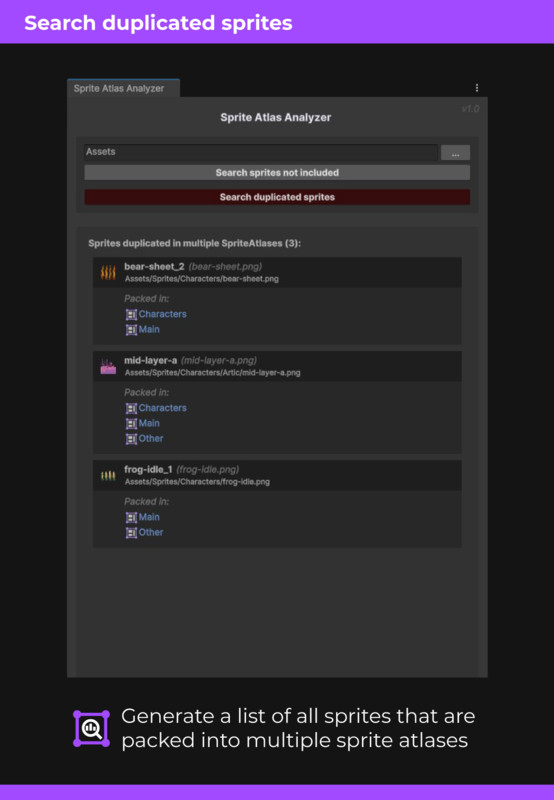
This option scans all Sprite Atlases in your project and reports any sprites that are included in more than one atlas.
(Note: If a sprite appears more than once within the same atlas, Unity handles it internally and it is only packed once — so there's no need to worry in that case.)
---
📍 Tip: From the report view, you can click on any listed item to quickly ping and locate the corresponding asset in your project, making it easy to clean up and organize your atlases efficiently.
From the publisher's Asset Store listing.