
 View on Asset Store (opens in new tab)
Package details
- Latest version
- 1.0
- Last updated
- First released
- Unity version
- 6000.0.37 or later
- Package size
- 74 KB
- Files
- 30
- Favorites
- 1
- Views in the past week
- 3
Price tracking
- Last checked
- Tracked since
- Lowest recorded
- $8.99 on
Keywords

Daikage Save Pro
- Price drop
Daikage Save Pro - Professional Save/Load System Transform your Unity project with the most comprehensive save/load system on the Asset Store! for more info visit https://daikagesavepro.infy.uk/
Lowest recorded price
Get 70% off on Asset Store (opens in new tab)Affiliate link · Purchases support this site
Price history
Last 6 months
USDAsset preview
1 / 2
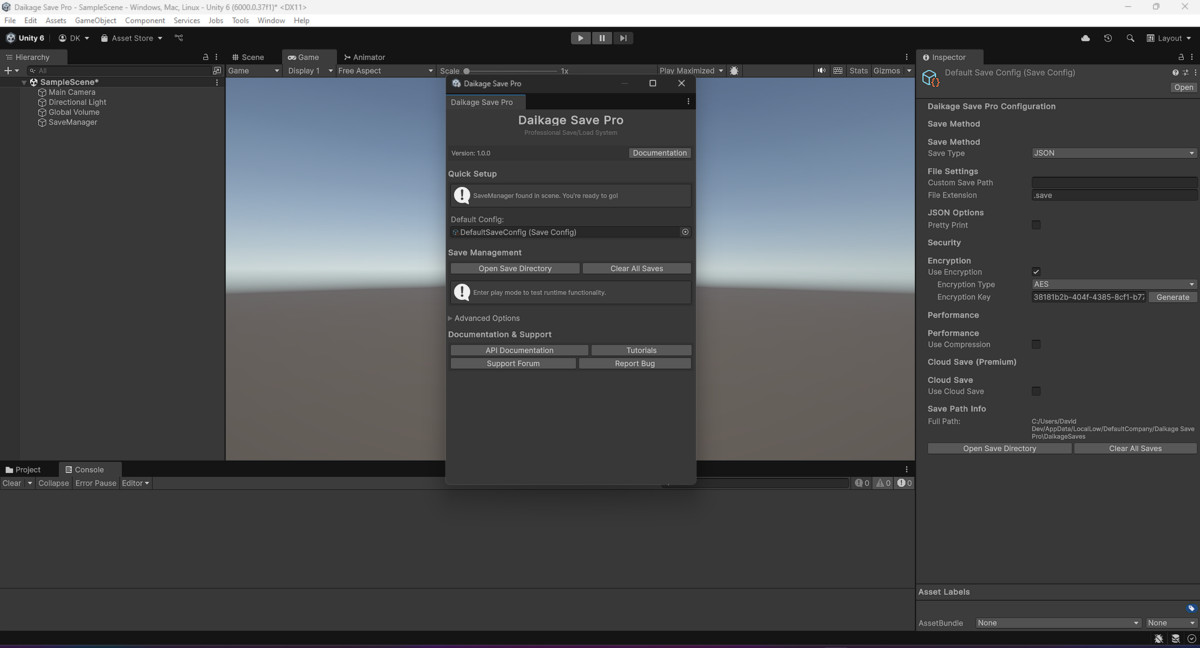
Daikage Save Pro screenshot 1
About this asset
Daikage Save Pro - Professional Save/Load System
Transform your Unity project with the most comprehensive save/load system on the Asset Store! Daikage Save Pro is a professional-grade solution that handles all your game data persistence needs with enterprise-level features, security, and performance.
🌟 Why Choose Daikage Save Pro?
Save Development Time: Drop-in solution that works out of the box - no complex setup required!
Multiple Save Formats: JSON, Binary, XML, and PlayerPrefs support with seamless switching
Enterprise Security: AES-256 and XOR encryption protect your player data
Cloud-Ready: Built-in support for Firebase, Google Play Games, and custom REST APIs
Performance Optimized: Async operations with optional compression for faster saves
Developer Friendly: Visual editor tools, comprehensive documentation, and example scenes
✨ Core Features
- 4 Save Formats: JSON, Binary, XML, PlayerPrefs
- Military-Grade Encryption: AES-256 & XOR encryption
- Data Compression: Reduce file sizes by up to 70%
- Async Operations: Non-blocking save/load operations
- Auto-Save System: Configurable triggers (pause, focus loss, scene change)
- Multiple Save Slots: Unlimited save slot support
- Version Migration: Automatic data migration between game versions
🚀 Premium Features
- Cloud Save Integration: Firebase, Google Play Games, Custom REST API
- Advanced Editor Tools: Visual save management and debugging interface
- Drag & Drop Components: SaveableComponent for instant GameObject persistence
- Smart Save Triggers: Automatic saving based on game events
- Professional UI Examples: Complete save/load interface templates
📱 Platform Support
- Windows, Mac, Linux
- iOS, Android
- WebGL compatible
- Unity 2020.3 LTS or newer
🎯 Perfect For
- Indie developers needing robust save systems
- Studios requiring enterprise-level data security
- Mobile games with cloud save requirements
- RPGs, simulation games, and progression-based titles
- Any project requiring reliable data persistence
📚 What's Included
- Complete source code (C#)
- 50+ example scripts and demos
- Comprehensive documentation
- Video tutorials
- Professional support
- Regular updates
💡 Quick Start
- Import the package
- Add SaveManager to scene (one click)
- Configure SaveConfig settings (Check Documentation in Package)
Join thousands of developers who trust Daikage Save Pro for their save system needs!
From the publisher's Asset Store listing.
Technical details
Technical Summary
Architecture Overview
Daikage Save Pro follows a modular, provider-based architecture that ensures flexibility, maintainability, and extensibility.
Core Components
- SaveManager - Central hub managing all save/load operations
- SaveConfig - ScriptableObject-based configuration system
- ISaveProvider Interface - Abstraction layer for different save formats
- EncryptionManager - Handles data security and encryption
- CloudSaveManager - Manages cloud save operations
- SaveableComponent - Component-based GameObject persistence
Provider System
- JsonSaveProvider: Human-readable JSON format with pretty-print option
- BinarySaveProvider: Compact binary format for performance
- XmlSaveProvider: Structured XML format for complex data
- PlayerPrefsSaveProvider: Unity's built-in preference system
Security Features
- AES-256 Encryption: Industry-standard symmetric encryption
- XOR Encryption: Lightweight obfuscation for performance-critical scenarios
- Automatic Key Generation: GUID-based encryption keys
- Data Integrity Validation: Built-in data corruption detection
Cloud Integration
- Firebase Provider: Real-time database integration
- Google Play Games Provider: Platform-specific cloud saves
- Custom REST Provider: Generic HTTP API integration
- Conflict Resolution: Automatic cloud/local data synchronization
Performance Characteristics
Benchmarks (Unity 2022.3, Windows 10)
- JSON Save: ~2ms for 1MB data
- Binary Save: ~1ms for 1MB data
- Encryption Overhead: +15% processing time
- Compression Ratio: 40-70% size reduction
- Memory Usage: <50MB peak during large operations
Optimization Features
- Async/await pattern prevents UI blocking
- Memory pooling for large data operations
- Lazy loading for improved startup times
- Background auto-save with configurable intervals
Data Structure Support
Native Unity Types
- Vector2, Vector3, Vector4
- Quaternion, Color, Rect
- Transform data (position, rotation, scale)
- All primitive types (int, float, string, bool)
Custom Data Types
- Serializable classes and structs
- Generic collections (List<T>, Dictionary<K,V>)
- Nested object hierarchies
- Interface-based polymorphic data
Editor Integration
Custom Inspector Windows
- SaveManager Window: Central management interface
- Save Configuration Editor: Visual config setup
- Debug Tools: Save file browser and manipulation
- Validation System: Configuration error detection
Scene Integration
- One-click SaveManager setup
- Automatic SaveableComponent discovery
- Save trigger placement tools
- Real-time save monitoring
Error Handling & Debugging
Comprehensive Logging
- Detailed operation logs with timestamps
- Error categorization (Critical, Warning, Info)
- Performance metrics and timing data
- Cloud sync status and conflict resolution logs
Built-in Validation
- Data integrity checks before save/load
- Encryption key validation
- File system permission verification
- Cloud connectivity status monitoring
System Requirements
Minimum Requirements
- Unity 2020.3 LTS or newer
- .NET 4.x or .NET Standard 2.1
- 10MB available disk space
Recommended Specifications
- Unity 2022.3 LTS
- 2GB RAM for large save operations
- SSD storage for optimal performance
Platform-Specific Features
Mobile Optimizations
- Battery-aware auto-save scheduling
- Background save operations
- Network-aware cloud synchronization
- Memory pressure handling
Console Support
- Platform-specific save locations
- Achievement integration
- User profile management
- Save data roaming
Compatibility
| Unity version | Built-in | URP | HDRP | Custom |
|---|---|---|---|---|
| 6000.0.37f1 | Compatible | Compatible | Compatible | Compatible |
As listed on the Asset Store.