
 View on Asset Store (opens in new tab)
Package details
- Latest version
- 2.0.1
- Last updated
- First released
- Unity version
- 2022.3.62 or later
- Package size
- 381 KB
- Files
- 198
- Favorites
- 6
- Views in the past week
- 12
Price tracking
- Last checked
- Tracked since
- Lowest recorded
- $28.00 on
Keywords
- Search for Structured Logging
- Search for Memory Leak
- Search for Editor Diagnostics
- Search for logger
- Search for Performance
- Search for Debug Console
- Search for diagnostics
- Search for Editor Debugging
- Search for Editor Tools
- Search for Editor Console
- Search for Unity Editor Tools
- Search for Debugging Tool
LoggerPro: Editor Diagnostics Toolkit
Structured logging and diagnostics for Unity Editor tool developers — plus a rebrandable support console you ship inside your own asset, so your users send reports instead of screenshots.
Affiliate link · Purchases support this site
Price history
Last 6 months
USDAsset preview
1 / 8
LoggerPro: Editor Diagnostics Toolkit screenshot 1


About this asset
🧭 WHAT LOGGERPRO IS
An Editor tool for the people who build Unity tools — plugin authors, framework maintainers, pipeline engineers, Asset Store publishers — with a small runtime assembly so your tool's runtime half can log into the same console during Play Mode.
It replaces Unity's console with a structured, filterable, exportable one, then adds the two things a tool developer actually needs and nobody else ships: a diagnostics suite that finds what breaks an Editor tool once it is installed in somebody else's project, and a support console you ship inside your own asset so your users can send you a real report.
What that means for a build: the console, the diagnostics suite and the exporters are Editor-only and are never compiled into a player. The runtime assembly is. In a build, a LoggerPro.Log call writes to the Unity player log and keeps the entry in a bounded in-memory buffer — and nothing else. No console window, no configuration read or written, no files created on the player's machine. Wrap calls in #if UNITY_EDITOR to remove them entirely.
No third-party dependencies. Full C# source included.
--------------------------------------------------------
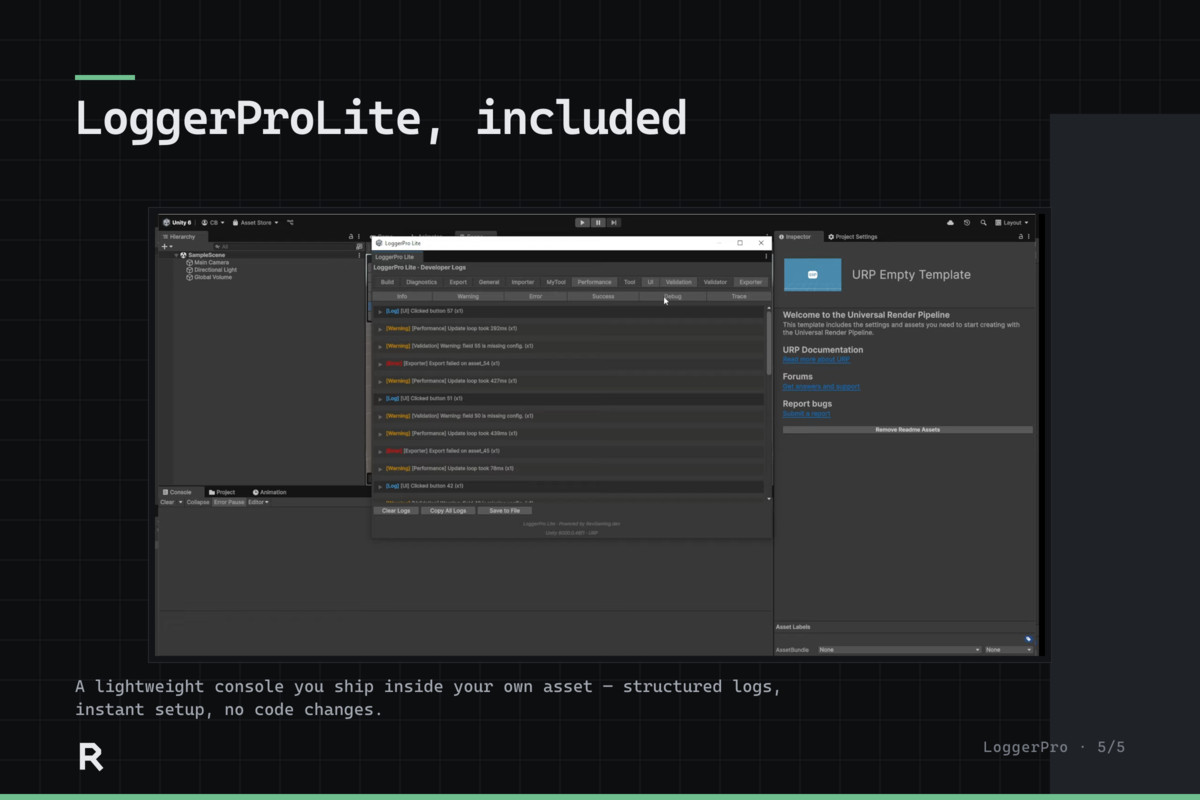
🔁 LOGGERPRO LITE — SHIP A SUPPORT CHANNEL INSIDE YOUR OWN ASSET
This is the part no other logging tool gives you.
LoggerProLite is a rebrandable copy of the console that you redistribute inside your own Unity asset. Your customers get a proper console for YOUR tool, and a Send Report button that produces one file describing exactly what happened.
A report carries:
- Every log, with its category, severity and timestamp
- Unity version, platform, render pipeline, scripting backend, colour space
- Scripting define symbols and the full installed package list
- Duplicate counts, so "it happened 40 times" is visible
You open it back in LoggerPro with one menu item and see their session.
"Prepare Lite For My Asset" generates a copy branded for you — your namespace, your assembly name, your menu path — so two assets that both shipLite can never collide.
Lite does not require your customers to own LoggerPro. If LoggerPro is installed it is found at runtime and routed through; if not, Lite stands alone. No dependency, no setup step, nothing for your user to install.
Developer logs structured events → user presses Send Report → you get categories, timestamps and their exact environment.
No more vague screenshots. No more "what Unity version are you on?" three messages deep.
AND IT COVERS THE HALF OF YOUR ASSET THAT ACTUALLY BREAKS
Say you ship a dialogue system: a node-graph editor, and a runtime DialogueRunner that plays conversations back. A customer reports "it just stops at node 12."
Your editor tooling can log — importer, validator, save. But DialogueRunner is a MonoBehaviour in a runtime assembly, and until 2.0 that half of your own asset could not log at all. The report showed everything your editor did and nothing about the thing that broke.
Now DialogueRunner logs
entered node 12 · condition "hasKey" was false · no outgoing edge
into the same console, same category, same report. You read the failure instead of guessing — and the same shape fits any asset with an editor half and a runtime half.
--------------------------------------------------------
🧩 THE CONSOLE
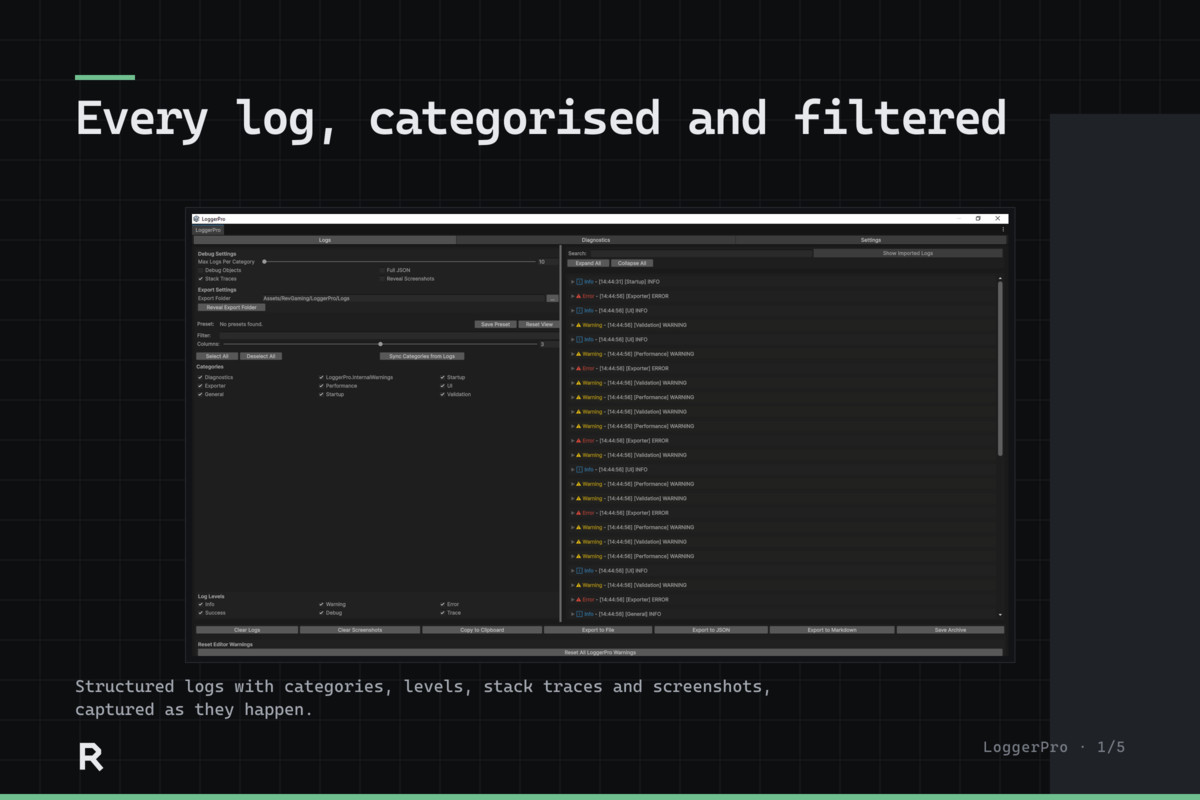
- Category-based logging — Importer, Validator, UI, whatever you invent. Categories create themselves the first time you use one.
- Six severities — Info, Warning, Error, Success, Debug, Trace — each independently filterable.
- Unity's own console mirrored in and categorised by origin — Unity.SomeAssetPack for a third-party folder, Unity.Compiler for build errors. Third-party output, unhandled exceptions and compiler errors finally in one place.
- Logs survive a recompile, so the reproduce-then-tweak loop keeps its history.
- Clickable stack traces, trimmed to start at the line YOU wrote rather than ten frames of logging plumbing.
- Virtualised list — a full session costs the same to draw as an empty one.
- Search, deduplication with counters, category presets, and a details pane with copy and ping.
- Opt-in error screenshots — off by default, rate limited, Play Mode only.
LoggerPro.Log("Import", "Reading source/character_base.fbx");
LoggerPro.LogWarning("Import", "character_armour.fbx has no UV2");
No asset to create, no prefab to place, no scripting define.
--------------------------------------------------------
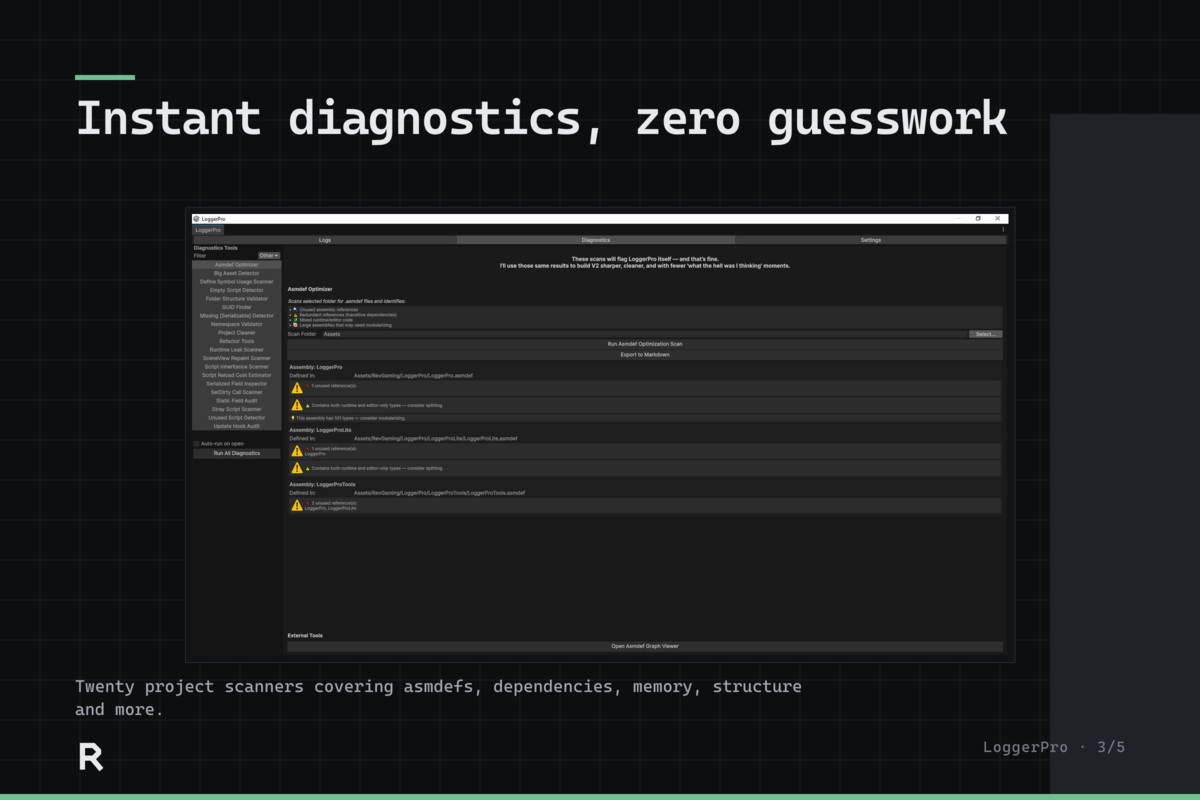
🧪 DIAGNOSTICS SUITE — 20 BUILT-IN TOOLS
Written to find what breaks an Editor tool once it is installed in a project that is not yours.
MEMORY & LIFETIME — static fields holding references · non-asset texture leaks · untracked materials and render textures · persistent delegates and update hooks that never unsubscribe
EDITOR PERFORMANCE — unsafe SceneView.RepaintAll() · expensive update hooks · script reload cost estimates · problematic SetDirty() patterns
STRUCTURE & MAINTENANCE — namespace and asmdef validation · stray scripts outside assembly scope · unused and empty scripts · folder structure · missing [Serializable] · oversized assets · orphaned .meta files and empty folders
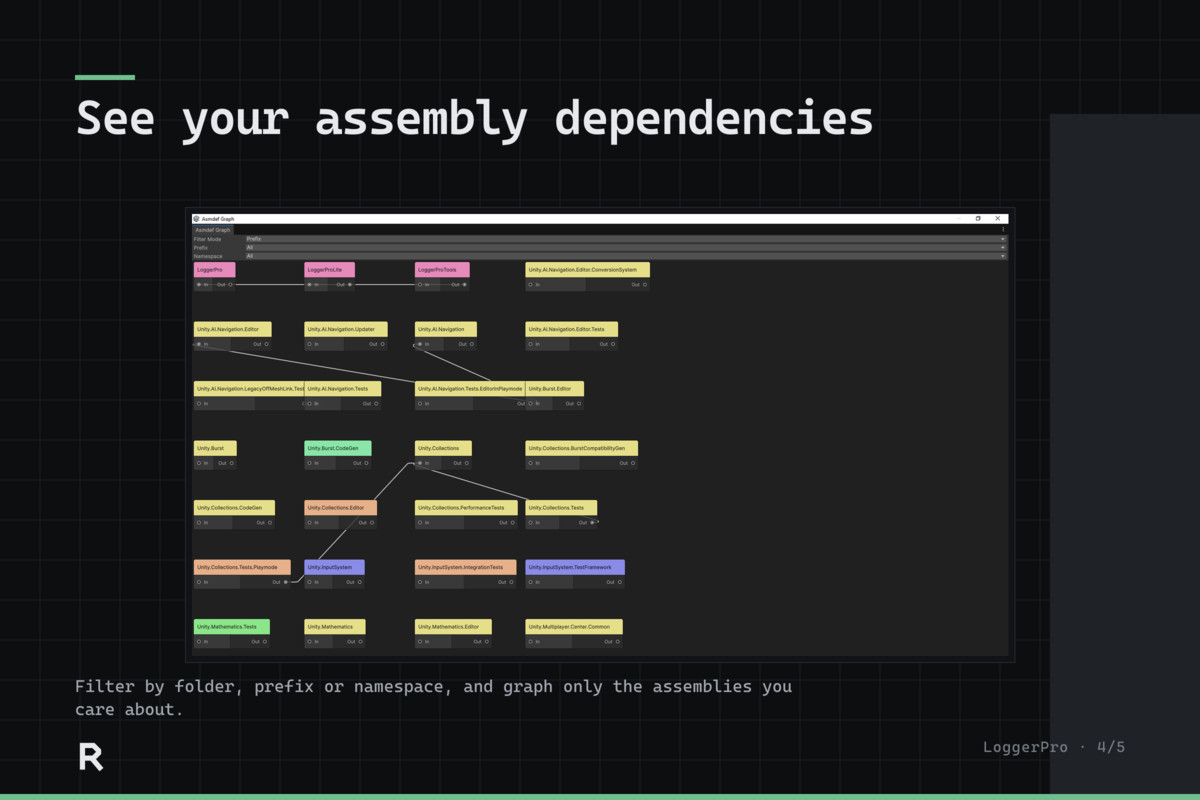
LARGE-CODEBASE TOOLING — asmdef dependency optimizer · assembly graph viewer · serialized field inspector · define symbol usage scanner · script inheritance scanner · GUID finder · project cleaner · refactor helpers
BUILT TO BE RUN MORE THAN ONCE
- Dismiss a finding in any of the six detection scanners and it stays dismissed, keyed so it survives editing the file — a scan before your next release shows what changed, not the forty things you already triaged.
- Scanners report progress, can be cancelled, and say how much they examined, so an empty result reads as an answer rather than a failure. Two single-pass tools have no progress to report.
- Every tool states what it assumes. Several checks are heuristics, and one aimed at gameplay code will flag things that are normal there. LoggerPro says so, per tool.
- Nothing is deleted outright: removals go to a trash folder you can restore from, rewrites say so before touching a file, and tools warn before writing into an asset you bought rather than one you wrote.
Extend it with IDiagnosticTool and your own tool appears in the same workspace.
--------------------------------------------------------
🎮 LOG FROM YOUR GAME CODE
New in 2.0. A MonoBehaviour can call LoggerPro directly:
public class Spawner : MonoBehaviour
{
void Start() => LoggerPro.Log("Spawner", $"Spawning {count} enemies");
}
Entries appear in the console during Play Mode, filtered by the same categories as your editor logs — so a runtime framework and its editor tooling finally share one console. See the footprint note at the top for exactly what this costs in a build.
--------------------------------------------------------
📤 EXPORT & REPORTING
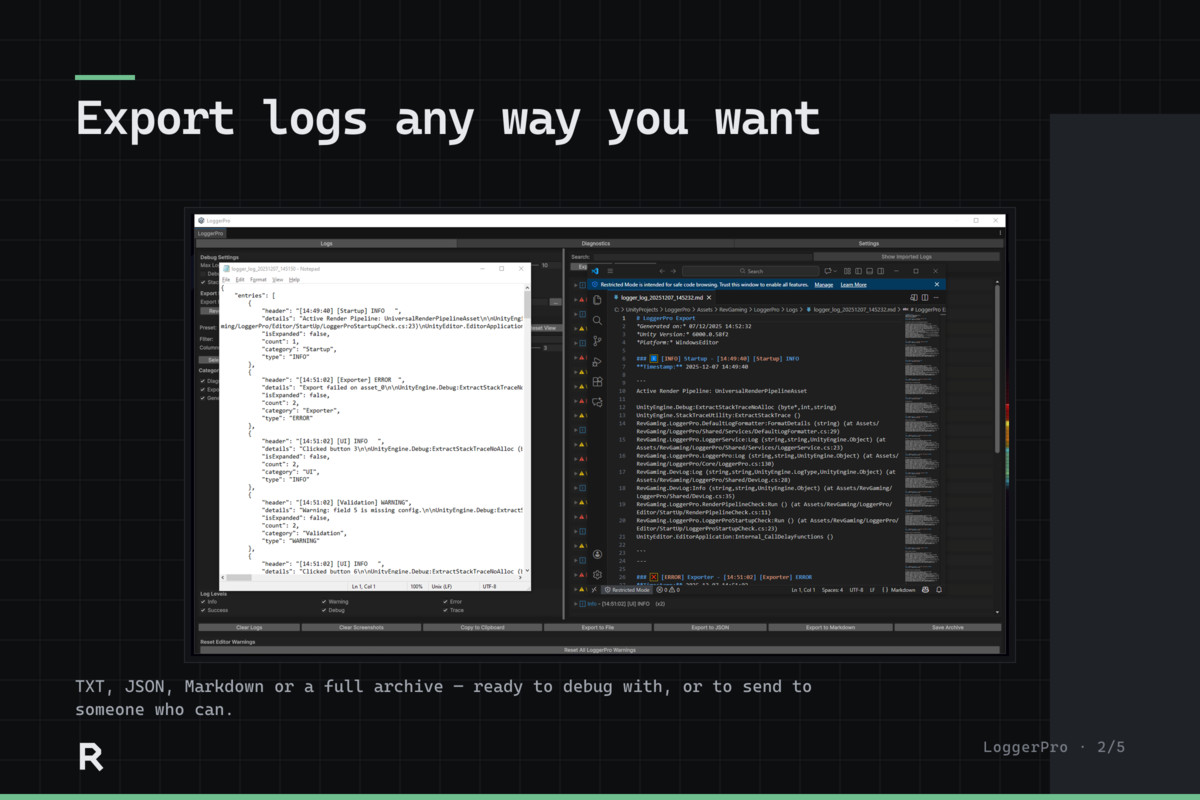
Built in: TXT, JSON, Markdown, session archive (.loggerproarchive), and clipboard.
Add your own. The export buttons are built from a registry, not hard-coded — implement ILogExportFormat, register it, and yours sits alongside the built-in ones with no special casing. Wire LoggerPro straight into your bug tracker or build server if you want to.
--------------------------------------------------------
🎨 EDITOR UI
Built-in themes (Pure Flat Noir, Retro Mac), light and dark compatible, with a consistent themed diagnostics workspace and custom styling support.
--------------------------------------------------------
📚 DOCUMENTATION
- In-editor Help tab — quick start, categories, logging from game code, the report loop, writing your own exporter — with copyable snippets and buttons that do the thing they describe
- A README beside the source in every folder, explaining what that area owns and why it is shaped that way, not restating what the code already says
- Written guide and changelog in the package, plus a README in every folder
- Full C# source, commented throughout
Where a design costs you something, the documentation says so. The upgrade notes name the 1.x defects by what they broke rather than by version number, because that is the form in which you would recognise one.
--------------------------------------------------------
🛠️ WHAT'S INCLUDED
- Full C# source — editor assembly plus a small runtime assembly
- Console window (Logs, Diagnostics, Settings, Help)
- 20 diagnostic tools
- LoggerProLite, plus the tool that brands it for you
- TXT / JSON / Markdown / archive exporters, and the API to add your own Example wrapper APIs
- Configuration in ProjectSettings/LoggerPro.json — outside Assets, so an update cannot overwrite your categories, and safe to commit
--------------------------------------------------------
⬆️ UPGRADING FROM 1.x
One required change, and only if you have your own assembly definition referencing LoggerPro: add "LoggerPro.Runtime" to its references. Scripts without an asmdef need no change. Categories and settings migrate automatically on first load, no API was removed, and no namespaces changed.
The release notes for this version carry the full detail, including the error you will see if you miss the reference.
--------------------------------------------------------
⚖️ LOGGERPRO LITE REDISTRIBUTION
LoggerProLite may be redistributed inside your own Unity Editor tools, branded for your asset by the "Prepare Lite For My Asset" tool, provided you keep the LoggerProLite-LICENSE.md file that tool generates alongside it and treat it as a third-party dependency. Full terms in LICENSE.md.
--------------------------------------------------------
🧭 WHY IT EXISTS
Unity gives tool developers a console designed for gameplay debugging, and nothing designed for shipping an Editor tool into somebody else's project.
LoggerPro is the other half.
Better visibility. Better diagnostics. Better support. Less guessing.
From the publisher's Asset Store listing.
Technical details
Core Logging System
- Editor-only structured logging system
- Log levels: Info, Warning, Error, Debug, Success, Trace
- Category-based filtering with Save/Load/Undo
- Deduplicated logs with count display
- Stack traces and Unity Object support
- Optional JSON log output
- Screenshot capture on Error
- Log search, session archive toggle, and clipboard export
🧪 Diagnostics Tools (15+ Included)
Includes a modular diagnostics suite with tools for:
- Memory and resource leak detection
- Static field audits
- Editor update/repaint analysis
- Unsafe API usage detection
- Project structure and namespace validation
📤 Export System
- Export logs to TXT, JSON, and Markdown
- Copy all logs to clipboard
- Save/load .loggerproarchive session files
- Includes timestamps, Unity version, and platform info
🎨 Theming & UI
- Fully themed Editor window (dark/light/custom)
- Theme settings via LoggerProThemeSettings
- Toggle between custom and Unity default styles
- Resizable layout with saved EditorPrefs
- Clean UI elements (foldouts, toolbars, help boxes)
⚙️ Presets & Preferences
- Save/load category view presets (with Undo/Trash)
- Log type toggles and filters
- Search and imported log toggle
- EditorPrefs-based persistence for UI and settings
🧩 Source Code & Extensibility
- 100% full C# source code
- Clean modular structure (SOLID principles)
- Interface-based design (ILoggerProContext, ILoggerStorage, etc.)
- Extend diagnostics via IDiagnosticTool
- Supports shipping with DevLog.Log() (works with or without LoggerPro installed)
📦 Requirements
- Unity 2022.3 LTS or newer
- Editor-only (does not run in builds)
- No runtime components
- No external dependencies
Compatibility
| Unity version | Built-in | URP | HDRP |
|---|---|---|---|
| 2022.3.62f2 | Compatible | Compatible | Compatible |
LoggerPro is Editor-only, and does not rely on any runtime shaders, materials, or pipeline-specific assets.
It is fully compatible with Built-in, URP, and HDRP.
Packaged with Unity 2022 LTS.
Tested in Unity 2022 LTS, Unity 2023, and Unity 6.
As listed on the Asset Store.