
 View on Asset Store (opens in new tab)
Package details
- Latest version
- 1.0
- Last updated
- First released
- Unity version
- 2021.3.45 or later
- Package size
- 69 KB
- Files
- 5
- Favorites
- 6
- Views in the past week
- 1
Price tracking
- Last checked
- Tracked since
- Lowest recorded
- $10.00 on
Keywords

Quick Inspect
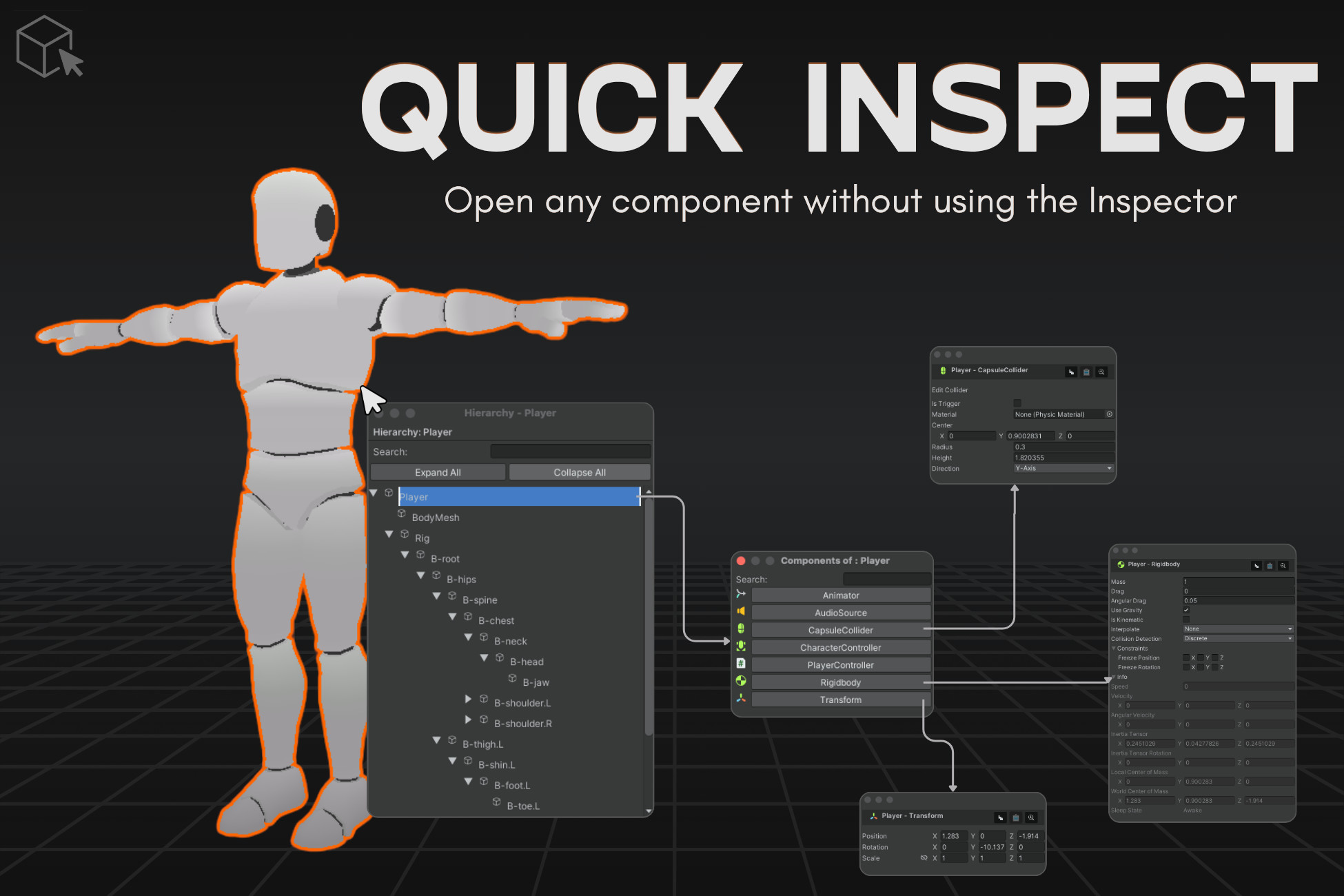
Quick Inspect lets you inspect GameObjects and components directly from the Scene view with a focused popup hierarchy.
Price $20.00
Buy on Asset Store (opens in new tab)
Affiliate link · Purchases support this site
Price history
Last 6 months
USDAsset preview
1 / 6

Quick Inspect screenshot 1



About this asset
Quick Inspect is an in-editor utility that gives you fast access to object hierarchies and their components directly in the Scene view.
With just Shift or Ctrl + Right Click, you can:
- Open a mini hierarchy showing only the selected GameObject and its parent/child structure
- Hover over objects to see them outlined in the Scene
- Open multiple components in pop-up inspectors
- Work fullscreen and still inspect your scene easily
Whether you're a level designer, technical artist or developer, Quick Inspect helps you focus and speed up your scene editing workflow.
From the publisher's Asset Store listing.
Technical details
Included Scripts
- ComponentListPopup
Displays a list of all components attached to a selected GameObject. - ComponentPopupWindow
Opens a pop-up inspector for the selected component with full interaction support. - HierarchyPopup
Shows a mini hierarchy containing only the selected GameObject and its full parent-child chain. - SmartSceneTooltip
When hovering over an object in the popup, it shows an outline in the Scene to visually locate it.
Key Features
- Shift/Ctrl + Right Click opens a focused hierarchy popup in the Scene view.
- Only the selected GameObject and its parent-child chain are displayed.
- Hovering over objects in the popup shows them with an outline in the Scene view.
- Click on any object to view a list of its components.
- Click on a component to open its inspector in a pop-up window.
- Copy/Paste component values between objects.
- Focus on the selected object directly in the Scene view.
- Open and view multiple component windows at the same time.
- Accessible via Unity menu:
Tools > Quick Inspect > Toggle Inspect
Tools > Quick Inspect > Close all popups
Editor Integration
- Editor-only tool — does not affect runtime or builds.
- Tested on Unity 2020.3 LTS and above.
Compatibility
| Unity version | Built-in | URP | HDRP |
|---|---|---|---|
| 6000.0.36f1 | Compatible | Compatible | Compatible |
| 2023.2.20f1 | Compatible | Compatible | Compatible |
| 2022.3.30f1 | Compatible | Compatible | Compatible |
| 2021.3.45f1 | Compatible | Compatible | Compatible |
As listed on the Asset Store.