
 View on Asset Store (opens in new tab)
Package details
- Latest version
- 1.1
- Last updated
- First released
- Unity version
- 6000.1.5 or later
- Package size
- 71 KB
- Files
- 9
- Favorites
- 9
- Views in the past week
- 8
Price tracking
- Last checked
- Tracked since
- Lowest recorded
- Free on
Keywords

SmartPrefabPlacer
- Price drop
Effortlessly place, align, and preview prefabs on terrain with snap-to-grid logic, rotation, and path placement—perfect for RTS, city builders, and base construction games.
Affiliate link · Purchases support this site
Price history
Last 6 months
USDAsset preview
1 / 6

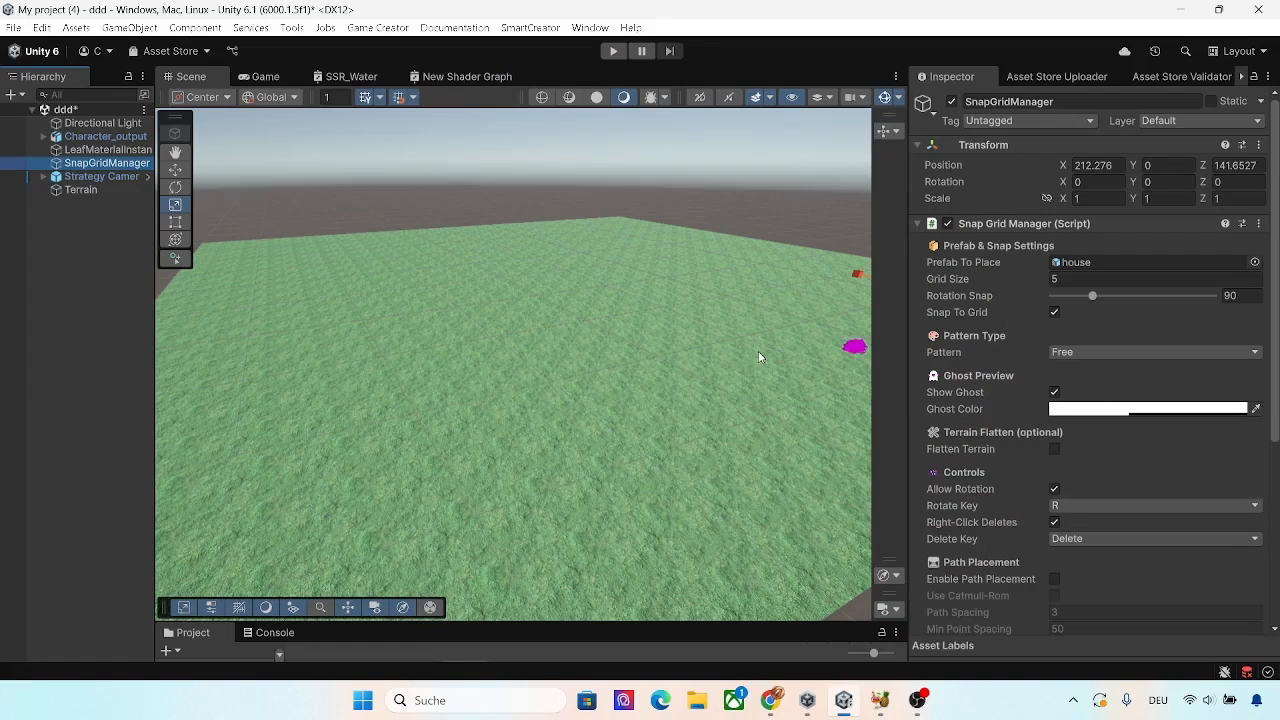
SmartPrefabPlacer screenshot 1


About this asset
Snap Grid Manager – Powerful Editor & Runtime Prefab Placement for Unity
Snap Grid Manager is a robust, intuitive editor and runtime prefab placement system designed for Unity developers building RTS, simulation, or sandbox-style games. Deliver AAA-level construction, level design, or in-game building systems with ease—whether you’re working in the Editor or letting players build at runtime.
Features
- Snap-to-Grid Placement:
Click anywhere on the terrain and place prefabs snapped to a customizable grid. Supports all prefab types—props, buildings, decorations, modular parts, and more. - Flexible Pattern Placement:
Instantly arrange prefabs in powerful patterns—lines, rectangles, circles, and even along custom curved or straight paths. Pattern parameters (size, spacing, count, rotation) are fully adjustable, giving you complete control for fences, walls, districts, or natural clusters. - Live Preview & Ghost Placement:
Instantly preview placement with a transparent ghost object. Rotate prefabs with one key for fast, accurate alignment before placing. - Path-Based Placement:
Define a curved or straight path with your mouse, then automatically place prefabs along that path using Catmull-Rom or linear interpolation—ideal for roads, fences, walls, and modular structures. - Terrain Flattening:
Automatically flattens terrain before placing structures to prevent unwanted clipping and ensure a clean, professional look. - Editor & Play Mode Support:
Use all features both in the Unity Editor and at runtime—perfect for custom level editors, in-game building, or God Mode tools. - Randomizer:
Apply random rotation, scale, and materials to prefabs for natural, non-repetitive environments.
Development and Quality Assurance
Parts of Snap Grid Manager were initially prototyped using AI-assisted scripting (ChatGPT by OpenAI).
All code was manually reviewed, optimized, and extended by the developer to ensure real-world usability, bug-free performance, and robust editor integration.
No AI-generated assets (textures, models, audio) are included—only custom code and prefabs created specifically for this package.
The final system has been playtested, structured for maintainability, and packaged by hand for production use.
Perfect For
- Real-Time Strategy (RTS), city builders, and simulation games
- Sandbox or creative building systems
- In-game level editors or developer debug tools
From the publisher's Asset Store listing.
Technical details
Features:
- Modular design: Easily extendable and cleanly structured for customization.
- Snap-to-grid placement: Customizable grid size for precise alignment.
- Ghost placement preview: Adjustable color and transparency for visual clarity.
- Advanced pattern placement: Place prefabs in lines, rectangles, circles, and along paths (Catmull-Rom and linear), with adjustable spacing and count.
- Terrain flattening: Optional auto-flattening under placed prefabs to prevent clipping.
- Live rotation: Instantly rotate prefabs during placement, with customizable snap angle.
- Editor & Play Mode support: All features work both in the Unity Editor and at runtime.
- Randomizer system: Add natural variation with random rotation, scale, and material assignment.
- Intuitive input: Mouse click to place, ‘R’ to rotate, Shift + drag to pan camera.
Includes:
- ✅ Full source code (C#)
- ✅ Demo scene with terrain, camera controls, and UI
- ✅ One code-generated house prefab (CC0-compatible, no license required)
- ✅ Custom editor inspector with foldouts and one-click action buttons
- ✅ PDF documentation
Compatibility
| Unity version | Built-in | URP | HDRP | Custom |
|---|---|---|---|---|
| 6000.1.5f1 | Compatible | Compatible | Compatible | Compatible |
As listed on the Asset Store.