
 View on Asset Store (opens in new tab)
Package details
- Latest version
- 1.0
- Last updated
- First released
- Unity version
- 2022.3.62 or later
- Package size
- 473 KB
- Files
- 25
- Favorites
- 2
- Views in the past week
- 12
Price tracking
- Last checked
- Tracked since
- Lowest recorded
- $4.99 on
Keywords

MarkdownViewer
Render GitHub-flavoured Markdown directly into TextMesh Pro labels, complete with lightweight syntax-highlighting for Python, JavaScript/TypeScript, Rust and Bash.
Affiliate link · Purchases support this site
Price history
Last 6 months
USDAsset preview
1 / 2

MarkdownViewer screenshot 1
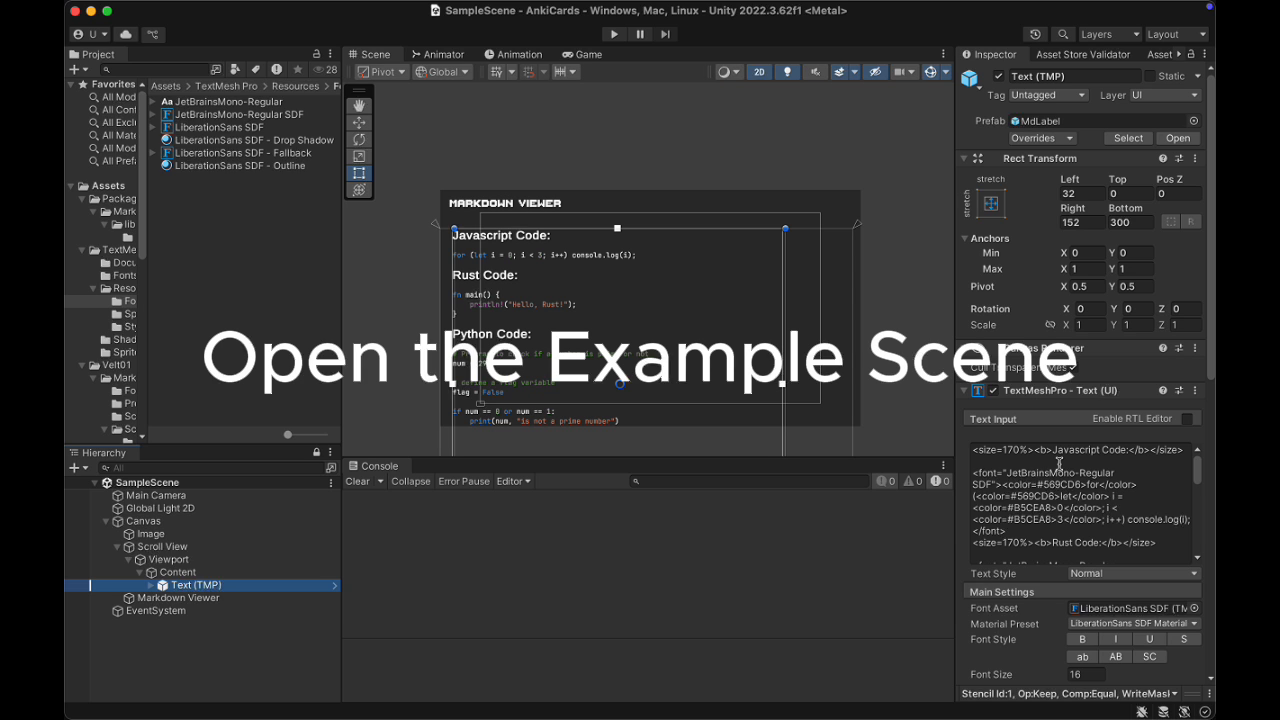
About this asset
Markdown → TMP — Lightning-fast Markdown renderer for TextMesh Pro
Key Features
- One-click component: just add the “Md Label” script and paste your Markdown.
- Full support for GitHub Flavoured Markdown: headings, lists, links, code fences, tables and inline formatting.
- Built-in syntax highlighting for Python, JavaScript, TypeScript, Bash, and Rust.
- Automatic conversion of Markdown tables into perfectly aligned monospace ASCII tables.
- No external DLLs required – includes lightweight Markdig and optional ColorCode highlighters as C# source.
- Editor live preview via Unity’s OnValidate mechanism.
Dependencies and Requirements
- Unity 2021.3 LTS or newer (supports all render pipelines).
- TextMesh Pro version 3.0.6 or later (installable via Unity Package Manager).
- Uses Markdig 0.30+ for Markdown parsing and System.Text.RegularExpressions for highlighting: https://github.com/xoofx/markdig
- Optional: Define COLORCODE_INSTALLED in your scripting symbols to use ColorCode-based highlighting instead of the default engine.
- Thaleah Font: https://tinyworlds.itch.io/free-pixel-font-thaleah
- JetBrains Mono Font: https://www.jetbrains.com/lp/mono/
Package Contents
- 12 C# source files (clean, documented, no DLLs or native plugins)
- 2 SDF font asset: JetBrainsMono-Regular for code blocks and Thaleah Fat for Pixel Font
- 0 Editor scripts – runtime only, no pollution of the Unity Editor namespace
Limitations and Transparency
- Inline raw HTML, footnotes, and definition lists are currently not supported.
- Extremely large documents (over 10,000 lines) may cause temporary string allocations; consider splitting.
- The highlighter registry is not thread-safe – register or modify highlighters on the main thread only.
- TextMesh Pro’s rich-text tags rely on correct color space settings. For URP or HDRP projects, use Linear color space for accurate display.
Versions / Editions
This package is only offered in a single version. There is no “lite” or “pro” tier – all features are fully included.
To use a font in the Markdown follow these steps:
Create the SDF by rightclicking your Font and choose Create-->Text Mesh Pro --> Font Asset.
Then copy the SDF file into Assets/TextMeshPro/Resources/Fonts&Materials
Use the the exact filename in the Markdown: <font="JetBrainsMono-Regular SDF">
You can contact me at [email protected] or at https://illuminated-subtasks-124140.framer.app/legalnotice.
From the publisher's Asset Store listing.
Technical details
1. Add the Component
- In your scene, create a new “TextMeshPro - UI” object or use an existing one.
- Select the GameObject that has a TMP_Text component.
- Click “Add Component” and choose “MdLabel”.
2. Enter Your Markdown
- In the Inspector, you’ll find a field called “Markdown”.
- Paste your Markdown content there.
Example:
- Heading with two hashes: ## Hello World
- Unordered lists: - This is bold (wrapped in double asterisks), italic (single asterisk), and inline code (using backticks)
- For code blocks, use triple backticks. Example for Python:
pythonKopierenBearbeiten```python
def greet(name):
return f"Hello, {name}"
KopierenBearbeiten
When you start the scene, the Markdown will be rendered in the TextMesh Pro label automatically.
Technical Details
- The Markdown-to-TMP pipeline works via Markdown → HTML → TMP text conversion using Markdig.
- Code blocks are detected using a code fence parser and styled by injecting TMP <color> tags.
- Markdown tables are transformed into monospace ASCII representations with perfect layout in UI and World Space text.
- Average conversion speed is under 0.3 ms for a 4 KB Markdown input on an Apple M1.
Compatibility
| Unity version | Built-in | URP | HDRP | Custom |
|---|---|---|---|---|
| 2022.3.62f1 | Compatible | Compatible | Compatible | Compatible |
As listed on the Asset Store.