
 View on Asset Store (opens in new tab)
Package details
- Latest version
- 1.1.1
- Last updated
- First released
- Unity version
- 2022.3.11 or later
- Package size
- 480 KB
- Files
- 38
- Favorites
- 11
- Views in the past week
- 5
Price tracking
- Last checked
- Tracked since
- Lowest recorded
- Free on
Keywords
Remo - Remote Runtime Editor [DEMO]
Remo is a powerful debug tool that allows you to live inspect your game build on a device, enabling extensive tests on the fly.
Affiliate link · Purchases support this site
Price history
Last 6 months
USDAsset preview
1 / 6

Remo - Remote Runtime Editor [DEMO] screenshot 1




About this asset
[FULL VERSION] - [WEBSITE] - [DOCUMENTATION] - [DISCORD]
Remo is a powerful debug tool that allows you to inspect your game after deployment on a device, enabling extensive tests on the fly. You can explore your entire scene, view and edit GameObjects, Components, Materials, and Scriptables Objects.
It saves you hours by letting you tweak values, run tests, and make small modifications without needing to run a new build or redeploy. Visualize and edit any properties, fields, structs, or arrays of any component.
Call methods and add components at runtime.
Inspect and tweak static classes in your codebase, effortlessly adjusting settings like Quality Settings or Render Settings in seconds.
View and edit materials, swap materials and shaders in real time.
Directly observe what's happening behind the scenes with the Remote Camera window—similar to the Editor's Scene View.
All these tools run directly from the Editor and require almost no setup.
[ Remote Hierarchy ]
- View and edit your game scenes remotely.
- Duplicate GameObjects, create new GameObjects or primitives, reparent, and delete GameObjects.
- Filter GameObjects by name or type.
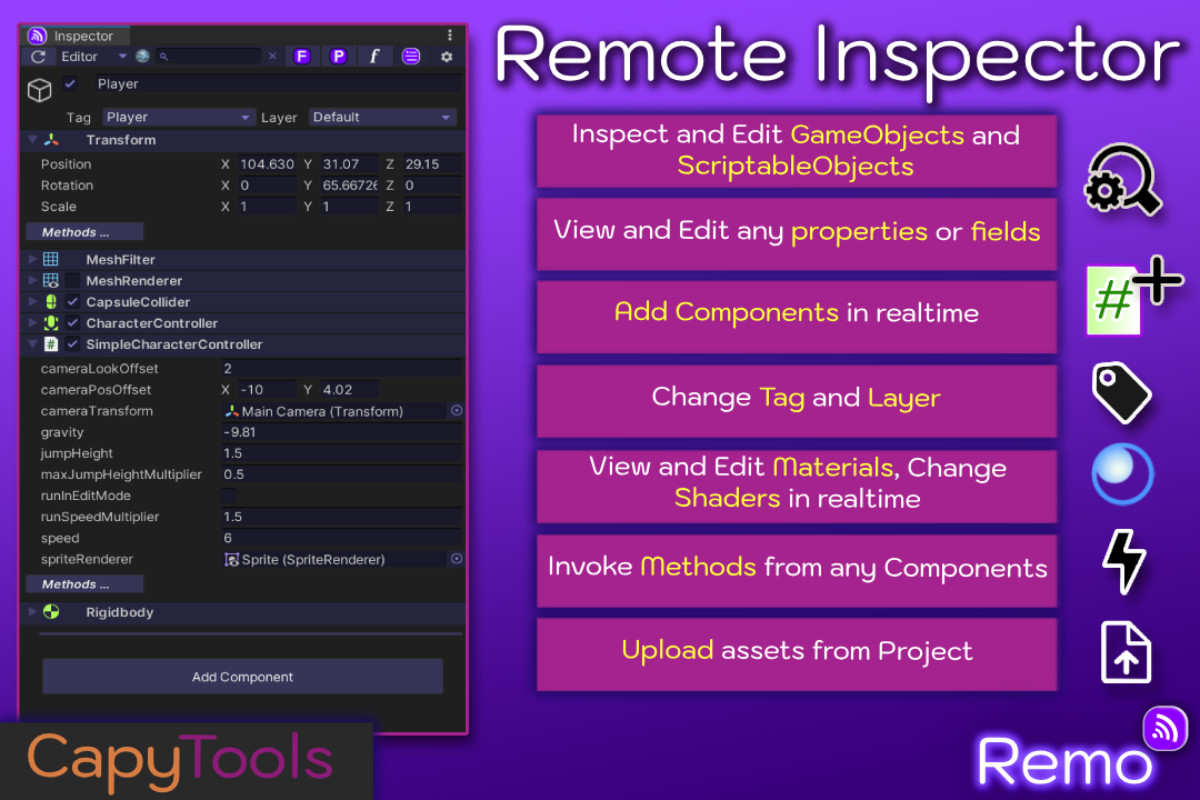
[ Remote Inspector ]
- Inspect and edit any GameObject. View and edit any field or property, just like in the Editor.
- Move, scale, and rotate GameObjects.
- View and edit serialized properties, fields, structs, arrays, and lists.
- Filter properties and fields using the search bar.
- Edit GameObject names, tags, and layers.
- [**] Change object references using drag-and-drop from the remote hierarchy.
- [**] Call any method and receive the return value.
- [**] Add or remove components.
- [**] View and edit ScriptableObjects.
- [**] View and edit materials, change materials, and swap shaders in real time.
- [**] Upload a new shader or material instantly—no rebuild required.
[ Remote Camera (Scene) ] **
- Visualize your game and navigate the scene as you would in the Editor’s Scene View, using keyboard and mouse controls.
- Click any GameObject (with a collider) to highlight it in the remote hierarchy.
- Anchor to any GameObject in the hierarchy.
- Double-click a GameObject in the remote hierarchy to fly to it.
- View FPS.
[ Static Window ] **
- Inspect and edit any static class properties or fields, and call static methods remotely.
- Easily test runtime settings such as Quality and Render Settings.
- Invoke methods, also from your own static classes (e.g., CheatsManager).
[ Remote Console ] **
- Fetch remote player logs.
Usage:
1 - Add 'RemoServer' Prefab to your main scene in your game.
( The prefab is located in Assets/Plugins/CapyTools/Remo/Prefabs/RemoServer.prefab )
2 - Build a Development Build*, Run your Player and wait for initialization.
3 - Open Window/Remote Runtime Editor/Remote Hierarchy, and select your device from the connection window
4 - Refresh and inspect your game.
____________________________________________________________________________
Full IL2CPP Support. Works on all major platforms, including mobile and consoles.*
This DEMO version allows you to test basic features and core functionality before purchasing the full version.
Note: DEMO version has limited features. The Inspector is read-only, but you can still inspect all values and toggle GameObjects and components. Features marked with [**] are not available on demo.
*While most platforms have been tested, we recommend trying the DEMO first. If something doesn’t work in your environment, feel free to contact us—we’ll be happy to provide a fix for you.
__________________________________________________________________________
This Asset uses third party plugins under MIT and BSD 2-Clause "Simplified" License; Please see Third-Party Notices.txt file in package for details.
From the publisher's Asset Store listing.
Technical details
Link to documentation : DOCUMENTATION
To report a bug or ask for support:
Requirements:
- Unity > 2022.3.11f to 6000.3.*f
Remo requires a Unity version newer than 2022.3.11f and up to 6000.3.*. Version older or newer are not guaranteed to be supported.
- EditorCoroutines
Remo requires the official EditorCoroutines package from Unity to work.
LIMITATIONS
Custom Editors are currently not supported. Members will be displayed similarly to the Debug Mode of the Inspector window.
This has the added benefit of allowing you to view and edit private members as well.
This DEMO version has limited features. The Inspector is read-only, but you can still inspect all values and toggle GameObjects and components. Features marked with [**] are not available on demo.
Compatibility
| Unity version | Built-in | URP | HDRP | Custom |
|---|---|---|---|---|
| 2022.3.11f1 | Compatible | Compatible | Compatible | Compatible |
As listed on the Asset Store.