
 View on Asset Store (opens in new tab)
Package details
- Latest version
- 1.3.1
- Last updated
- First released
- Unity version
- 6000.5.10 or later
- Package size
- 1.3 MB
- Files
- 105
- Favorites
- 23
- Views in the past week
- 25
Price tracking
- Last checked
- Tracked since
- Lowest recorded
- $19.99 on
Keywords

NjConsole: Advanced Logger, Inspector & Commands for In-Game + Editor Debugging
- Price drop
Blazing-fast debug console for Unity. View logs with advanced filters, deep-inspect objects, and run cheats or dev tools via menus or command line. Runs in editor window or directly in-game.
Lowest recorded price
Get 31% off on Asset Store (opens in new tab)Affiliate link · Purchases support this site
Price history
Last 6 months
USDAsset preview
1 / 10

NjConsole: Advanced Logger, Inspector & Commands for In-Game + Editor Debugging screenshot 1





About this asset
NjConsole: the ultimate debug console you never knew you needed — until now.
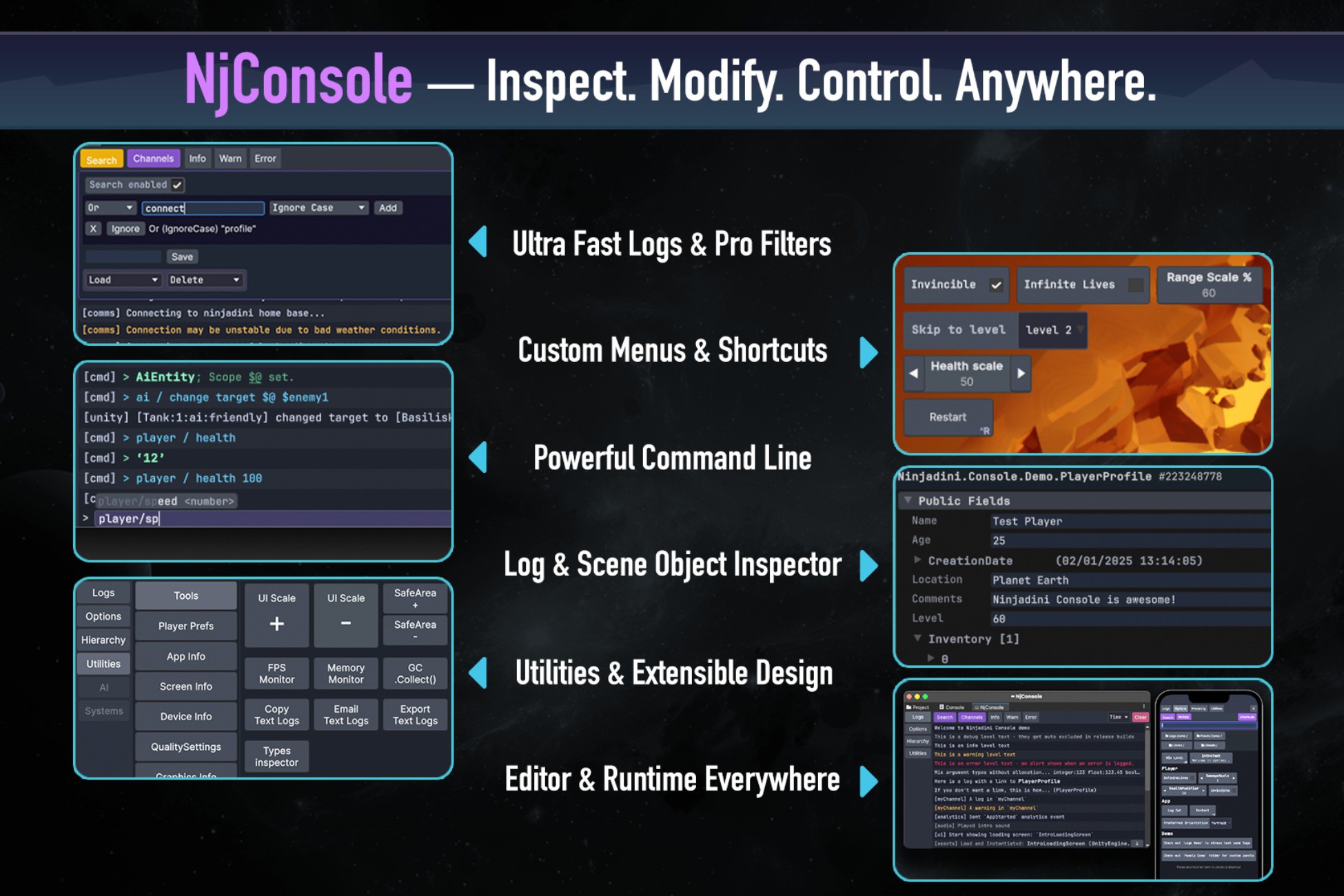
- Runtime log viewer with powerful filtering (AND, OR, NOT, etc.)
- Ultra-fast logging with high-performance near-zero allocations
- Object inspector: view/edit values, follow references, and call methods
- Log entries can link to objects — tap to inspect and tweak them instantly
- Hierarchy viewer: browse live GameObjects and their components, then inspect them in detail using the object inspector
- Custom menu options and keybindings: cheat menu, QA, or prototyping
- Command Line: To call menu options. With commands history, autocompletion and multi-params support.
- Quick-access shortcuts: assign to any screen corner for quick access
- Cross-platform support: works in Unity Editor, standalone, WebGL, and mobile (supports safe areas, touch input, keyboard, and all orientations)
- Dockable editor window and in-game floating overlay for large screens
- Plug-and-play setup: Starts automatically without setup by default.
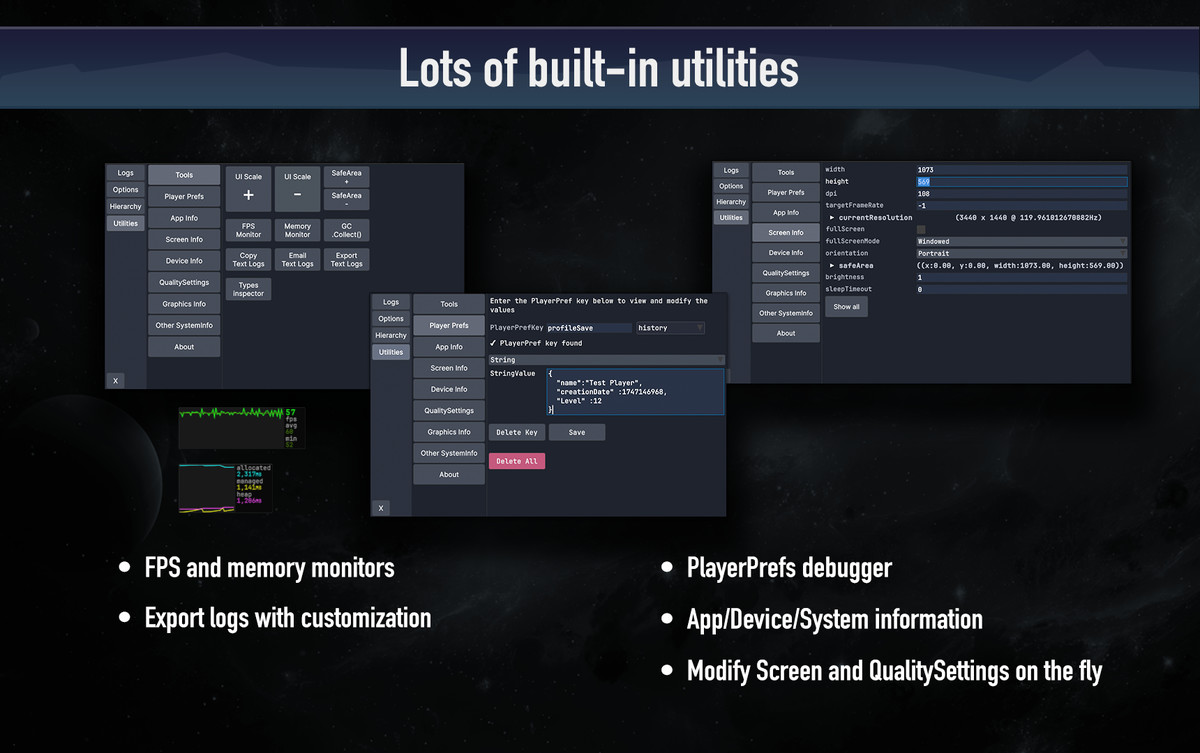
- Built-in utilities: including:
- - FPS and memory monitors
- - PlayerPrefs debugger
- - Real-time control of Screen and QualitySettings for tuning on the fly
- - App, device, and system info viewer
- Modular design: plug in your own modules and panels
- Removable: Easily disable NjConsole at compile-time to save memory, build size, and prevent unintended access in production
Whether you're debugging complex behavior, prototyping features, or tweaking values on the fly, NjConsole gives you full control over your game — in the editor or at runtime, on any platform.
🌐 Web Demo
👾 Discord
From the publisher's Asset Store listing.
Technical details
- Unity Version: ⚠️ Requires Unity 2022.3 or newer
- Tested Editor versions: 2022.3, Unity 6 - 6.7
- Tested Platforms: Standalone Windows / macOS, WebGL, iOS, Android.
- Fully supports mobile safe areas, virtual keyboard and touch interactions.
- Input Support: Compatible with both Input Manager and Input System.
- Keybinding API automatically adapts to the active input backend.
- Supports Editor Play Mode `Do not reload Domain or Scene`
- Supports High Managed Stripping Level.
- Memory Usage: Designed with low allocation in mind.
- Logs without stack traces are allocation-free and use pooled buffers for efficiency.
- Modular System: Easily extendable — register your own modules, panels, and tools.
- Source: Full C# code included
- Documentation provided for all public-facing APIs — includes C# XML comments and a Getting Started guide. Web documentation with latest tips and tricks also avaviable
Compatibility
| Unity version | Built-in | URP | HDRP | Custom |
|---|---|---|---|---|
| 6000.5.10f1 | Compatible | Compatible | Compatible | Compatible |
⚠️ Unity 2022.3 or newer is required — NjConsole relies on Unity’s UI Toolkit, which became stable for runtime use in 2022.3 LTS.
As listed on the Asset Store.