
 View on Asset Store (opens in new tab)
Package details
- Latest version
- 1.2.0
- Last updated
- First released
- Unity version
- 6000.3.9 or later
- Package size
- 421 KB
- Files
- 20
- Favorites
- 7
- Views in the past week
- 7
Price tracking
- Last checked
- Tracked since
- Lowest recorded
- Free on
Keywords

Object Notes — Editor Notes & TODOs
Add notes and TODOs to any GameObject in the Unity Editor. Stay organized with checkboxes, scene gizmos, and a clean, editor-only workflow.
Affiliate link · Purchases support this site
Price history
Last 6 months
USDAsset preview
1 / 2
Object Notes — Editor Notes & TODOs screenshot 1

About this asset
Object Notes - Scene Notes & Handoff Tool
Keep your Unity scene feedback where it belongs: directly on the GameObjects.
Object Notes by Nesbit Labs is a lightweight Unity workflow tool for attaching notes, task lists, and production metadata directly to objects in your scene. It helps developers, designers, artists, and small teams keep track of scene work without relying on scattered documents, spreadsheets, screenshots, or memory.
Use Object Notes for:
- level design reminders
- scene cleanup tasks
- bug notes
- art feedback
- audio reminders
- optimization notes
- per-object task lists
- team handoff notes
- production review comments
Instead of writing “fix the door prompt” in an external document, attach that note directly to the door.
What’s New In v1.2.0
Object Notes now works more like a scene handoff board, not just a note component.
New and improved features include:
- note categories
- priorities
- status tracking
- owner field
- optional due date
- Markdown export
- CSV export
- overview modes
- quick filters
- global task actions
- compact, calmer Overview UI
- expandable note cards
- color chips
- context menu actions
- current-scene validation
- enabled build-scene note scan
- editor utility tests
- namespace and assembly definition cleanup
Key Features
Attach Notes To GameObjects
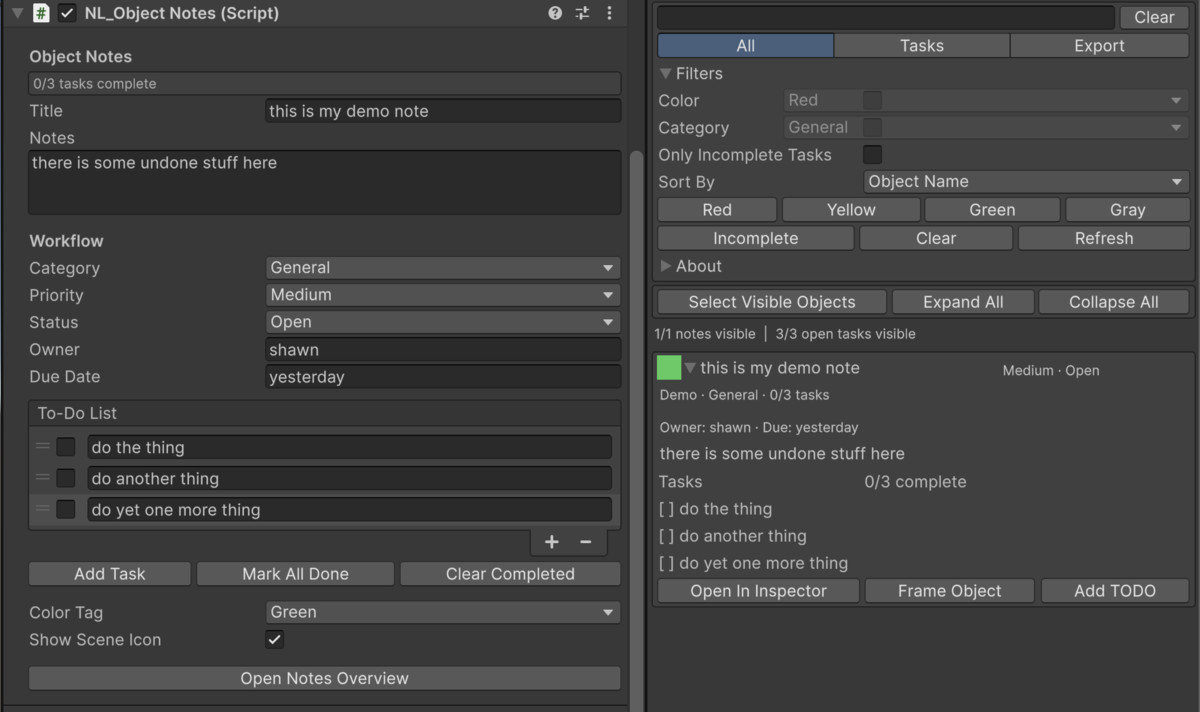
Add an NL_ObjectNotes component to any GameObject and store object-specific context directly in the scene.
Each note can include:
- title
- note body
- category
- priority
- status
- owner
- due date
- color tag
- to-do list
- Scene view icon toggle
Built-In To-Do Lists
Each note includes a reorderable checklist.
Use it to:
- add tasks
- reorder tasks
- mark tasks complete
- mark all tasks done
- clear completed tasks
- track task completion at a glance
Workflow Metadata
Object Notes supports production-friendly metadata for cleaner team handoffs.
Categories:
- General
- Bug
- TODO
- Design
- Art
- Audio
- Optimization
Priorities:
- Low
- Medium
- High
- Blocking
Statuses:
- Open
- In Progress
- Blocked
- Done
Optional fields:
- Owner
- Due Date
Scene View Note Icons
Objects with notes can display a small Scene view icon, making it easier to spot objects with attached context.
Color tags:
- Red
- Yellow
- Green
- Gray
- None
Scene icons can be enabled or disabled per object.
Object Notes Overview
Open the Overview window from:
Window > Nesbit Labs > Object Notes Overview
The Overview window gives you a focused scene handoff board for all notes in the current scene.
It supports:
- search
- filtering
- sorting
- task-focused mode
- export mode
- compact note cards
- expandable note details
- quick navigation to objects
- context menu actions
Overview modes:
- All
- Tasks
- Export
Search, Filter, And Sort
Find notes quickly by searching:
- object name
- note title
- note body
- owner
- due date
- category
- priority
- status
- task text
Filter by:
- color tag
- category
- incomplete tasks
Sort by:
- object name
- title
- category
- priority
- status
- color tag
- incomplete task count
Fast Scene Navigation
From the Overview window, you can:
- select note objects
- frame objects in Scene view
- open the note in the Inspector
- select all visible note objects
- use right-click context actions on note cards
Clicking a note card selects and frames the related GameObject.
Markdown And CSV Export
Export the currently visible notes for handoff, production review, task tracking, or external documentation.
Export formats:
- Markdown
- CSV
Exports respect the current search and filter state, so you can export only the notes you are currently viewing.
Example uses:
- export all blocking bugs
- export art notes only
- export incomplete tasks
- export a scene handoff checklist
- export notes for spreadsheet review
Validation Tools
Object Notes includes validation tools to help with production cleanup.
Validation options:
- validate current scene
- detect empty notes
- count incomplete tasks
- count open blocking notes
- scan enabled Build Settings scenes for Object Notes components
This helps you identify whether note components still exist in scenes you plan to ship.
Important Runtime Note
Object Notes is designed for editor workflow use, but the note data is stored on a normal MonoBehaviour component attached to scene GameObjects.
If you do not want note components in production builds, remove them from production scenes before shipping or keep notes only in editor/demo scenes.
The included validation tools help you find Object Notes components in enabled Build Settings scenes.
Installation
- Import the package into your Unity project.
- Add NL_ObjectNotes to any GameObject.
- Open the overview from:
Window > Nesbit Labs > Object Notes Overview
You can also add notes from:
GameObject > Nesbit Labs > Add Object Note
Recommended Workflow
- Add Object Notes to scene objects that need feedback, tasks, or reminders.
- Add note titles, descriptions, categories, priorities, statuses, owners, and tasks.
- Use color tags and Scene view icons for quick visual scanning.
- Open the Object Notes Overview window.
- Search, filter, and sort notes as needed.
- Use Tasks mode to focus on incomplete work.
- Use Export mode to create Markdown or CSV handoff files.
- Run validation before shipping if you want to remove note components from build scenes.
Included Content
- NL_ObjectNotes component
- custom Object Notes inspector
- Object Notes Overview window
- Scene view icon overlay
- Markdown export
- CSV export
- current-scene validation
- build-scene note scan
- readme onboarding asset
- README
- changelog
- PDF documentation
- example scene
- editor tests
- assembly definitions
Compatibility
- Unity 2021.3 LTS or newer recommended
- Works with Built-in Render Pipeline, URP, and HDRP
- No external dependencies
- No third-party packages required
Known Limitations
- Notes are stored as scene component data.
- Notes are not a cloud task tracker.
- Notes are not automatically synced across scenes.
- Markdown/CSV export is file-based, not a live integration with external tools.
- Scene icons are editor overlays, not runtime UI.
- If you do not want note components in builds, remove them from production scenes before shipping.
About Nesbit Labs
Nesbit Labs creates polished Unity tools and assets for game developers. Our goal is to simplify repetitive workflows and provide practical, production-friendly tools that help creators build faster and stay organized.
Support
For feedback, bug reports, or feature requests:
Website:
https://nesbitlabs.itch.io
From the publisher's Asset Store listing.
Technical details
- Unity workflow tool for attaching notes and to-do lists directly to GameObjects.
- Main runtime component: NL_ObjectNotes.
- Overview menu path: Window > Nesbit Labs > Object Notes Overview.
- Add note menu path: GameObject > Nesbit Labs > Add Object Note.
- Compatible with Unity 2021.3 LTS and newer recommended.
- Compatible with Built-in Render Pipeline, URP, and HDRP.
- No external dependencies.
- Includes assembly definitions:
- NesbitLabs.ObjectNotes
- NesbitLabs.ObjectNotes.Editor
- NesbitLabs.ObjectNotes.ReadMe
- NesbitLabs.ObjectNotes.Editor.Tests
- Code is organized under Nesbit Labs namespaces.
- NL_ObjectNotes fields include:
- note title
- note body
- category
- priority
- status
- owner
- due date
- to-do list
- color tag
- Scene view icon toggle
- Note categories:
- General
- Bug
- TODO
- Design
- Art
- Audio
- Optimization
- Note priorities:
- Low
- Medium
- High
- Blocking
- Note statuses:
- Open
- In Progress
- Blocked
- Done
- Color tags:
- None
- Red
- Yellow
- Green
- Gray
- Includes custom inspector for editing notes and task lists.
- Includes reorderable to-do list support.
- Includes task actions:
- Add Task
- Mark All Done
- Clear Completed
- Includes Scene view note icon drawer.
- Includes Overview window with:
- All mode
- Tasks mode
- Export mode
- search
- filters
- sorting
- expandable note cards
- contextual actions
- Search supports:
- GameObject name
- note title
- note text
- owner
- due date
- category
- priority
- status
- task text
- Filters support:
- color tag
- category
- incomplete tasks
- Sort modes:
- object name
- title
- category
- priority
- status
- color tag
- incomplete tasks
- Export formats:
- Markdown
- CSV
- Export respects visible filtered notes.
- Validation tools:
- current-scene validation
- empty note detection
- incomplete task count
- open blocking note count
- enabled Build Settings scene scan
- Includes editor tests for overview utility behavior.
- Includes example scene.
- Includes README, changelog, PDF documentation, and onboarding readme asset.
- Designed for editor workflow organization.
- Note component is a normal MonoBehaviour; remove from production scenes if you do not want note data in builds.
Compatibility
| Unity version | Built-in | URP | HDRP |
|---|---|---|---|
| 6000.3.9f1 | Compatible | Compatible | Compatible |
As listed on the Asset Store.