
 View on Asset Store (opens in new tab)
Package details
- Latest version
- 1.4
- Last updated
- First released
- Unity version
- 2021.3.45 or later
- Package size
- 473 KB
- Files
- 13
- Favorites
- 135
- Views in the past week
- 23
Price tracking
- Last checked
- Tracked since
- Lowest recorded
- Free on
Keywords
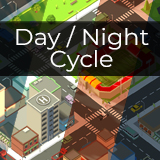
Dynamic Day/Night Cycle: Lite
A lightweight, customizable day-night cycle system with smooth environmental blending, time control, and dynamic fog/water color support.
Affiliate link · Purchases support this site
Price history
Last 6 months
USDAsset preview
1 / 3

Dynamic Day/Night Cycle: Lite screenshot 1


About this asset
**UPGRADE AVAILABLE** Advanced, Lightweight Day–Night & Seasonal Sky System
Bring your worlds to life with this easy-to-use Day/Night Cycle System. Designed for flexibility, it smoothly transitions ambient lighting, directional light rotation, fog, and water color based on in-game time.
Supports:
- Real-time progression or manual time control.
- Adjustable sunrise, midday, sunset, and night lighting settings.
- Dynamic fog and water color blending.
- Optional UI clock display.
- Supports both stylized and realistic projects.
Perfect for open-world, survival, simulation, and casual games.
Fully customizable - no coding required for typical setups.
* The city in the demo uses the awesome FREE SimplePoly City - Low Poly Assets
From the publisher's Asset Store listing.
Technical details
Key Features:
- Real-time day/night progression with adjustable speed.
- Manual time setting or smooth time resets.
- Daybreak, Midday, Sunset, Night.
- Blend between 4 customizable lighting profiles
- Dynamic sun rotation based on time of day.
- Supports fog color and density blending.
- Water color blending with any material using a color property.
- Optional TMP UI clock that updates automatically.
- Forward-only time mode for narrative-driven games.
- Lightweight — minimal impact on performance.
Compatibility:
- Unity 2020.3 LTS and above.
- Works in Built-in Render Pipeline
- Works with URP and HDRP, but not with the setup in the project provided
Compatibility
| Unity version | Built-in | URP | HDRP |
|---|---|---|---|
| 2021.3.45f2 | Compatible | Compatible | Not listed |
You will need TextMeshPro for the UI elements (like the clock display) to work, but these are optional and not required for the component to work.
The demo scene was set up in Built-In render pipeline so if you open in URP, you will need to set up the materials yourself.
As listed on the Asset Store.