
 View on Asset Store (opens in new tab)
Package details
- Latest version
- 1.0.0
- Last updated
- First released
- Unity version
- 2022.3.61 or later
- Package size
- 6.5 MB
- Files
- 231
- Favorites
- 17
- Views in the past week
- 9
Price tracking
- Last checked
- Tracked since
- Lowest recorded
- $9.99 on
Keywords

Primitive Mesh Creator
Create over 90 types of primitive 2D and 3D meshes in both Editor and Runtime. Easily customize, preview, and generate optimized procedural meshes directly in Unity with UVs, normals, and more.
Price $19.99
Buy on Asset Store (opens in new tab)
Affiliate link · Purchases support this site
Price history
Last 6 months
USDAsset preview
1 / 24

Primitive Mesh Creator screenshot 1






About this asset
- Primitive Mesh Creator is a powerful and versatile mesh generation tool for Unity that lets you create over 90 different types of primitive shapes — from flat 2D polygons to complex 3D solids — both in the Editor and at Runtime. Whether you're prototyping quickly or building custom runtime geometry, this tool delivers precision, flexibility, and speed.
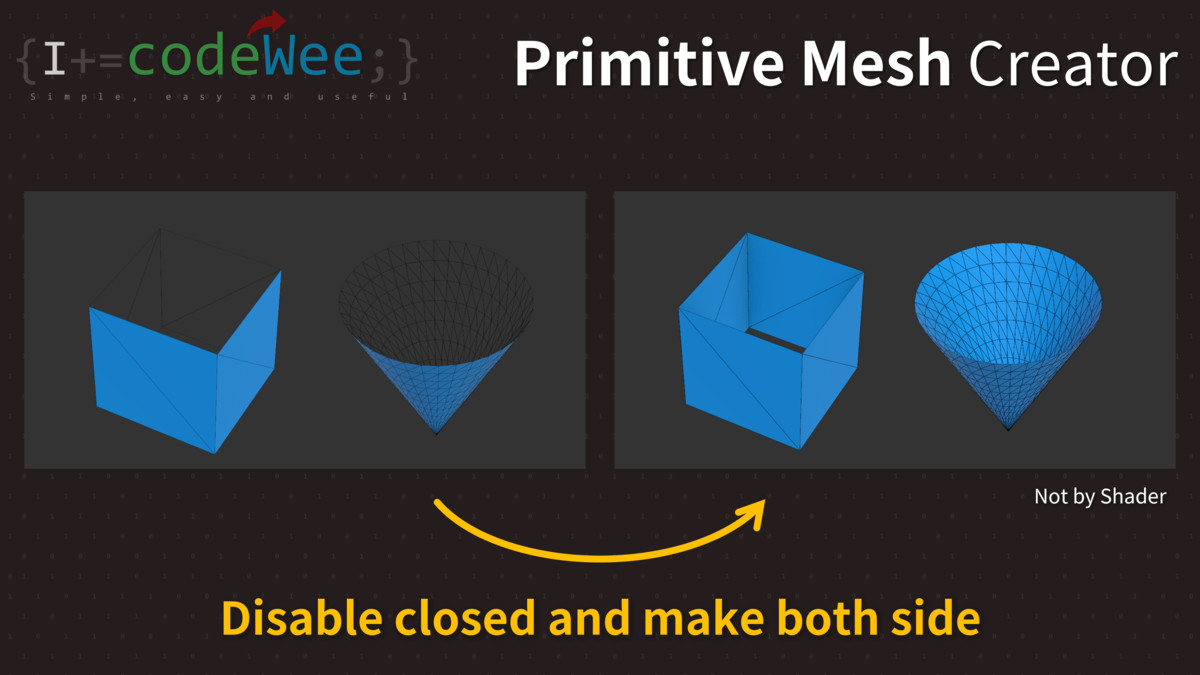
- Using a dedicated Editor Window, you can interactively preview and configure a wide range of mesh properties such as size, height, segment count, roundness, and more using intuitive sliders. Many mesh types include advanced options like shear (skew), face culling, thickness, submeshes, and double-sided rendering — all without using shaders.
- Developers can also generate these meshes during gameplay using provided static C# functions, with runtime support mirroring all Editor capabilities. Additionally, the tool auto-generates ready-to-use C# code based on your current mesh setup, making it easy to copy and reuse in your projects.
- Whether you're a game designer, technical artist, or tools developer, Primitive Mesh Creator is an essential utility for procedural geometry in Unity.
- Supports Unity 2022 and Unity 6000+ (Unity 6.x).
- Generated meshes are fully compatible across all Unity versions.
From the publisher's Asset Store listing.
Technical details
- C# class dll library for Editor GUI and Runtime
- Editor Support: Custom Editor Window with real-time mesh preview
- Runtime Support: Full static API with all Editor capabilities
- Mesh Types:
- 2D Primitives: Triangle, Rectangle, N-gon, Rounded Rectangle, Frame, Star, Parallelogram, Circle, Ellipse, Sector, etc.
- 3D Primitives: Cube, Pyramids (Triangular, Square, N-sided), Prisms (Triangular, Square, N-sided), Cylinder, Sphere, Icosphere, Hemisphere, Egg shape, 3-Axis Cross, Torus, Helix, Rounded Cubes, and many hollow/thickened variants
- and Teapot
- Options per Mesh:
- Adjustable width, height, depth via sliders
- Segment control for smoothness
- Radius control for circular shapes
- Enable/disable smoothing
- Enable/disable double-sided rendering (no shader required)
- Remove or include caps on cylindrical and conical shapes
- Apply shear/skew transformation
- UV Mapping: Fully UV-mapped with live material and texture preview
- Submeshes: Multi-face shapes use submeshes for individual materials
- Visualization Tools:
- Toggle wireframe
- Toggle normals and tangents display
- Show vertex index numbers on hover
- Transform Tools:
- Modify pivot position
- Rotate around X, Y, Z axes
- Invert mesh normals
- Code Generation:
- Auto-generate C# code matching current settings
- Copy to clipboard for use in runtime scripts
Key Features
- 🔷 Generate 90+ customizable 2D and 3D mesh types
- ⚙️ Real-time Editor Window with intuitive sliders and live preview
- 🧩 Full runtime API for procedural mesh generation during gameplay
- 🧱 Support for hollow, capped, rounded, and smoothed variants
- 🎯 Precision control over size, segment count, shape roundness, and shear
- 🧵 Built-in UV mapping and submesh support for multi-material setups
- 🧭 Toggle wireframe, normals, tangents, and vertex indices
- 🔄 Transform tools: pivot adjustment, rotation, normal inversion
- 🧪 Export C# mesh generation code for direct runtime use
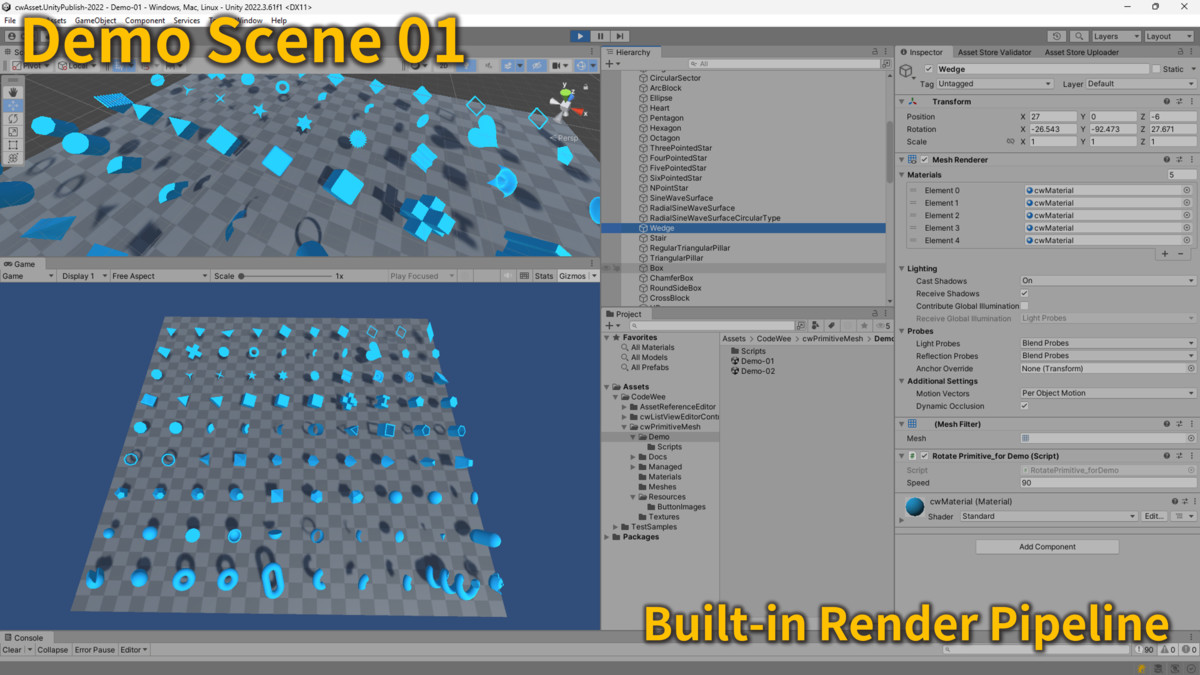
- 💡 Works in URP, HDRP, and Built-in render pipelines
- ✅ No third-party dependencies or shaders required
Additional Features - Mesh Tool API
- Invert Normal
- Change Pivot
- Translate verticies (not by GameObject Transform)
- Get Geometry Center Position
- Merge two meshes
- Rotate X, Y, Z (not by GameObject Transform)
- Make Both Side (not by Shader)
Compatibility
| Unity version | Built-in | URP | HDRP |
|---|---|---|---|
| 2022.3.61f1 | Compatible | Compatible | Compatible |
For Built-in demo scene:
- `DemoScene-BuiltIn/*.unity`
For URP or HDRP demo scene:
- Befor open the Scenes, Go to `Project Settings > Graphics` and assign the correct Pipeline Asset.
- `DemoScene-HDRP/*.unity`
- `DemoScene-URP/*.unity`
- URP/HDRP scenes may show "Missing Script" warnings if opened in Built-in pipeline.
- These can be safely ignored or hidden if not using those pipelines.
As listed on the Asset Store.