
 View on Asset Store (opens in new tab)
Package details
- Latest version
- 1.3.4
- Last updated
- First released
- Unity version
- 2022.3.43 or later
- Package size
- 756 KB
- Files
- 111
- Favorites
- 267
- Views in the past week
- 148
Price tracking
- Last checked
- Tracked since
- Lowest recorded
- $17.70 on
Keywords

QUBIC - Modular Builder
Modular building tool for Unity Editor. Instantly design multi-story buildings, dungeons or mazes with smart prefabs, auto room logic, and interior props - perfect for fast level design.
Affiliate link · Purchases support this site
Price history
Last 6 months
USDAsset preview
1 / 8

QUBIC - Modular Builder screenshot 1





About this asset
QUBIC is a fast and intuitive editor tool for constructing architectural designs in Unity using modular prefabs.
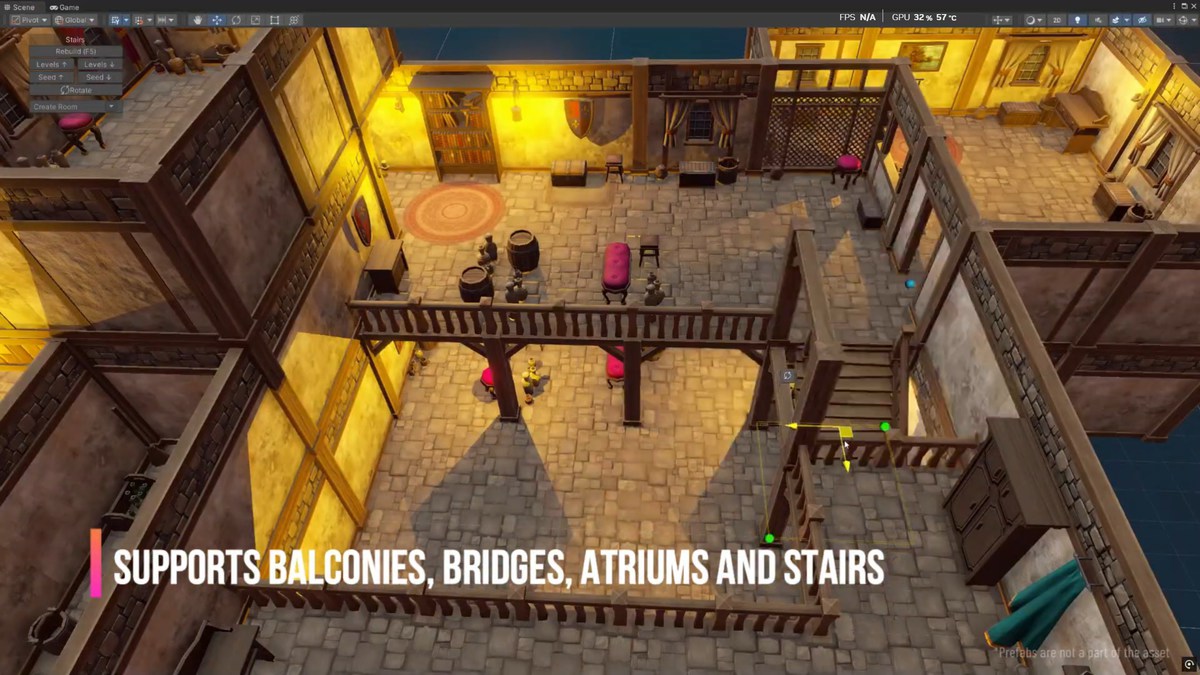
QUBIC lets you draw rooms like in a map editor, and builds the entire structure around them: walls, floors, doors, windows, stairs, props and furniture.
Just draw or move rooms in the scene view - everything updates instantly. Doors and passages are placed automatically, furniture spawns according to rules, and multi-story buildings stay connected by logic, not by hand.
No need to place each wall, align doorways, or manually decorate interiors - QUBIC handles the structure so you can focus on your ideas.
⚡ Fast & Interactive Building
- Draw rooms and corridors directly in the scene
- Instant live updates on any change (movement, resize, style)
- Smart room logic automatically places doors, arches, rails, windows
🏗 Modular Construction
- Grid-based snapping for accurate placement
- Supports multi-floor structures, with logic across levels
- Customizable room styles with easy switching
🪑 Interior Generation
- Rule-based furniture spawning (curtains, beds, carpets, etc.)
- Auto prop placement per room/floor
- Support for bridges, balconies, atriums, rails, fences, rooftops
🧠 Smart Prefab System
- One-click prefab setup using tag rules - no coding
- Edit prefabs directly in-place and see instant updates
- Style override for individual rooms or entire buildings
🧭 Advanced Tools
- Debug view for placement rules and cell logic
- Different door/connection strategies (e.g., labyrinth, tree, fully connected)
- Isometric view support for easier 2.5D game layout
Designed For
- Level designers working with modular kits
- Game prototypes that need quick interior spaces
- Dungeon/corridor design tools
- Architectural previsualization
From the publisher's Asset Store listing.
Technical details
Before You Buy
- This is an editor tool for manually drawing buildings, mazes, or dungeons.
- This tool can be used to draw buildings or create levels at runtime. However, the asset does not include a GUI for runtime drawing.
- Requires your own modular prefab set (walls, floors, doors, etc.)
- While Qubic is compatible with most prefab types, certain prefab sets may not be fully compatible. Also, in some cases, specialized prefabs, like columns for wall corner connections, may be needed to achieve optimal results.
Performance
All updates are real-time - even buildings with thousands of cells update in milliseconds. You can have multiple buildings in a single scene, each with separate settings and styling.
Rule-Based Spawning
Prefab logic is driven by tags and naming - no code needed. You define spawn behavior based on placement type, floor number, and room style, allowing consistent and predictable results.
At the same time, it is a very flexible and extensible tool. You can write own spawn logic via API.
Compatibility
| Unity version | Built-in | URP | HDRP | Custom |
|---|---|---|---|---|
| 2022.3.43f1 | Compatible | Compatible | Compatible | Compatible |
Unity6 compatible
As listed on the Asset Store.