
 View on Asset Store (opens in new tab)
Package details
- Latest version
- 1.0.0
- Last updated
- First released
- Unity version
- 2022.3.22 or later
- Package size
- 67 KB
- Files
- 4
- Favorites
- 1
- Views in the past week
- 2
Price tracking
- Last checked
- Tracked since
- Lowest recorded
- $4.99 on
Keywords
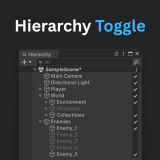
Hierarchy Toggle
The Hierarchy Toggle lets you enable/disable GameObjects directly in the Hierarchy, saving time and simplifying workflow.
Affiliate link · Purchases support this site
Price history
Last 6 months
USDAsset preview
1 / 2

Hierarchy Toggle screenshot 1

About this asset
Tired of clicking into the Inspector just to enable or disable a GameObject? Hierarchy Toggle makes it effortless by adding a simple toggle button right next to each GameObject in the Hierarchy.
With just one click, you can turn objects on or off without breaking your flow. The tool blends seamlessly into the Unity Editor and includes a handy settings window to customize toggle placement or turn the feature off when you don't need it.
Key Features
- Quick enable/disable toggles in the Hierarchy window.
- Clean, native look that fits right into Unity.
- Global toggle control and position adjustment.
- Works in both Edit and Play mode.
- Editor-only, no runtime impact.
- Full source code included.
From the publisher's Asset Store listing.
Technical details
Hierarchy Toggle is compatible with all 2021.x, 2022.x, 2023.x, and Unity 6 Editors.
Compatibility
| Unity version | Built-in | URP | HDRP | Custom |
|---|---|---|---|---|
| 2022.3.22f1 | Compatible | Compatible | Compatible | Compatible |
As listed on the Asset Store.