
 View on Asset Store (opens in new tab)
Package details
- Latest version
- 1.0.1
- Last updated
- First released
- Unity version
- 2021.3.45 or later
- Package size
- 1.5 MB
- Files
- 10
- Favorites
- 2
- Views in the past week
- 3
Price tracking
- Last checked
- Tracked since
- Lowest recorded
- $7.99 on
Keywords
- Search for productivity
- Search for editor tool
- Search for Dev Tools
- Search for scene navigation
- Search for Quick Scene Switch
- Search for Scene Loader
- Search for scene manager
- Search for Unity Utility
- Search for yethgamedev
- Search for additive scenes
- Search for multi scene
- Search for unity editor extension

QuickScene Pro – Easy Scene Switcher & Scene Management Tool for Unity
Quickly switch, favorite, and organize Unity scenes with ease. Boost your workflow in multi-scene projects—built for speed, clarity, and dev sanity.
Affiliate link · Purchases support this site
Price history
Last 6 months
USDAsset preview
1 / 2
QuickScene Pro – Easy Scene Switcher & Scene Management Tool for Unity screenshot 1

About this asset
🚀 Introducing QuickScene Pro
QuickScene Pro is a productivity-focused Unity Editor extension that gives you instant control over your scene navigation — without touching folders, scripts, or manual setups.
Built for developers working on projects with multiple scenes, QuickScene Pro brings clarity, speed, and simplicity to your daily workflow. Whether you're working solo, collaborating in a team, or managing a large game structure, this tool helps you get to the right scene — fast.
✨ Core Features
✅ Ready-to-use, no setup required
Just import the tool and open the window — it automatically detects all your scenes.
✅ One-click Scene Switching
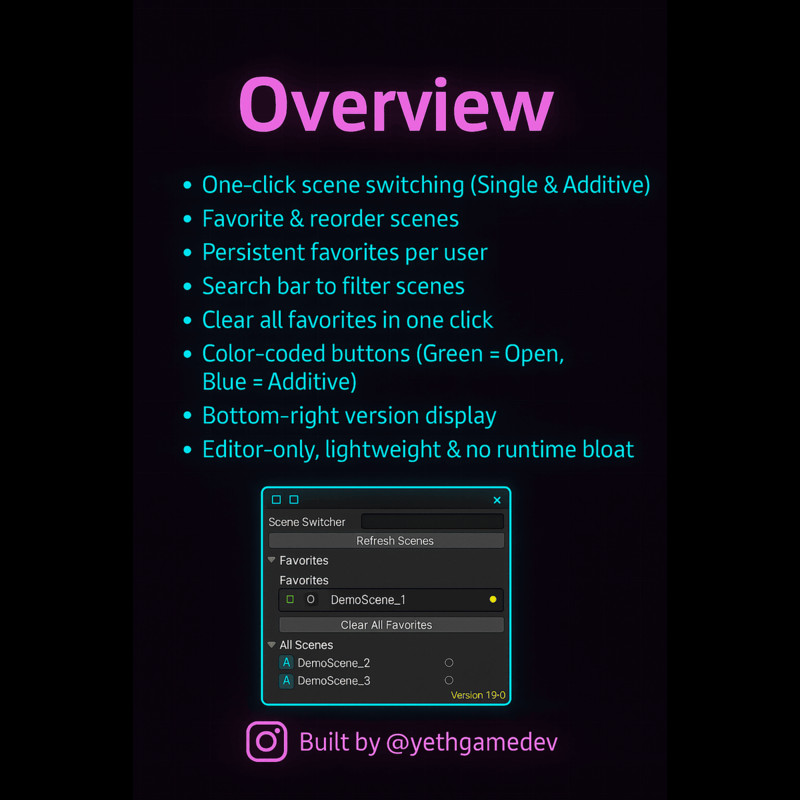
Open scenes with a single click using “O” (green) or load them additively with “A” (blue). Designed for quick test iterations and clean transitions.
✅ Favorites System
Star your most-used scenes and reorder them in a persistent, user-based list. Spend less time scrolling and more time building.
✅ Clear All Favorites
Quickly reset your favorite list with a dedicated button — useful when switching tasks or working on multiple branches.
✅ Search Bar Filtering
Filter scenes live by name to quickly find what you need in large projects.
✅ Color-coded Interaction
Visual clarity at a glance — green buttons for opening scenes, light blue for additive loads, yellow highlights for favorites.
✅ Persistent Preferences
Favorites are stored locally via EditorPrefs, meaning they stay saved across editor restarts and project reloads.
✅ Built-in Version Display
Tool version is shown in the bottom corner of the window to help with version tracking across your team.
✅ Keyboard Shortcut Access
Launch the tool with Ctrl+Alt+M (or Cmd+Alt+M on macOS) for quick access anytime during development.
✅ 100% Editor-Only Tool
This extension is completely editor-side — it has zero impact on your runtime builds or performance.
✅ Fully Documented, Open Source Code
Includes the entire C# source code, fully commented and ready for extension or integration into custom pipelines.
🧠 Who Is QuickScene Pro For?
Unity developers who want to:
- Save time while switching between gameplay, UI, and menu scenes
- Test modular or additive-based systems quickly
- Work efficiently across large projects with dozens of scenes
- Keep their Editor organized and their mind in the flow
Whether you're building a 2D/3D mobile game or a large-scale VR app, QuickScene Pro enhances your day-to-day experience inside Unity — without clutter or bloat.
🎮 Compatibility
- Tested Unity Versions: Unity 2019.4.1f1, 2021.3.45f1, 2022.3.10f1, 6000.0.32f1.
- Render Pipelines: URP, HDRP, Built-in Pipeline.
- Platforms: Windows, macOS.
- Editor-only: Does not affect runtime builds, scenes, or performance in any way.
📦 What’s Included?
- 🔹 Full editable C# source code
- 🔹 Drag-and-drop .unitypackage setup
- 🔹 Demo scenes for immediate testing
- 🔹 PDF documentation + README
- 🔹 MIT license (Indian jurisdiction applicable)
- 🔹 Ongoing updates and community support
🤖 AI Use Disclosure
Some marketing material, documentation text, and image prompts were enhanced with the help of AI tools (such as ChatGPT and SORA) under full human review and supervision. All code and final assets were written, validated, and assembled by real developers.
🛠️ About Us
@yethgamedevv is a two-person indie developer team from India, passionate about creating lightweight, high-utility Unity tools that make everyday game development smoother. We build the tools we wish existed — and share them with the community.
🎓 Follow us on Instagram & YouTube: @yethgamedevv
More editor extensions and workflow boosters coming soon!
From the publisher's Asset Store listing.
Technical details
- Editor Tool Only: No runtime footprint. Operates entirely within the Unity Editor.
- Scene Management: Supports single and additive scene loading, scene search, favorites system, and reorderable UI elements.
- Keyboard Shortcut: Ctrl+Alt+M (Cmd+Alt+M on macOS) to open the tool quickly.
- Tested With: Unity 2019.4.1f1, 2021.3.45f1, 2022.3.10f1, 6000.0.32f1.
- Compatible With: URP, HDRP, and Built-in Render Pipeline on Windows/macOS
- Source Code: 100% C#, fully documented and included for customization
- AI Disclosure: Portions of the documentation, promotional visuals, and UI writing were enhanced using AI tools (ChatGPT & SORA) under full human supervision and review.
Compatibility
| Unity version | Built-in | URP | HDRP | Custom |
|---|---|---|---|---|
| 2021.3.45f1 | Compatible | Compatible | Compatible | Compatible |
As listed on the Asset Store.