
 View on Asset Store (opens in new tab)
Package details
- Latest version
- 3.0
- Last updated
- First released
- Unity version
- 6000.3.0 or later
- Package size
- 1.3 MB
- Files
- 21
- Favorites
- 127
- Views in the past week
- 53
Price tracking
- Last checked
- Tracked since
- Lowest recorded
- Free on
Keywords
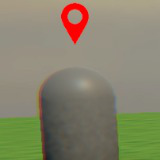
Waypoint Marker System
Easily add objective markers and guides to your Unity game. Point players where they need to go. Works great for 2D or 3D projects. Smooth performance included.
Price Free
Get it free on Asset Store (opens in new tab)
Affiliate link · Purchases support this site
Price history
Last 6 months
USDAbout this asset
Guide Your Players
This system helps you add clear visual pointers in your Unity game. Show players exactly where objectives are or highlight important items. Keep players engaged and reduce confusion.
Works For Your Game
- Flexible: Perfect for many game types like shooters RPGs or open world adventures. Use it in 3D or 2D scenes.
- Smooth Performance: Designed to run fast without slowing your game down. Smart marker reuse keeps things efficient.
- Easy Setup: Get started quickly without complex configuration. Add target markers to objects with one simple component.
Clear Visual Markers
- On Screen: Markers appear directly over targets when they are visible to the player.
- Off Screen: When targets are outside the player's view markers can stick to the screen edge and point the way. Never let players get lost.
Simple Control and Customization
- Easy Settings: Adjust how far markers can be seen or how smoothly they update using a simple settings file.
- Your Look: Customize marker appearance using your own User Interface images. Match your game's style.
- Code Control: Easily turn markers on or off from your own scripts for quests or events.
From the publisher's Asset Store listing.
Technical details
- Clear Visual Guidance: Easily add objective markers and guides for players.
- On Screen Markers: Display indicators directly over visible targets.
- Off Screen Indicators: Show markers clamped to screen edges pointing towards unseen targets.
- 2D & 3D Support: Works seamlessly in both orthographic (2D) and perspective (3D) views.
- Performance Optimized: Uses object pooling and adjustable update frequency for smooth gameplay.
- Easy Setup: Component based design allows for quick integration.
- Simple Configuration: Use ScriptableObject settings to easily adjust distance update speed and visuals.
- Customizable Appearance: Define marker visuals using your own UI prefabs.
- Script Control: Activate and deactivate waypoints via code to sync with game events.
- Dynamic Targets: Automatically handles targets appearing and disappearing during gameplay.
- Distance Culling: Set maximum visibility distance to ignore far away targets.
Skybox by Chad Wolfe (CC BY-NC-SA 3.0)
Compatibility
| Unity version | Built-in | URP | HDRP |
|---|---|---|---|
| 6000.3.0f1 | Compatible | Compatible | Compatible |
Demo scenes have URP materials.
As listed on the Asset Store.