
 View on Asset Store (opens in new tab)
Package details
- Latest version
- 1.1
- Last updated
- First released
- Unity version
- 2022.3.12 or later
- Package size
- 136.5 MB
- Files
- 51
- Favorites
- 2
- Views in the past week
- 4
Price tracking
- Last checked
- Tracked since
- Lowest recorded
- $6.96 on
Keywords
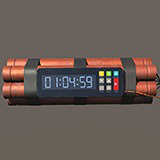
Animated Timer Bomb
There are an animated digit timer with a bomb models .
Affiliate link · Purchases support this site
Price history
Last 6 months
USDAsset preview
1 / 11

Animated Timer Bomb screenshot 1


About this asset
This animated bomb timer can be used in many games to add some visual effects and game features where the user can set the timer time or update it in the running game.
From the publisher's Asset Store listing.
Technical details
Animated bomb timer uses mouse input to set the timer time (HH:MM:SS). Easy to set time, pause, start, reset. Flashing function before stopping the timer. Backlight function to make the numbers and buttons visible.
There are 27 textures (png,tga,tif) from 512x512 to 4096x4096
BombTimer_01: 10 meshes : 2124 triangles
BombBody_01 :22032 triangles
BombBody_02: 7840 triangles
BombLowSet_01 :388 triangles
Extra items in the demo scene:
Box_01: 2 meshes : 2496 triangles
DemoRoom_01 : 32 triangles
Prefabs:
BombBody_01
BombBody_02
BombLowSet_01
BombObject_01
BombTimer_01
DemoRoom_01
WoodBox_01
LODs:
LOD 0 : 24300 Triangles- 10 Sub Meshes // Batches:40 ,SetPass calls:25
LOD 1 : 10108 Triangles- 3 Sub Meshes // Batches:12 ,SetPass calls:11
LOD 2: 388 Triangles- 1 Sub Meshes // Batches:4 ,SetPass calls:4
UV mapping: Yes
Rigging : No
Scripts:1
BombTimer : one material with one custom shader
BombBody_01/_02/BombLowSet_01 : one material with Autodesk Interactive shader
Buttons are animated via script
Compatibility
| Unity version | Built-in | URP | HDRP |
|---|---|---|---|
| 2022.3.12f1 | Compatible | Not listed | Not listed |
I tested it with Unity 2020.3.10f1 , 2022.3.12ff1 , 6000.0.27f1 and it works good.
Attention for users Unity 6 :
* The BombTimer script is designed with the input module of the old event system so you might need change <<Active Input Handling >> to Both
As listed on the Asset Store.