
 View on Asset Store (opens in new tab)
Package details
- Latest version
- 0.6.9-ari/pub
- Last updated
- First released
- Unity version
- 6000.0.31 or later
- Package size
- 211 KB
- Files
- 11
- Favorites
- 3
- Views in the past week
- 4
Price tracking
- Last checked
- Tracked since
- Lowest recorded
- $4.99 on
Keywords

SimpleTick
- Price drop
A lightweight, zero-GC, attribute-based tick system for scheduling code execution at fixed intervals.
Lowest recorded price
Get 38% off on Asset Store (opens in new tab)Affiliate link · Purchases support this site
Price history
Last 6 months
USDAsset preview
1 / 2
SimpleTick screenshot 1

About this asset
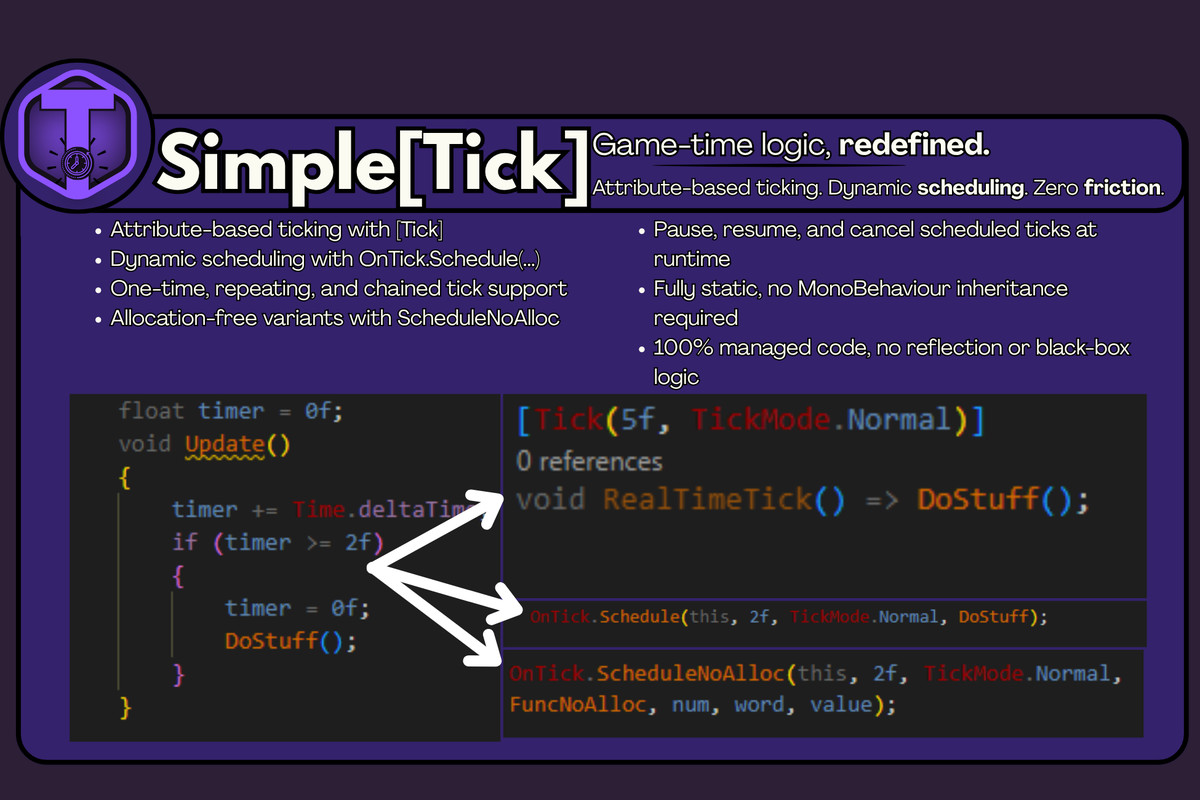
Schedule game logic with a single line. No Update, no boilerplate, no GC.
Write less update code. No coroutines. No InvokeRepeating.
Simple[Tick] is a zero-GC tick scheduler for Unity that lets you run methods at set intervals with clean [Tick] attributes or dynamic OnTick.Schedule() (or ScheduleNoAlloc for no GC) calls... No boilerplate, no coroutine mess, no garbage.
Perfect for cooldowns, periodic logic, and background tasks, Simple[Tick] supports both scaled time (paused with the game) and unscaled time (real-time). Whether you're ticking a UI clock, polling a server, or regenerating health, this system has you covered!
Just drop it in and go. One component handles everything. No reflection, no magic. Just clean, fast execution.
This system is useful for:
- Cooldowns and ability timers
- Health regeneration ticks
- AI pathfinding or scan intervals
- Save autosync or cloud checks
- Multiplayer ping/polling intervals
- Time-based UI updates (e.g., clock, event countdown)
- Lightweight alternative to coroutines or InvokeRepeating
- Any situation where you want repeatable or one-off timed execution
From the publisher's Asset Store listing.
Technical details
- Attribute-Based Callbacks
Use [Tick(interval, mode)] on parameterless methods for effortless scheduling. No setup or boilerplate required. - Dynamic Scheduling API
Call OnTick.Schedule() or OnTick.ScheduleOnce() at runtime to queue repeatable or one-time logic. - GC-Free Scheduling
Use OnTick.ScheduleNoAlloc() to schedule ticks with zero garbage collection allocation. Ideal for performance-critical systems. - Scaled and Unscaled Time
Supports both Time.deltaTime and Time.unscaledDeltaTime using TickMode for full control over game-time or real-time updates. - Pause and Resume Support
Pause or resume individual ticks at runtime for flexible control. - Single Component Management
A single OnTick component manages all tick logic in the scene. No need for additional managers or per-object schedulers. - No Reflection
[Tick] methods are compiled directly into delegates for fast, efficient invocation. - Drop-In Integration
Simply add OnTick to a GameObject to get started. No special setup required. - Clean, Lightweight API
The codebase is readable, minimal, and free of external dependencies. Easy to learn and integrate. - TickValidator
Automatically verifies [Tick] methods on scene load to ensure they are valid and safe to run. - Scoped Tick Handles
TickHandle implements IDisposable, allowing automatic unscheduling using using blocks. Useful for tools, tests, or temporary logic. - Custom Error Handling
Assign error callbacks to individual ticks to handle failures safely without halting the scheduler. - Supports Up to 3 Arguments
Dynamically scheduled methods can accept up to three parameters using overloads. No need to use closures unless desired. - MonoBehaviour-Decoupled Backend
Core tick logic is decoupled from Unity’s Update() loop. The system is portable and suitable for custom use beyond Unity if needed. - Fully Documented
Includes in-code XML summaries, usage examples, and integration notes for every feature. Designed to be easy to pick up and extend.
Compatibility
| Unity version | Built-in | URP | HDRP | Custom |
|---|---|---|---|---|
| 6000.0.31f1 | Compatible | Compatible | Compatible | Compatible |
Unity 2021.3+ Compatible
As listed on the Asset Store.