
 View on Asset Store (opens in new tab)
Package details
- Latest version
- 1.0
- Last updated
- First released
- Unity version
- 2022.3.11 or later
- Package size
- 6 KB
- Files
- 2
- Favorites
- 19
- Views in the past week
- 6
Price tracking
- Last checked
- Tracked since
- Lowest recorded
- Free on
Keywords
Scene Attribute - Reference Scenes in Inspector
Affiliate link · Purchases support this site
Price history
Last 6 months
USDAsset preview
1 / 1
Scene Attribute - Reference Scenes in Inspector screenshot 1
About this asset
📘 What to Expect? 📘
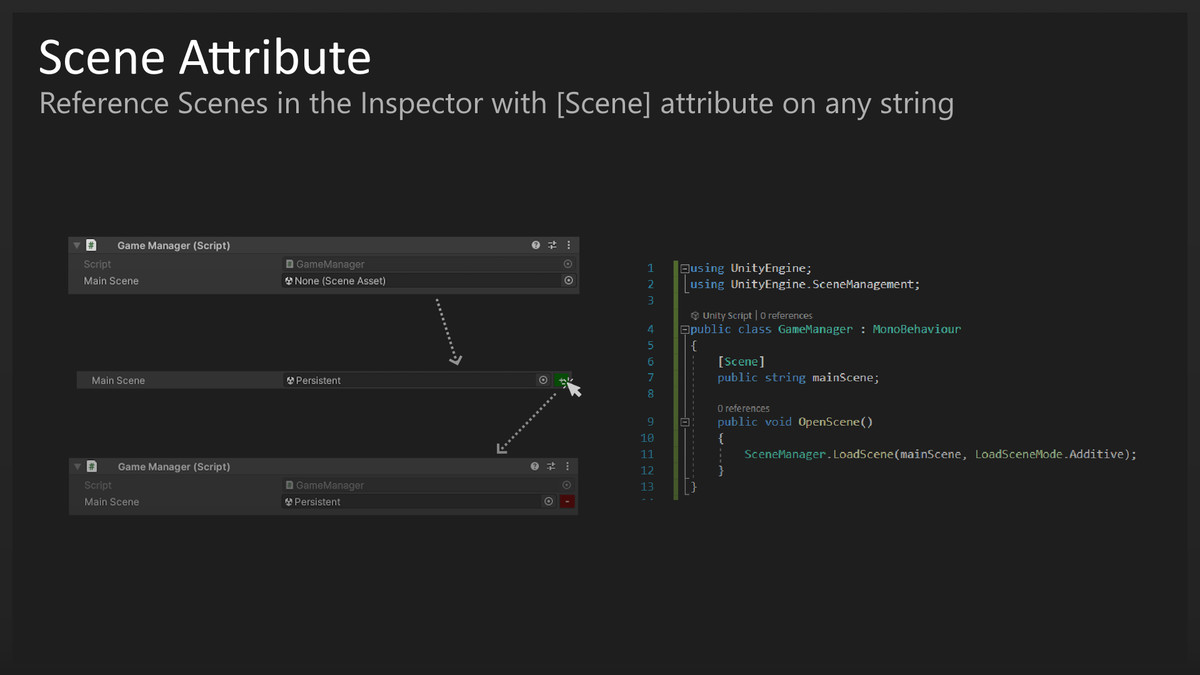
The [Scene] Attribute allows you to reference scenes and add them to the build index all within the Inspector for a cleaner look and to help increase your producitivity and code quality.
[Scene] can be placed on any string type variable including lists, arrays, and more. This attribute will serialize any SceneAsset as a path to allow you to dynamically refer to a scene when working with the SceneManager and is self correcting if the SceneAsset is later moved.
🧧 Features 🧧
- Easeful Integration
- Extremely Lightweight
- Built-In PropertyDrawer
Easeful Integration:
As the [Scene] attribute is completely self contained, the PropertyAttribute and PropertyDrawer are contained within a single script making it easy to organise and slot into any project.
Extremely Lightweight:
[Scene] is extremely lightweight as it's an Editor-only Attribute for the Inspector. There will be no difference in performance for runtime or for your builds as it serializes as a string.
Apply [Scene] to any type of string!
Built-In PropertyDrawer:
The PropertyDrawer makes the bulk of the [Scene] Attribute by providing you with the tools necassary to improve your workflow and easily aid designers. The PropertyDrawer contains an object field that displays all SceneAssets within the Project and includes the ability to drag and drop.
Additionally it displays whether or not this scene is apart of the Build Index so you know whether or not your scenes will be up and running upon Building your Project. Click the button to add or remove the Scene from the Build Index.
✨ What's Next? ✨
- A more customisable SceneReference class will be added in the near future to give more control over referencing scenes. (For better serialisation).
For support, feedback, or bug reports, you can contact me at:
From the publisher's Asset Store listing.
Compatibility
| Unity version | Built-in | URP | HDRP | Custom |
|---|---|---|---|---|
| 2022.3.11f1 | Compatible | Compatible | Compatible | Compatible |
As listed on the Asset Store.