
 View on Asset Store (opens in new tab)
Package details
- Latest version
- 1.0
- Last updated
- First released
- Unity version
- 6000.0.40 or later
- Package size
- 5.7 MB
- Files
- 33
- Favorites
- 2
- Views in the past week
- 4
Price tracking
- Last checked
- Tracked since
- Lowest recorded
- $7.99 on
Keywords
Cards Management
A flexible and organized data management tool. Whether you're managing simple cards or complex projects, With a simple user interface and the ability to work with data directly within Unity.
Affiliate link · Purchases support this site
Price history
Last 6 months
USDAsset preview
1 / 5

Cards Management screenshot 1


About this asset
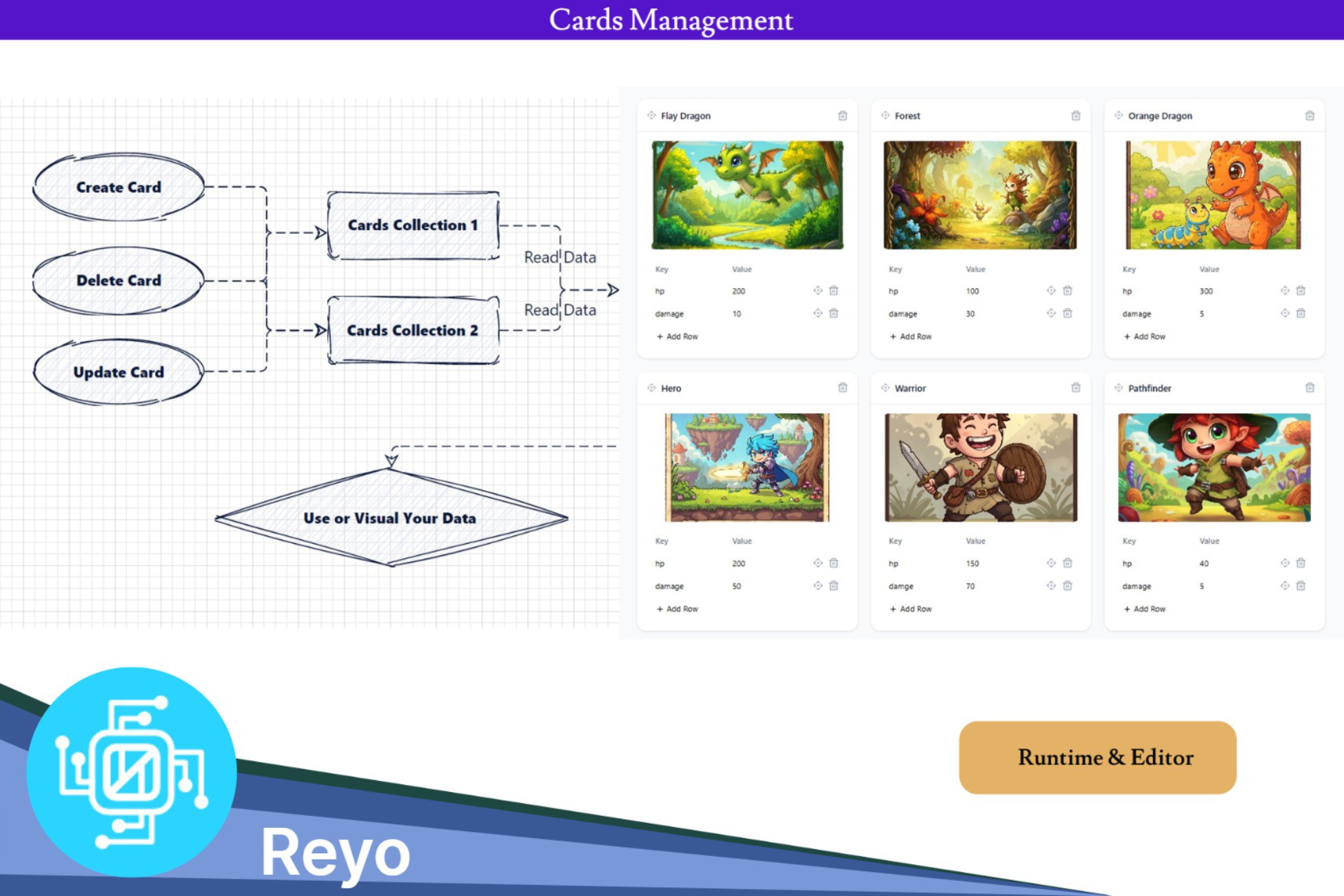
If you're looking for a simple and effective tool to create and organize data in a flexible and easy-to-use way, this tool is the perfect choice. It's specifically designed to help you create, edit, and delete cards with ease, while providing a smooth and intuitive user interface that makes it easy to work with data efficiently.
Simple and straightforward interface
The program features an elegant and simple user interface that emphasizes ease of use. Upon opening the program, you'll notice that all essential options are directly available. There's no need to navigate complex menus or confusing settings; everything you need is in one place.
- You can create a new card with the click of a button.
- Editing existing cards is easy, without having to re-enter all the data.
- If you have cards you no longer need, you can quickly delete them with just one click.
- The program's interface is designed to be clear even to users who don't have much technical experience.
Therefore, whether you're a professional or a beginner, you'll find yourself able to use the program seamlessly.
Grouping Data into Collections
One of the most notable features of this asset is its ability to group cards into groups. This feature allows you to organize data more efficiently according to your needs.
- You can create different collection for each type of data.
- For example, if you're managing a project, you could create a collection for tools, another for people, and another for tasks.
- Collections are managed directly within the app, where you can view all cards within a specific group or easily move cards between groups.
Direct integration within Unity
If you're working within the Unity environment, this program offers seamless integration with your platform.
- You can import data directly from the app into your Unity project.
- The program supports multiple data formats, meaning you won't encounter any problems transferring information between different systems.
- Editing data within the app is fully aligned with updates you make within Unity, ensuring that all information is always up-to-date and consistent.
Why should you choose this asset?
- Ease of use: The simple and organized interface makes the program suitable for all users.
- Flexibility: You can create and manage any type of data to suit your needs.
- Efficiency: The ability to group cards into groups makes information easier to access and manage effectively.
- Integration with Unity: If you're developing with Unity, this asset offers customized solutions to enhance your experience.
From the publisher's Asset Store listing.
Technical details
- The tool included web app work directly in your browser when press double click.
- Visual Card component support (legacy text and text mesh pro).
- all data stored as a json files
Compatibility
| Unity version | Built-in | URP | HDRP | Custom |
|---|---|---|---|---|
| 6000.0.40f1 | Compatible | Compatible | Compatible | Compatible |
As listed on the Asset Store.