
 View on Asset Store (opens in new tab)
Package details
- Latest version
- 1.0
- Last updated
- First released
- Unity version
- 2022.3.53 or later
- Package size
- 1.6 MB
- Files
- 17
- Views in the past week
- 15
Price tracking
- Last checked
- Tracked since
- Lowest recorded
- $4.99 on
Keywords
AI Translation & Auto Translator
Translate your projects easily using Google Translate or ChatGPT. Features a "No API Key" mode for FREE AI translations and a lightweight editor window to manage 30+ languages.
Affiliate link · Purchases support this site
Price history
Last 6 months
USDAsset preview
1 / 3
AI Translation & Auto Translator screenshot 1

About this asset
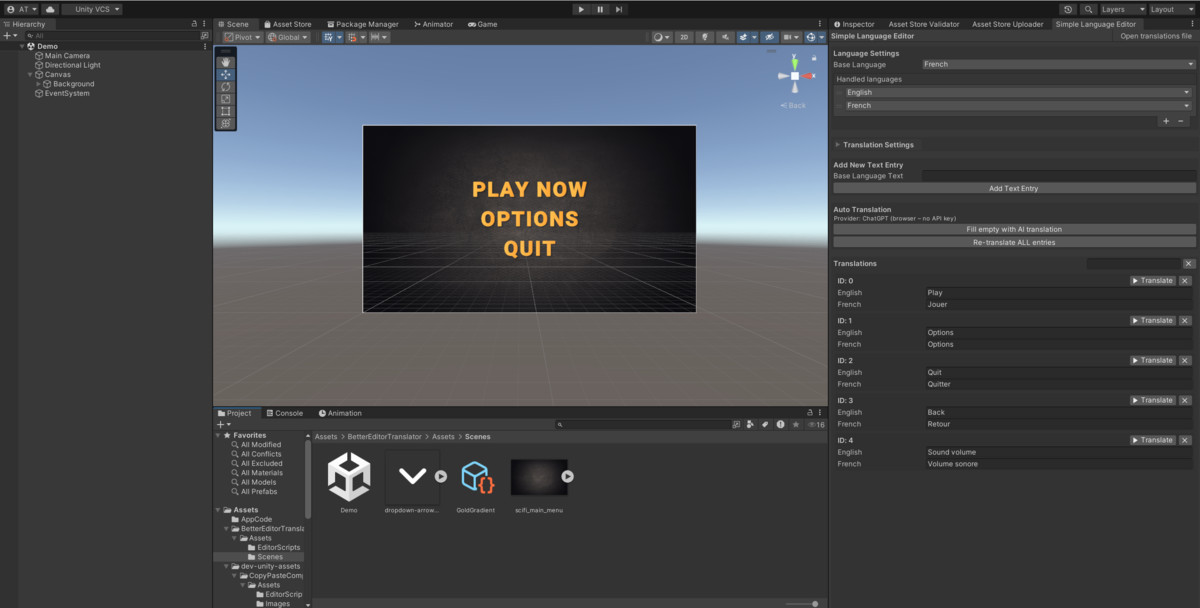
This package provides a dedicated editor window to manage your game's text. You create a list of unique keys and fill in translations for over 30 supported languages. It is designed to be simple and self-contained, storing all data in a single, human-readable JSON file within your project assets.
The translation process is automated through two translation workflows. You can use the internal Google Translate integration for quick, free results.
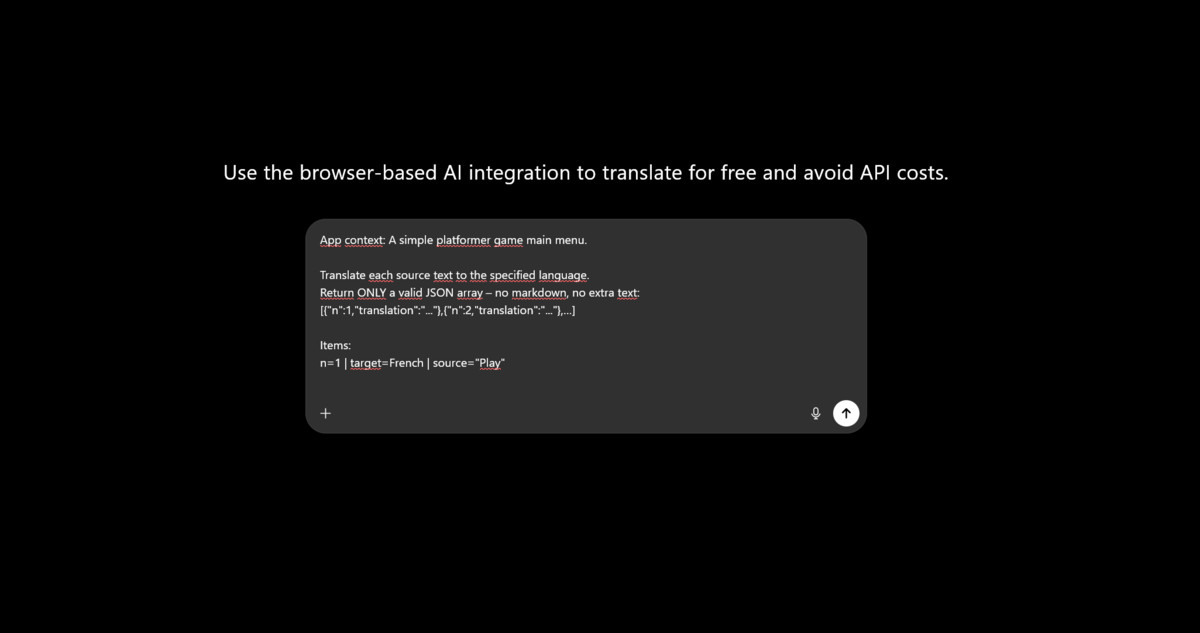
Alternatively, the ChatGPT integration allows for context-aware translations. You can describe your project (e.g., "a casual game for kids") in the tool so the AI adapts the tone and vocabulary. This works either via a standard API key or through a unique and self made "Browser Mode" that generates a batch prompt for you to paste into the web version of ChatGPT, avoiding API costs entirely.
At runtime, the system handles language switching automatically. You simply attach a component to your Text or TextMeshPro objects to link them to your translation keys. A pre-made dropdown component is also included to let players switch languages on the fly, which automatically saves their preference.
REQUIREMENTS & DEPENDENCIES
• Unity 2022.3 LTS or newer.
• Requires the Unity TextMeshPro and UGUI packages for TextMeshPro and legacy UI Text component support.
• Requires the Unity Newtonsoft JSON package.
• Internet access is required for all automatic translation workflows.
TRANSLATION OPTIONS
• Public translation endpoint (Google Translate): no API key required. This service is external, unofficial, and its availability or rate limits are not guaranteed.
• AI API mode (optional): requires the user's own compatible AI provider account, API key, and model access. Provider charges may apply. The API key is stored locally in Unity Editor preferences and is never included in builds.
• Browser AI mode (optional): requires a supported web browser and an active account with a compatible AI chat service. The tool opens a pre-filled batch prompt; the user submits it in the browser and pastes the JSON response back into Unity. No API key is required. Availability, usage limits, and account requirements are determined by the external service.
RUNTIME
Runtime language switching uses the local translations.json file. No internet connection or external account is required at runtime.
From the publisher's Asset Store listing.
Technical details
Core Features:
- Dedicated Editor Window: Manage translations for 30+ supported languages in a clean interface.
- ChatGPT (Browser Mode): Batch translate without an API key by using your web browser.Three Translation Modes:
Google Translate: Free, unofficial endpoint integration.
ChatGPT (API Mode): Direct integration using your OpenAI API Key. - Context-Aware: "App Context" field ensures AI understands your project's tone.
- Batch Operations: Fill all empty fields or re-translate specific entries in one click.
- JSON Storage: Human-readable translations.json file located in your Assets folder.
Runtime Components:
- SimpleTranslator: Attaches to any GameObject with Text or TextMeshPro components.
- SimpleTranslatorDropdown: Ready-to-use language switcher with auto-save functionality.
Supported Languages: English, French, Spanish, German, Italian, Portuguese, Dutch, Russian, Chinese, Japanese, Korean, Arabic, and many more.
Compatibility
| Unity version | Built-in | URP | HDRP | Custom |
|---|---|---|---|---|
| 2022.3.53f1 | Compatible | Compatible | Compatible | Compatible |
As listed on the Asset Store.