
 View on Asset Store (opens in new tab)
Package details
- Latest version
- 1.1.1
- Last updated
- First released
- Unity version
- 2022.3.13 or later
- Package size
- 84.4 MB
- Files
- 346
- Views in the past week
- 8
Price tracking
- Last checked
- Tracked since
- Lowest recorded
- $9.99 on
Keywords
Gomoku Pro
Gomoku Game Template offers classic strategy gameplay with AI & local multiplayer. Features customizable boards, smart AI, AdMob integration, and premium UI for an immersive experience.
Affiliate link · Purchases support this site
Price history
Last 6 months
USDAsset preview
1 / 12

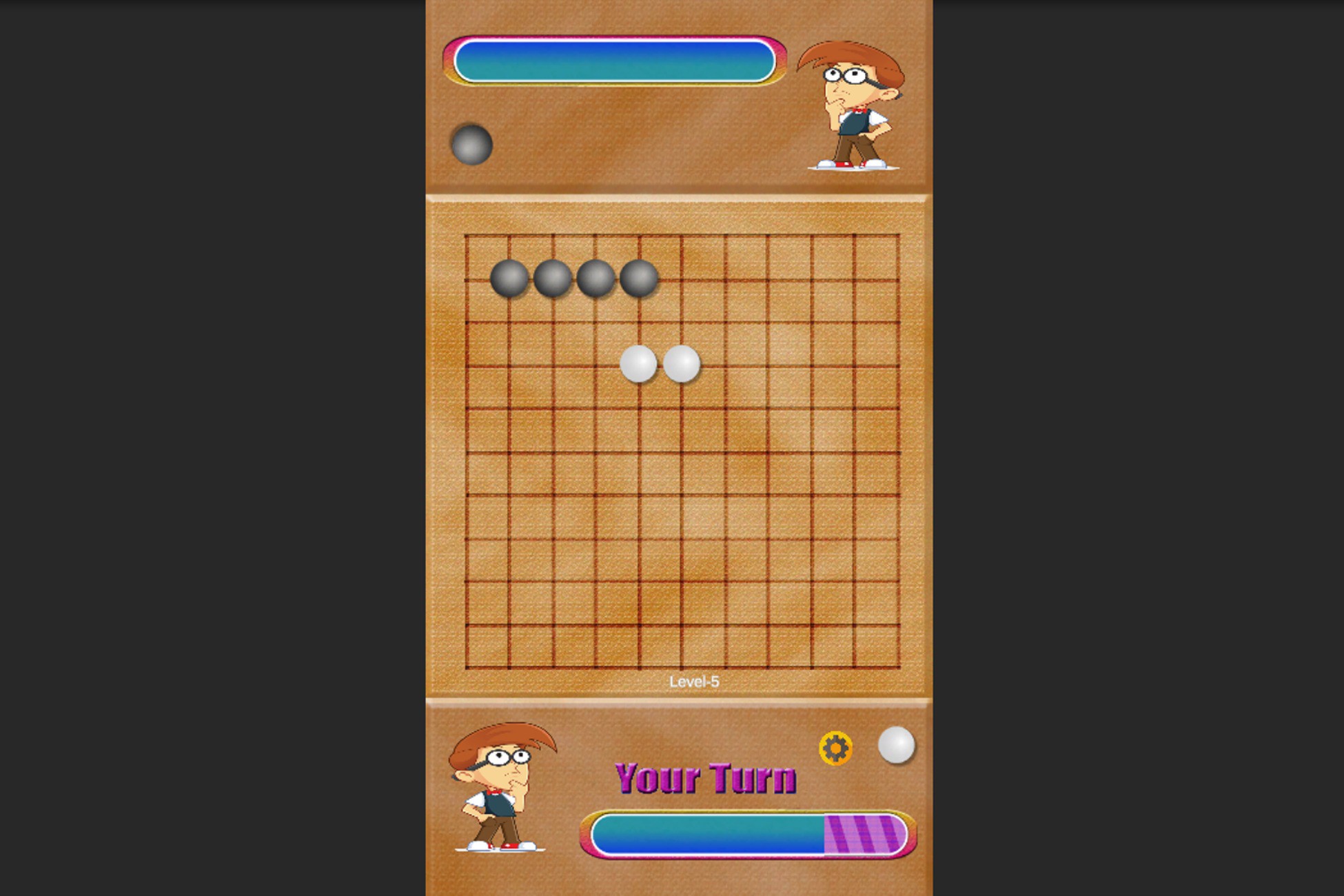
Gomoku Pro screenshot 1



About this asset
🚀 Create & Publish Your Own Gomoku Game with Ease!
Gomoku is a timeless strategy board game where players compete to form an unbroken line of five stones on a 15x15 grid. This ready-to-use Unity template offers a polished UI, smart AI opponent, customizable boards, and monetization support to help you launch your game quickly!
Key Features:
✅ Classic Gomoku Gameplay – Play on a 15x15 grid with smooth mechanics.
✅ Two Game Modes – Single Player (AI) and Two Player (Local Multiplayer).
✅ Smart AI Opponent – Compete against an adaptive AI with increasing difficulty.
✅ AdMob Integration – Monetize with banner, interstitial, and rewarded ads.
✅ Customizable Board & Pieces – Modify grid size, board themes, and pawn designs.
✅ Game History & Stats – Track wins, losses, and in-game currency.
✅ Smooth Animations & Premium UI – High-quality graphics for an engaging experience.
✅ Easy Customization – Modify gameplay rules, UI elements, sounds, and ads easily.
From the publisher's Asset Store listing.
Technical details
📌 General Information:
- Game Type: Strategy Board Game (Gomoku)
- Unity Version: Compatible with Unity 2021+
- Supported Platforms: Android, iOS, PC, WebGL
- Programming Language: C#
- Rendering Pipeline: Universal Render Pipeline (URP) & Built-in RP supported
📂 Project Structure:
- Gomoku/ – Main game folder containing all assets
- Scenes/ – Pre-built game scenes (Home, Gameplay, Settings, etc.)
- Scripts/ – Organized scripts for AI, UI, game logic, and Ad integration
- SFXManager/ – Handles sound effects customization
- GameSettings/ – Configure ads, game difficulty, in-game currency, and UI elements
- Resources/ – Assets such as textures, prefabs, and animations
🎮 Gameplay Features:
- Grid-Based Gameplay – Default 15x15 grid, customizable to 9x9, 12x12, or 19x19
- AI System – Smart AI with increasing difficulty across 6 levels
- Game Modes:Single Player (vs. AI) – AI difficulty increases with levels
Two Player – Local multiplayer mode - Game Currency System:Players start with 1000$Win: +100$ | Lose: -100$ (Configurable)
- Game History Tracking – View win/loss stats
- Help Section – In-game tutorial for new players
- Settings Menu:Sound Effects: Adjust volume levels
UI & Grid System: Fully customizable from GameManager script
📢 Monetization & Ads:
- AdMob Integration:Banner Ads
Interstitial Ads
Rewarded Ads - Ad Configuration:Easily replace default ad IDs in GameSettings scriptable object
Add or remove ads without modifying core scripts
🎨 Customization Options:
- Grid Size: Modify to 9x9, 12x12, 15x15, etc.
- Player Tokens: 4-5 different pawn styles available
- Board Themes: 6 different board styles to choose from
- Turn Timeout: Configure player move time limits
- Audio Settings: Modify sounds (Dice Roll, Move, Capture, Game Over, etc.) in SFXManager
📥 External Dependencies:
- 📌 Download: Google Ads SDKGoogle Mobile Ads SDK (For AdMob)
- 📌 Download: Unity Jar ResolverExternal Dependency Manager (For Plugin Management)
- Advertisement Legacy from package manager
🔧 Easy Setup & Installation:
- Import Gomoku Game Template into Unity.
- Move Resources Folder inside Assets/.
- Open GameSettings scriptable object to configure ads & settings.
- Run LoadingScene to start the game.
- Customize UI, sound, and difficulty as needed.
Compatibility
| Unity version | Built-in | URP | HDRP | Custom |
|---|---|---|---|---|
| 2022.3.13f1 | Compatible | Compatible | Compatible | Compatible |
As listed on the Asset Store.