
 View on Asset Store (opens in new tab)
Package details
- Latest version
- 1.0.32
- Last updated
- First released
- Unity version
- 6000.0.25 or later
- Package size
- 48.2 MB
- Files
- 104
- Favorites
- 16
- Views in the past week
- 28
Price tracking
- Last checked
- Tracked since
- Lowest recorded
- Free on
Keywords

Dialofy - Easy Dialogue System
- Price drop
Create interactive, branching dialogue fast. No coding. Node-based editor. Customizable UI. Supports multi-language & AI-generated dialogue (coming soon). Ideal for RPGs, narratives, and more.
Affiliate link · Purchases support this site
Price history
Last 6 months
USDAsset preview
1 / 3

Dialofy - Easy Dialogue System screenshot 1

About this asset
Dialofy - Easy Dialogue System (Early Access)
Add interactive dialogue to your game in minutes.
Dialofy is the simplest and most versatile way to implement dialogue systems in Unity:
✔ Visual node-based editor
✔ Ready-to-use customizable UI
✔ Multi-language support (automatic translation coming soon)
✔ No coding required
🚀 Early Access: Actively in development with powerful features on the way:
— Advanced condition and variable system
— Real-time AI-generated dialogue
— Expanded multilingual localization tools
Perfect for narrative-driven games, RPGs, visual novels, and more.
Compatible with both 2D and 3D projects. Take your storytelling to the next level, without the hassle.
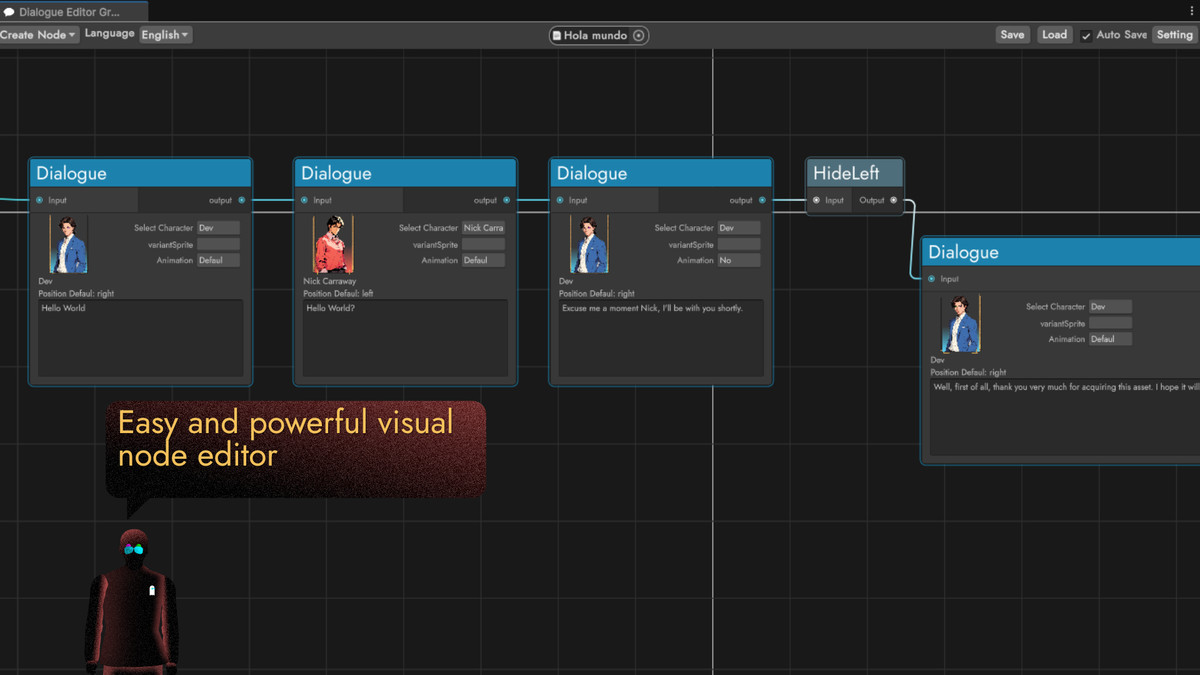
🔥 Our dialogues are built through our system of nodes, we have the following nodes:
Start: With this node the conversation starts. If you put more than one start, when starting a dialogue, it will choose one at random.
Dialogue: In this node we define the dialog that a character will say. First, you select the character that will speak (Select Character), then you choose the variation of the sprite that will be shown (VariantSprite) and, finally, you select the animation that will accompany the character while he/she speaks (Animation).
Switch: With this you can make decisions that will affect the narrative of the project.
Animation: Runs an animation without dialogue.
Trigger: This executes the trigger event of the Dialogue Trigger
Hide: Hides a character, either the one on the right or the one on the left.
They may seem few, but they are more than enough to build complex stories. New features will be added in the future.
From the publisher's Asset Store listing.
Compatibility
| Unity version | Built-in | URP | HDRP | Custom |
|---|---|---|---|---|
| 6000.0.25f1 | Compatible | Compatible | Compatible | Compatible |
As listed on the Asset Store.