
 View on Asset Store (opens in new tab)
Package details
- Latest version
- 2025.00.0
- Last updated
- First released
- Unity version
- 6000.0.28 or later
- Package size
- 107.1 MB
- Files
- 127
- Favorites
- 6
- Views in the past week
- 4
Price tracking
- Last checked
- Tracked since
- Lowest recorded
- $5.99 on
Keywords
Majestic Japan HDRP: Japanese Anime Styled Vegetation
- Price drop
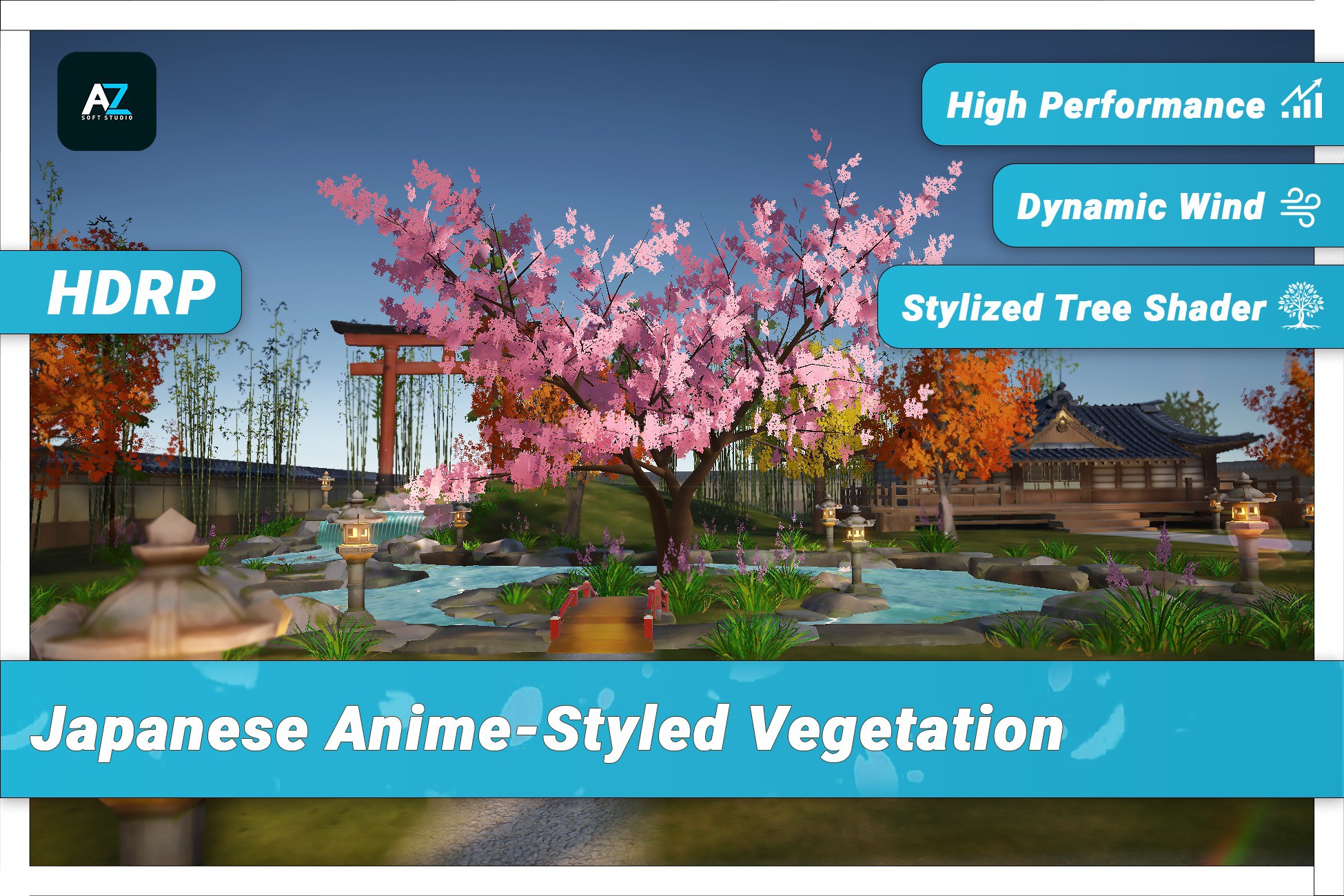
Japanese Anime Styled Vegetation features stylized cherry blossoms, bamboo, maple, ginkgo, and pine trees.Includes LOD levels, a subsurface scattering shader, and customizable wind system for flexible
Lowest recorded price
Get 60% off on Asset Store (opens in new tab)Affiliate link · Purchases support this site
Price history
Last 6 months
USDAsset preview
1 / 8

Majestic Japan HDRP: Japanese Anime Styled Vegetation screenshot 1


About this asset
Note:
- This Asset is not built for Wind System and does not contains all the environment showed in the showcase video
- This version of the asset only includes HDRP. URP will be avaiable in another package from same publisher {AZSoftStudio}
Elevate your projects with Majestic Japan: Japanese Anime Styled Vegetation, featuring beautifully stylized cherry blossoms, bamboo, maple, ginkgo, and pine trees. This asset is designed to bring vibrant and serene environments to life, perfect for games, animations, and virtual experiences.
Key Features:
- Level of Detail: Ensures optimized performance for different platforms, including PC, Mobile, and VR.
- Subsurface Scattering Shader: Achieve realistic lighting effects for more immersive vegetation.
- Customizable Shader: Easily adapt the look to fit various project themes.
- Aero Flow Wind System: Adds an anime-stylized wind effect that simulates the movement of trees and foliage, including tree bending and leaf movement based on wind direction, speed, and force.
- Editor Script: Allows easily create wind system and control of the wind system parameters, providing global control for tree behavior.
Models:
This asset includes 5 Japanese Trees
- Cherry Blossom (Sakura)🌸 – This is one of the most iconic Japanese trees, representing spring and beauty in Japanese culture. Its pink blossoms are perfect for romantic or serene settings, adding a distinct seasonal feel.
- Japanese Maple (Momiji) 🍁 – Known for its fiery red leaves in autumn, this tree is ideal for adding rich, contrasting colors to scenes, which are great for anime-style aesthetics, particularly for dramatic or emotional landscapes.
- Bamboo 🎍 – Widely used in Japanese gardens and forests, bamboo adds a serene and zen-like quality to the environment. It’s also versatile, fitting various game styles from peaceful rural settings to intense, action-based scenes.
- Pine (Matsu) 🌲 – Japanese pines are often used in temples or shrine environments, giving a grounded and traditional feel. These trees are useful for Japanese castle environments, mountainscapes, or temple grounds.
- Ginkgo 🍀 – With its unique fan-shaped leaves that turn golden in autumn, ginkgo trees are great for parks and urban Japanese settings, adding realism and aesthetic charm to environments.
Easy to Use:
Simply import the asset package, drag and drop the prefabs into your scene, and customize the settings as needed.
Compatibility:
- ✅ URP 2020.3LTS+
- ✅ HDRP 2020.3LTS+[will be avaiable in another package from same publisher]
This asset is designed for Unity versions 2020.3 LTS and later.
Please note that due to API changes in Unity 6,
- Object.FindObjectOfType() has replaced Object.FindFirstObjectByType() in "AeroFlowWindShaderEditor".
- If you are using Unity versions prior to 2023.1, you should continue using Object.FindObjectOfType() instead.
- For any assistance in making these adjustments, feel free to Contact Us
Technical Details:
- Number of Textures: 43 Textures at Total
- Texture Dimensions: 2048x2048 for main assets [e.g., All trees]
- Polygon Count (Per Model):
- Cherry Blossom Tree: 3,500 triangles avg Bamboo: 1,000 triangles avg Maple Tree: 2,500 triangles avg Ginkgo Tree: 4,800 triangles avg Pine Tree: 2,500 triangles avg
- Minimum Polygon Count: 100 triangles [small bamboos]
- Maximum Polygon Count: 6,800 triangles
- Number of Meshes/Prefabs: 30 meshes / 8 prefabs
- Animation Type : Anime Styled Wind System
- UV Mapping: Yes
- LOD Information: 5 levels of detail per model
- Types of Materials and Texture Maps: PBR (Albedo, Normal)[for anime look]
Support:
For assistance, visit our website to Contact Us.
From the publisher's Asset Store listing.
Technical details
Technical Details:
- Number of Textures: 43 Textures at Total
- Texture Dimensions: 2048x2048 for main assets [e.g., All trees]
- Polygon Count (Per Model):
- Cherry Blossom Tree: 3,500 triangles avg Bamboo: 1,000 triangles avg Maple Tree: 2,500 triangles avg Ginkgo Tree: 4,800 triangles avg Pine Tree: 2,500 triangles avg
- Minimum Polygon Count: 100 triangles [small bamboos]
- Maximum Polygon Count: 6,800 triangles
- Number of Meshes/Prefabs: 30 meshes / 7 prefabs
- Animation Type : Anime Styled Wind System
- UV Mapping: Yes
- LOD Information: 5 levels of detail per model
- Types of Materials and Texture Maps: PBR (Albedo, Normal)[for anime look]
Compatibility
| Unity version | Built-in | URP | HDRP |
|---|---|---|---|
| 6000.0.28f1 | Not listed | Not listed | Compatible |
This asset is designed for Unity versions 2020.3 LTS and later. Please note that due to API changes in Unity 6,
- Object.FindObjectOfType() has replaced Object.FindFirstObjectByType() in "AeroFlowWindShaderEditor.cs".
- If you are using Unity versions prior to 2023.1, you should continue using Object.FindObjectOfType() instead.
- For any assistance in making these adjustments, feel free to Contact Us
As listed on the Asset Store.