
 View on Asset Store (opens in new tab)
Package details
- Latest version
- 1.0
- Last updated
- First released
- Unity version
- 2022.3.17 or later
- Package size
- 14.4 MB
- Files
- 55
- Favorites
- 2
- Views in the past week
- 3
Price tracking
- Last checked
- Tracked since
- Lowest recorded
- $5.00 on
Keywords
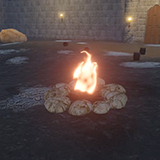
Vfx stylized Flame-Fire Flame
Stylized Flame VFX Asset Pack is designed for Universal Render Pipeline (URP) featuring highly customizable flame shaders built using Shader Graph.
Affiliate link · Purchases support this site
Price history
Last 6 months
USDAsset preview
1 / 1

Vfx stylized Flame-Fire Flame video 1
About this asset
This pack allows developers to create realistic and stylized fire effects with adjustable parameters such as distortion, dissolve, color intensity, and animation speed. It is optimized for performance and flexibility, making it suitable for games, animations, and VFX-driven environments.
How to Use?
- Import the StylizedFlameVFxPack into your Unity URP project.
2. Enter play mode and press “Left Mouse” to test the next effect in demo scene.
3. Easily integrate the effects into your project with drag and drop functionality like Drag and Drop Prefab into scene.
4. Apply the Flame Material to a particle system, or mesh to create a stylized flame effect.
Customization:
Adjust Color to match the desired fire effect (e.g., red-orange for fire, blue for magic flames).
Modify DistortionAmount and DistortionScale for different flame motion styles.
Set DissolveSpeed for faster or slower flame flicker.
Also modify the Smoke and flame Spark particles using inspector properties.
Flame Shader Graph:
Properties:
MainTex (Texture2D): Base texture for the flame.
Color (HDR Color): Controls the flame's color and intensity.
DistortionAmount (Float): Adjusts the intensity of the flame’s distortion effect.
DistortionScale (Float): Controls the scale of the distortion, affecting how warped the flame looks.
DissolveSpeed (Vector2): Controls the movement speed of the dissolve effect, giving the flame its animated flicker.
DissolveScale (Float): Adjusts the size of the dissolve pattern on the flame.
DissolveAmount (Float): Controls the amount of flame dissolving over time, useful for fading effects.
From the publisher's Asset Store listing.
Technical details
Only for Urp Render pipe line
- Texture size: 1024 b/w 1024
- Texture type: Default
Compatibility
| Unity version | Built-in | URP | HDRP |
|---|---|---|---|
| 2022.3.17f1 | Not listed | Compatible | Not listed |
As listed on the Asset Store.