
 View on Asset Store (opens in new tab)
Package details
- Latest version
- 1.0
- Last updated
- First released
- Unity version
- 6000.0.29 or later
- Package size
- 180 KB
- Files
- 7
- Favorites
- 3
- Views in the past week
- 2
Price tracking
- Last checked
- Tracked since
- Lowest recorded
- $15.00 on
Keywords
Universal Camera Controller (2D and 3D)
The CameraController script provides comprehensive camera movement, rotation, and zoom functionality for a Unity project in both 2D and 3D environments.
Price $15.00
Buy on Asset Store (opens in new tab)
Affiliate link · Purchases support this site
Price history
Last 6 months
USDAsset preview
1 / 1

Universal Camera Controller (2D and 3D) video 1
About this asset
This script controls the camera in a Unity scene, enabling users to move, rotate, and zoom using customizable key bindings. It offers the flexibility to:
- Pan the camera using keyboard inputs or screen edge panning with mouse control.
- Rotate the camera around a defined pivot point or around its own position.
- Zoom in and out with assigned key controls.
- Limit camera movement within a defined boundary range for each axis (X, Y, Z).
- Provides an optional pivot for rotating around specific points in 3D space.
From the publisher's Asset Store listing.
Technical details
- Movement Modes: Supports movement via keyboard keys (W, A, S, D) and mouse edge panning (customizable border thickness).
- Rotation: Handles free or pivot-based rotation, customizable via key inputs (Q, E, R, F for different axes).
- Zooming: Zooms in and out based on key inputs (Z, X) and limits zoom range by Y-position.
- Speed Controls: Includes configurable movement speed, rotation speed, and zoom speed.
- Boundary Clamping: Ensures the camera stays within set movement boundaries defined by minX, maxX, minY, and maxY.
- Pivot Point: Optionally supports rotation around a specified pivotPoint transform, otherwise rotates around its own position.
- Key Bindings: Each action (movement, rotation, zoom) can be independently enabled or disabled and configured with specific keys, including custom controls for vertical movement in 2D games.
- Collision-Free Movement: The script does not handle collisions but can be adapted to prevent the camera from passing through objects by adding collision detection code.
Key Fields:
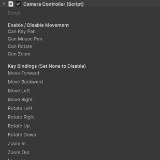
- canKeyPan, canMousePan, canRotate, canZoom: Toggles for enabling/disabling movement, rotation, and zoom functionalities.
- moveForward, moveBackward, etc.: Key bindings for camera movement and actions.
- panSpeed, rotationSpeed: Control the speed of the camera's movement and rotation.
- minX, maxX, minY, maxY, minZ, maxZ: Boundaries to constrain the camera's position.
- pivotPoint: Optional point around which the camera can rotate.
This script provides versatile camera control mechanics that are essential for many Unity-based projects, offering both flexibility and ease of integration into various game types.
Compatibility
| Unity version | Built-in | URP | HDRP | Custom |
|---|---|---|---|---|
| 6000.0.29f1 | Compatible | Compatible | Compatible | Compatible |
As listed on the Asset Store.