
 View on Asset Store (opens in new tab)
Package details
- Latest version
- 1.0
- Last updated
- First released
- Unity version
- 2021.3.45 or later
- Package size
- 23 KB
- Files
- 4
- Favorites
- 3
- Views in the past week
- 4
Price tracking
- Last checked
- Tracked since
- Lowest recorded
- $4.99 on
Keywords

Sprite Suite Pro
- Price drop
Sprite Suite Pro extends Unity's sprite slicing with batch processing, multiple slicing methods, and optional export to streamline your sprite workflow.
Lowest recorded price
Get 67% off on Asset Store (opens in new tab)Affiliate link · Purchases support this site
Price history
Last 6 months
USDAsset preview
1 / 3
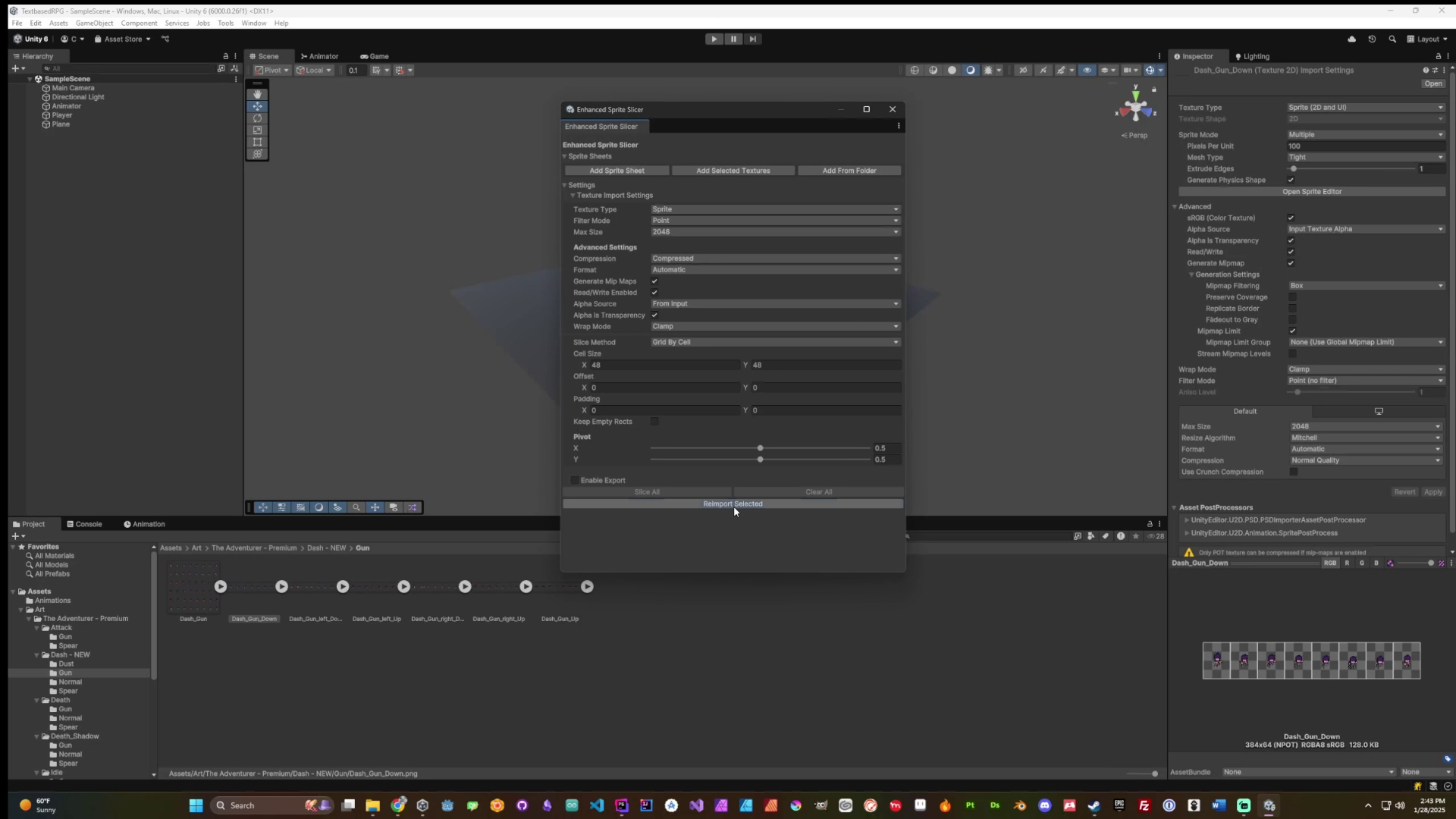
Sprite Suite Pro video 1 (plays on the Asset Store)

About this asset
Sprite Suite Pro is highly customizable and suitable for any project that uses sprite sheets, whether it's pixel art, hand-drawn art, or modern UI elements.
The tool is particularly valuable for:
- Pixel art games with tile sets and character sprites
- Games with multiple character animation sheets
- Isometric games requiring specialized sprite slicing
- UI-heavy projects with many interface elements
- Any project managing multiple sprite sheets
Key customization options include:
- Multiple slicing methods to handle different sprite sheet layouts
- Adjustable grid settings for precise control
- Customizable alpha tolerance for automatic slicing
- Export options with format and quality controls
- Batch processing settings to match your workflow
While especially useful for 2D games of any genre, the tool can benefit any Unity project that needs efficient sprite sheet management.
From the publisher's Asset Store listing.
Technical details
Batch Processing:
- Process multiple sprite sheets simultaneously
- Preview all slicing results before applying
- Single-click application for all sheets
Multiple Slicing Methods:
- Automatic detection using alpha
- Grid-based slicing (fixed size or count)
- Isometric grid support
- Custom pivot points
Import Settings Handling:
- Unified texture import configuration
- Apply settings to multiple sheets
- Memory-efficient processing
Export System:
- Multiple format support (PNG, JPG, TGA, WebP)
- Quality control settings
- Batch export capability
- Customizable naming and organization
Unity Integration:
- Builds on Unity's native sprite system
- Editor window docking support
- Progress tracking and cancellation
- Undo/redo support
Workflow Optimization:
- Sprite preview during setup
- Real-time feedback
- Easy settings adjustment
- Clear error handling
Compatibility
| Unity version | Built-in | URP | HDRP |
|---|---|---|---|
| 6000.0.26f1 | Compatible | Compatible | Compatible |
| 2022.3.55f1 | Compatible | Compatible | Compatible |
| 2021.3.45f1 | Compatible | Compatible | Compatible |
As listed on the Asset Store.