
 View on Asset Store (opens in new tab)
Package details
- Latest version
- 1.0.6
- Last updated
- First released
- Unity version
- 6000.0.83 or later
- Package size
- 51.0 MB
- Files
- 647
- Favorites
- 696
- Views in the past week
- 120
Price tracking
- Last checked
- Tracked since
- Lowest recorded
- $39.99 on
Keywords

Code Monkey Toolkit
Winner "Best Development Tool" Unity Awards 2025! Collection of super useful Tools and Elements to help you SAVE TIME and make AWESOME GAMES!
Affiliate link · Purchases support this site
Price history
Last 6 months
USDAsset preview
1 / 9

Code Monkey Toolkit screenshot 1




About this asset
Winner "Best Development Tool" Unity Awards 2025!
Regularly Updated with More and More Tools! Launched with 40 and currently at 58! (FREE Updates)
Save hundreds of hours and make games BETTER and FASTER by using various Tools and Elements included in this toolkit.
- Does your game need an Input Window? Just drag and drop!
- Do you need an Interaction System? Use the included one!
- Does your game need an easy way to Reference Assets? Use the GameAssets class!
- Need a Character Controller for a quick prototype? Drag and drop one of the many included ones!
- Does your game need a simple Text Writing effect? Use the TextWriter class!
- Do you need to store some data in a Grid (like a City Builder)? Use the Grid System!
- Improve your player's experience with the Error Detector. Just drag and drop!
- Want to interact with a server/API? Use the WebRequests class!
- Do you need to ask your player something? Use the Question Dialog window!
...and many more!
This toolkit contains a collection of super useful Tools and Elements to help you save time and make awesome games!
Right now it includes 50+ Tools and Elements to help you in various ways. Some are pre-made UI elements, others are Game Mechanics and Systems, others are helpful Utilities, etc. (more Tools and Elements to come in future free updates)
This toolkit is great for any part of the development process.
For prototyping, nowadays finding success as an indie developer is very difficult and you need to quickly test out lots of ideas, this Toolkit helps you do exactly that, it helps you try out new ideas very quickly by reusing a ton of these Tools and Elements, it can help you save hundreds of hours!
Or if you're already deep in development then this Toolkit helps you explore new ideas, or helps you with debugging, or helps you with polish.
Tools have a linked Tutorial Video that explains how it works, if you want to learn, or you can just use them. There are Demo Scenes for every tool (and walkthrough video) with easy to understand code for how you use them, most tools you just drag and drop a prefab or call a function from a single line of code.
BONUS: Includes a Shop Simulator Prototype that I built to test out all these tools. Initially I was going to just make it for myself but I figured I might as well include it in the Toolkit as a nice bonus. You can take this as a starting point and build upon it to make a game in this VERY popular Steam genre.
My name is Code Monkey and I've been making games with Unity for over 10 years, I've got 9 successful games published on Steam. 8 years ago I started a YouTube channel sharing my knowledge and in that time I've made over 800 videos/tutorials that got millions of views and helped thousands of people who want to make games!
From the publisher's Asset Store listing.
Technical details
TOOLS AND ELEMENTS
- FunctionPeriodic: Trigger an action every X amount of time
- FunctionTimer: Trigger an Action after X seconds
- FunctionUpdater: Trigger an Action on every Update();
- GameAssets: Extremely useful class for easy access to any asset references
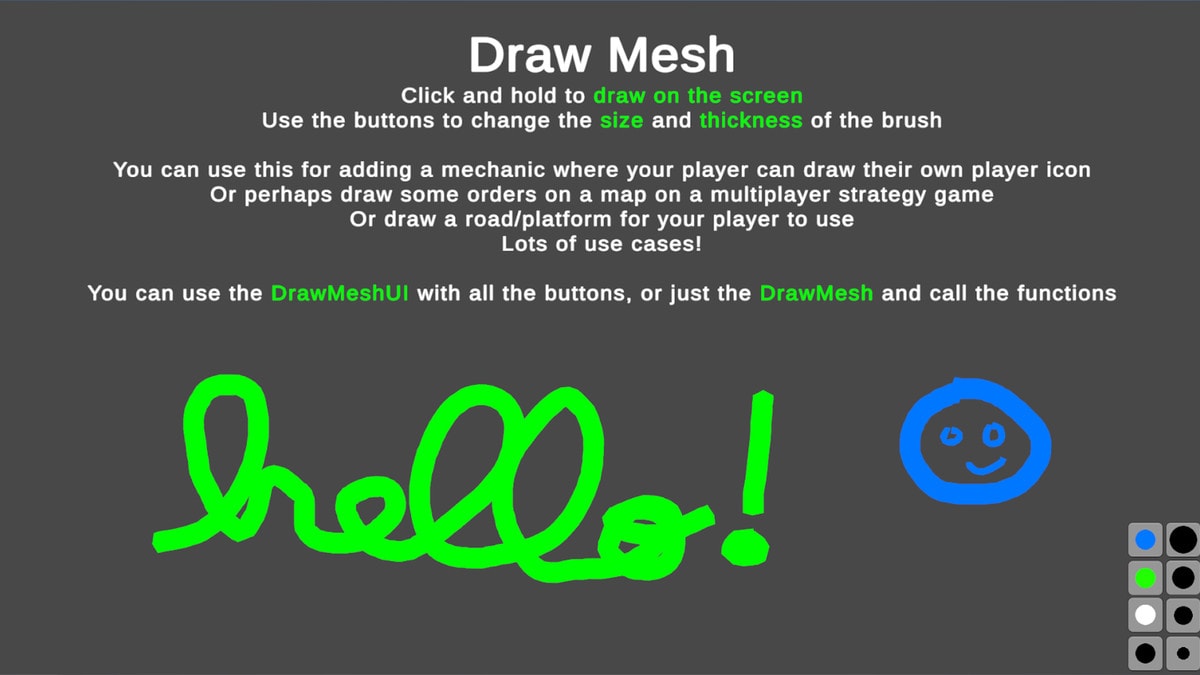
- DrawMesh: Draw a mesh with the mouse, great for giving orders, making annotations, or drawing a logo, etc
- DrawPixels: Draw pixel art in-game, great for modding, draw player icon, draw enemy icon, draw item, etc
- InteractionSystemLookAt: General system for interacting with objects or NPCs, Look At Objects
- InteractionSystemProximity: General system for interacting with objects or NPCs, Proximity to Objects
- ErrorDetector: Window that detects errors and shows them to the player
- InputWindow: Window for getting input from the player, ask for their name, age, weapon damage, etc
- MousePosition: Get the Mouse World Position in 3 ways: 2D; Raycast or Plane
- QuestionDialog: Ask the player some question, buttons on Yes/No/Ok/Cancel
- WebRequests: Contact a web server to get any data you want, or submit some data
- FirstPersonController: Simple Character Controller in First Person, look around and move
- HealthSystem: Manage any kind of health on any kind of object
- SaveFileScreenshot: Save Game Data with a Screenshot in the same file
- TakeScreenshot: Take a Screenshot, with or without UI
- BreakTheScreen: Nice effect where it takes a screenshot and then shatters it
- RandomData: Various functions to generate random data, numbers, vectors, strings
- TextPopup: Spawn a Text Popup, great for debugging
- ZoomShader: Zoom on the area behind an object, for example scope/binoculars
- CameraControllerBasic: Simple Camera Controller, Move and Rotate.
- CameraControllerBasic2D: Simple Camera Controller in 2D, Move and Rotate.
- CinematicBars: Show or Hide Cinematic Black bars on top and bottom of the screen, great for cutscenes
- FPSCounter: Simple UI element to show framerate, useful in builds
- GridSystem: Split the world in a Grid, place any data you want in any Grid Position, extremely versatile
- GridSystemHex: Split the world in a Grid with Hexagonal shapes, place any data you want in any Grid Position, extremely versatile
- GridSystemXY: Split the world in a Grid oriented in XY, place any data you want in any Grid Position, extremely versatile
- LookAtCamera: Utility class to make an object look at the camera, very useful for things like Health Bars
- TextWriter: Text Writing effect, simple and easy to use
- Tooltip: Show Tooltip to give the player extra information
- ChatBubble: Spawn a nice Chat Bubble to display some message with an icon
- ChatBubble3D: Spawn a nice Chat Bubble to display some message with an icon, in 3D
- TopDownCharacterController: Simple Character Controller from a Top Down Perspective (no gravity)
- TopDownCharacterController3D: Simple Character Controller 3D in Top Down perspective (no gravity)
- KeyDoorSystem: System for managing Keys and Doors.
- Templates: Great for single-use elements so you don't clutter your project files with tons of single-use prefabs
- ResetUIRectTransform: Simple utility script to reset a UI position to 0,0 and full scale by default
- BlockerUI: Simple visual meant for blocking UI clicks
- MonoBehaviourHooks: Simple utility class that allows you to attach Action Delegates to all the MonoBehaviour functions
- PointerHooks: Simple utility class that allows you to attach Action Delegates to all the IPointer functions
- DragWindow: Easily add this component to make any UI window draggable
- OpenAIAPI: Talk to ChatGPT from inside your game, ask questions, analyze images, generate images and more.
- SceneLoadingSystem: Simple Loading system with a Loading screen
- TickSystem: Run logic every X amount of time, super useful for optimization of things that don't need to run on Update
- VirtualCursor: Control a cursor with a Gamepad that also interacts with UI elements
- ShaderBlur2D: Simple Blur 2D Sprites shader
- ShaderDissolve2D: Simple Dissolve 2D Sprites shader
- ShaderOutline2D: Simple Outline 2D Sprites shader
- ShaderPixelate2D: Simple Pixelate 2D Sprites shader
- ShaderTint2D: Simple Tint 2D Sprites shader
- TransitionEffect: Smooth shader effect perfect for scene transitions
- AgentAISkills: Added Skills.md so agents know how to use the Toolkit and all its tools
- DayNightCycle: Simple script keeping track of time and animating the sun
- GraphicsSettingsWindow: Drag and drop to easily allow your player to modify graphics settings
- MainMenu: Simple Main Menu to easily add to your games/prototypes
- SaveSystem: Easily expandable save system to help you save any data you can imagine
- SimpleDestruction: Showcase of how to easily add destruction to your games
Compatibility
| Unity version | Built-in | URP | HDRP |
|---|---|---|---|
| 6000.0.83f1 | Not listed | Compatible | Not listed |
Most tools are just code-based so they're not related to any Render Pipeline, only the Shaders and the Graphics Settings Window are specific to URP.
As listed on the Asset Store.