
 View on Asset Store (opens in new tab)
Package details
- Latest version
- 1.2
- Last updated
- First released
- Unity version
- 6000.0.62 or later
- Package size
- 2.6 MB
- Files
- 348
- Favorites
- 112
- Views in the past week
- 52
- Requires
Price tracking
- Last checked
- Tracked since
- Lowest recorded
- $14.99 on
Keywords

UI Animation
UIAnimation is a powerful and user-friendly tool for Unity designed to simplify and accelerate the process of creating animations for UI elements.
Affiliate link · Purchases support this site
Price history
Last 6 months
USDAsset preview
1 / 13

UI Animation screenshot 1



About this asset
Documentation | YouTube | WebGL Demo | DISCORD COMMUNITY
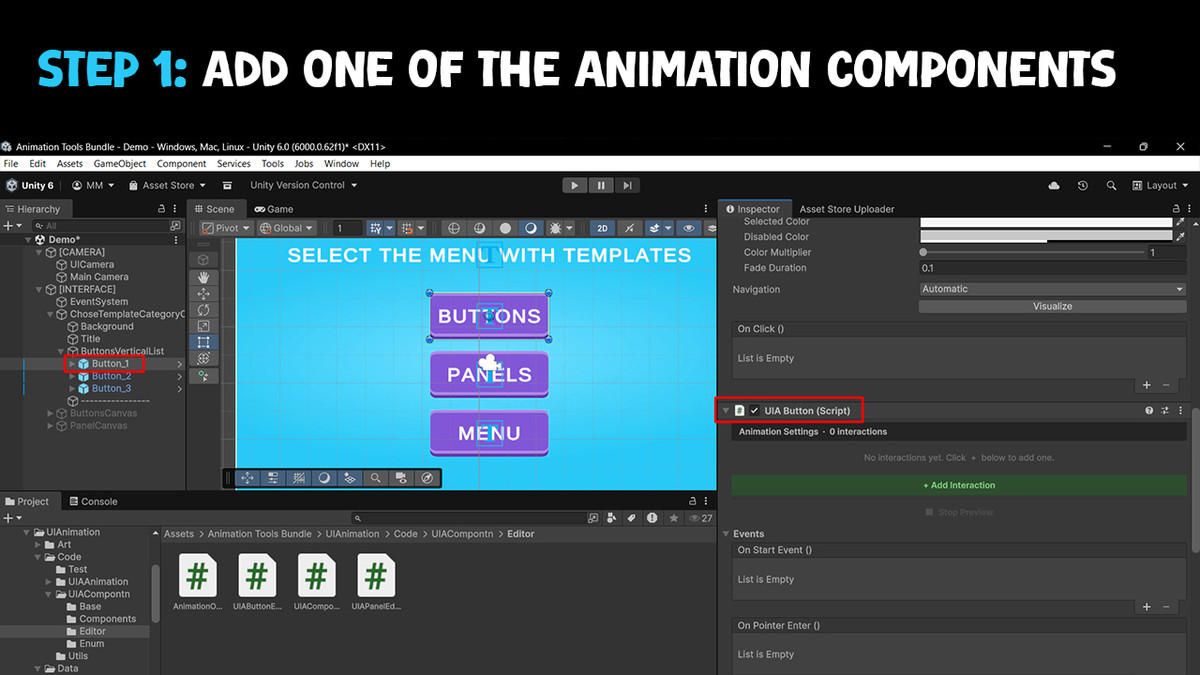
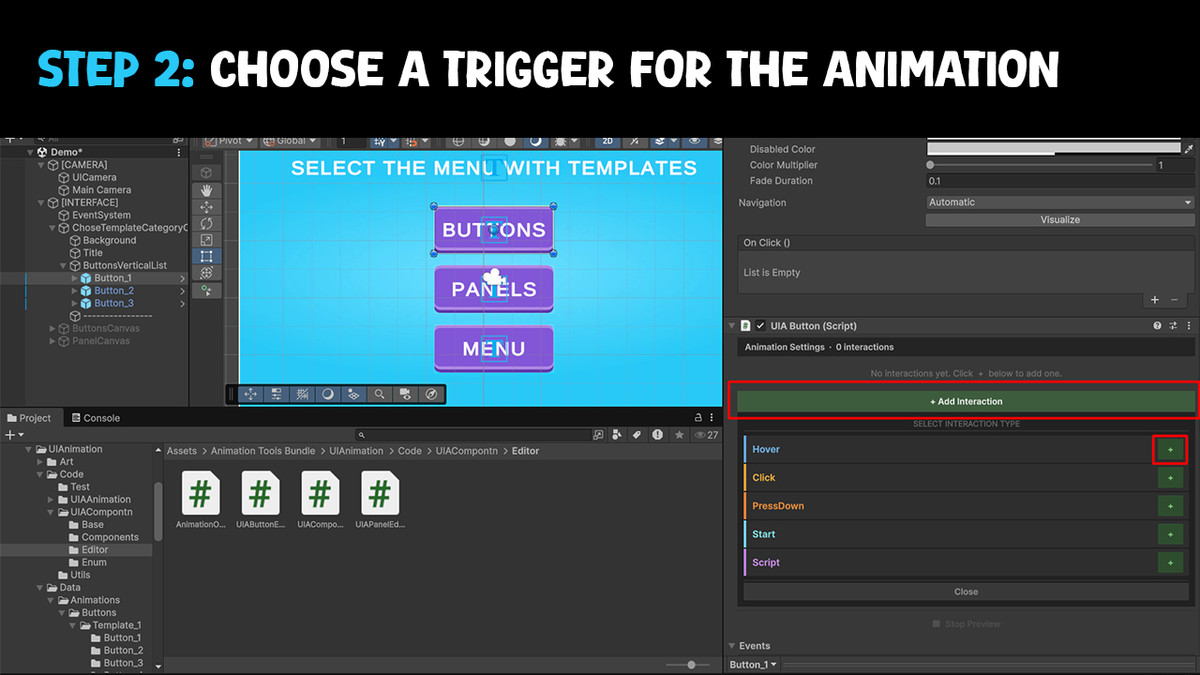
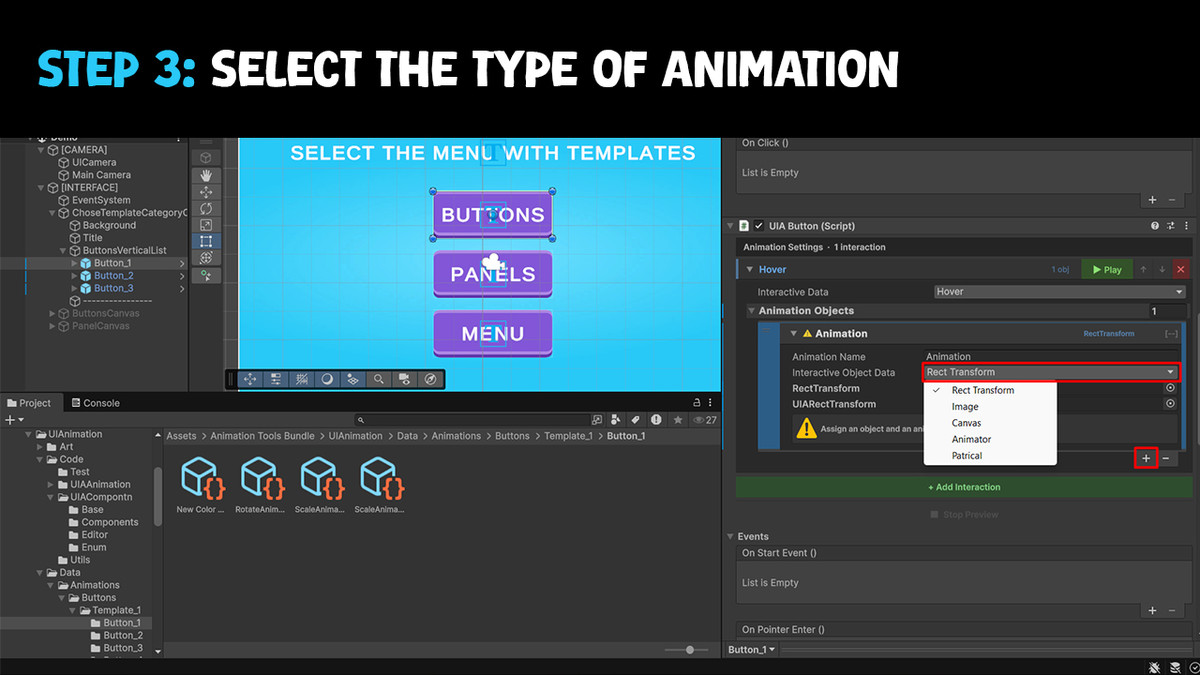
UIAnimation is the ultimate tool for creating dynamic and engaging UI animations effortlessly. By using the UIAButton and UIAPanel components, you can bring your interface to life with just a few clicks. Simply choose the interaction type (such as Hover, Click, Open, Close, etc.), select the animation type, and apply it to the desired object. That's it! No coding required.
👀 Extension:
📌 Why Choose UIAnimation?
- User-Friendly: Designed to be intuitive and easy to use, even for beginners.
- Time-Saving: With pre-made templates and prefabs, you can create animations in minutes.
- Flexible: Customize animations to fit any style or project requirement.
- Expandable: Regular updates ensure that UIAnimation stays ahead of the curve with new features and improvements.
❓ How It Works:
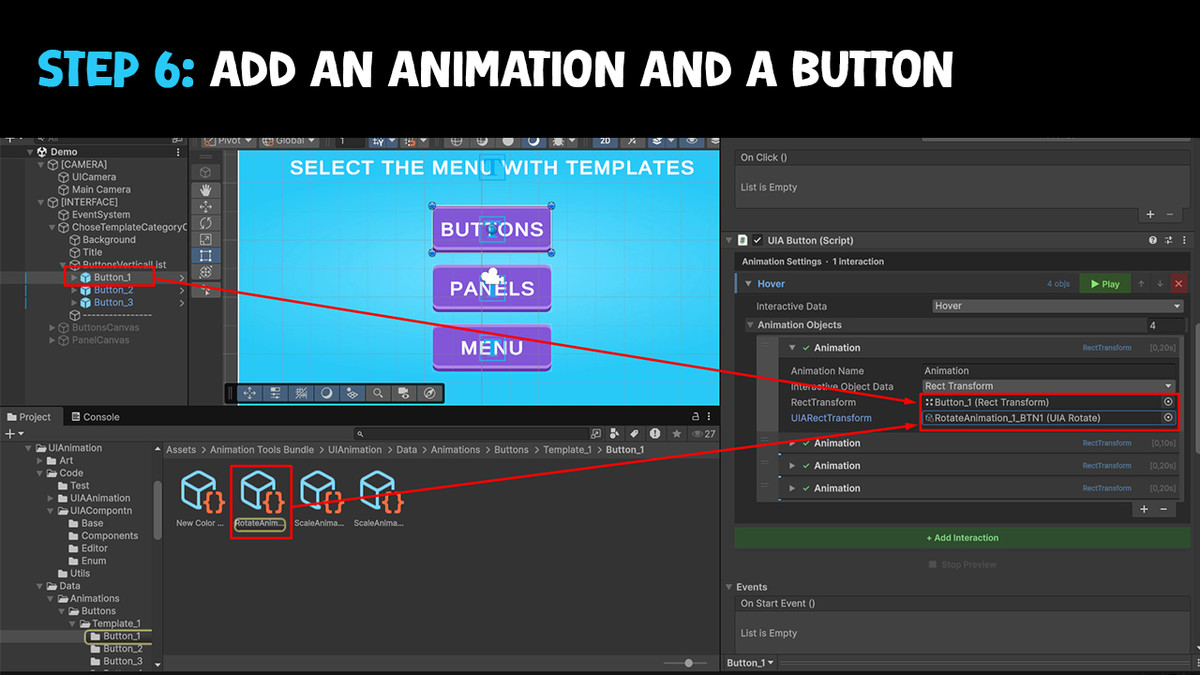
- Add a Component: Attach the UIAButton or UIAPanel component to your UI element.
- Choose Interaction Type: Select how the animation will be triggered (e.g., Hover, Click, Open, Close).
- Select Animation Type: Choose from a variety of animation types, such as Rotate, Scale, Translate, etc.
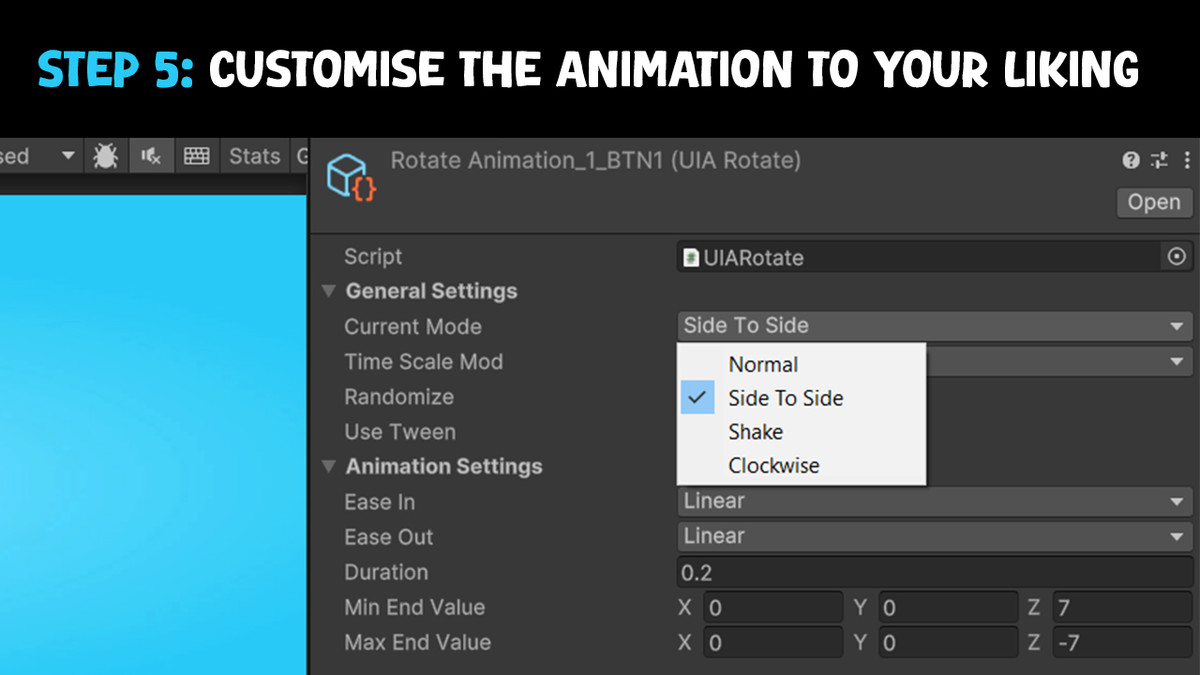
- Customize Parameters: Adjust the animation settings using Scriptable Objects to fit your needs.
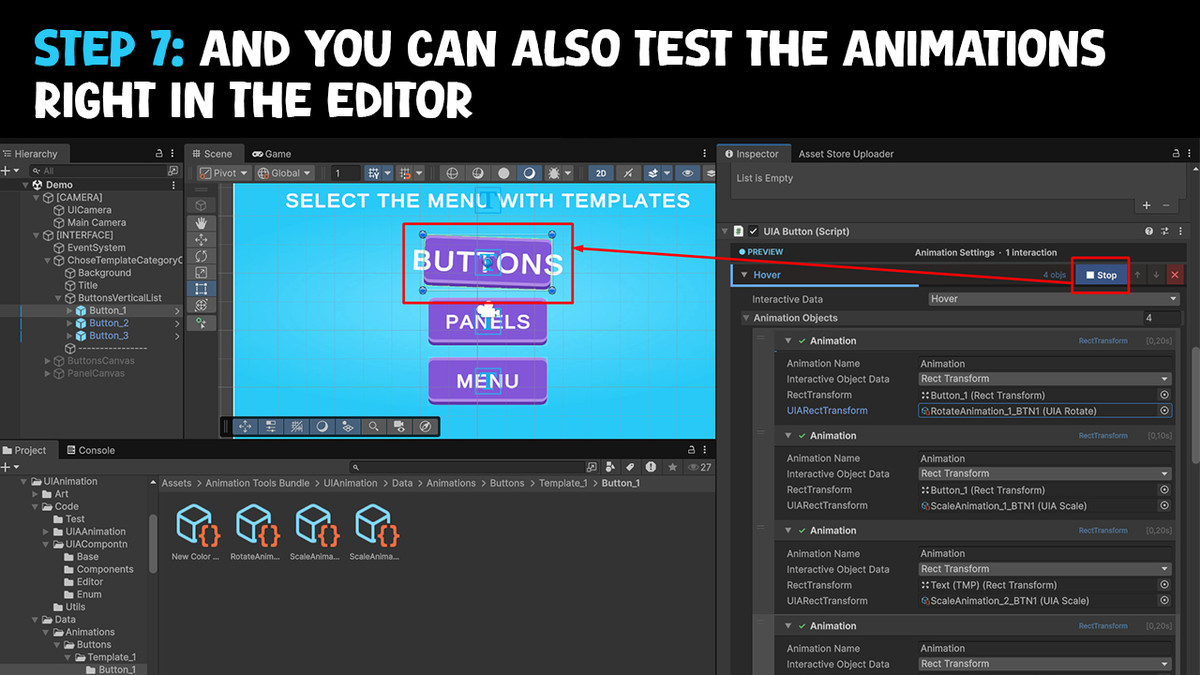
- Play & Enjoy: Run your game and watch your UI come to life with smooth, professional animations.
✅ Key Features:
- No Coding Needed: Create complex animations without writing any code.
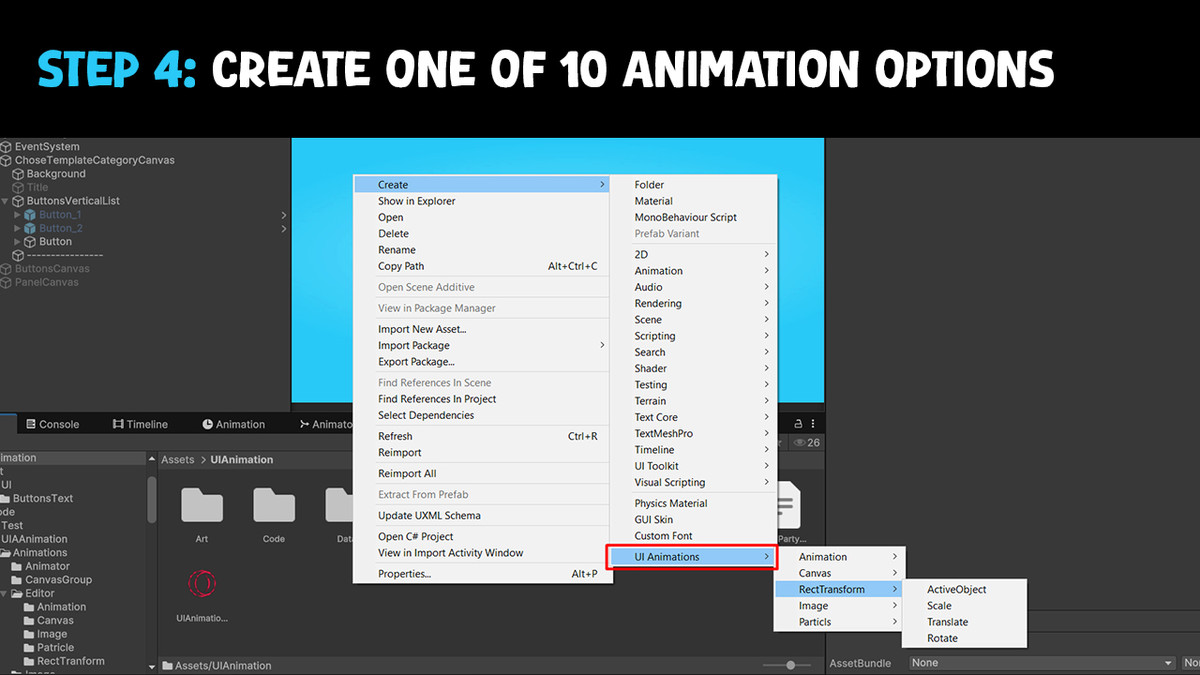
- Types of animation: There are 10 types of animation in total: Rotate, Scale, Translate, FillAmount, Canvas Gropu, Image Color, Sprite Change, Animator, Activate Object. And each of them has its own modes. For example, Image Color has 7 different modes such as ripple, random colour and others, which makes the setting more flexible. You can find more information in the documentation!
- 35 Ready-to-Use Prefabs: Save time with prefabs that are fully configured and ready to be dropped into your scene.
- Demo Scene Included: Explore the demo scene to see all 35 animation templates in action.
- Ready-made menu and sub-menus: main menu, shop menu, setting menu, leaderboard menu, level selection menu
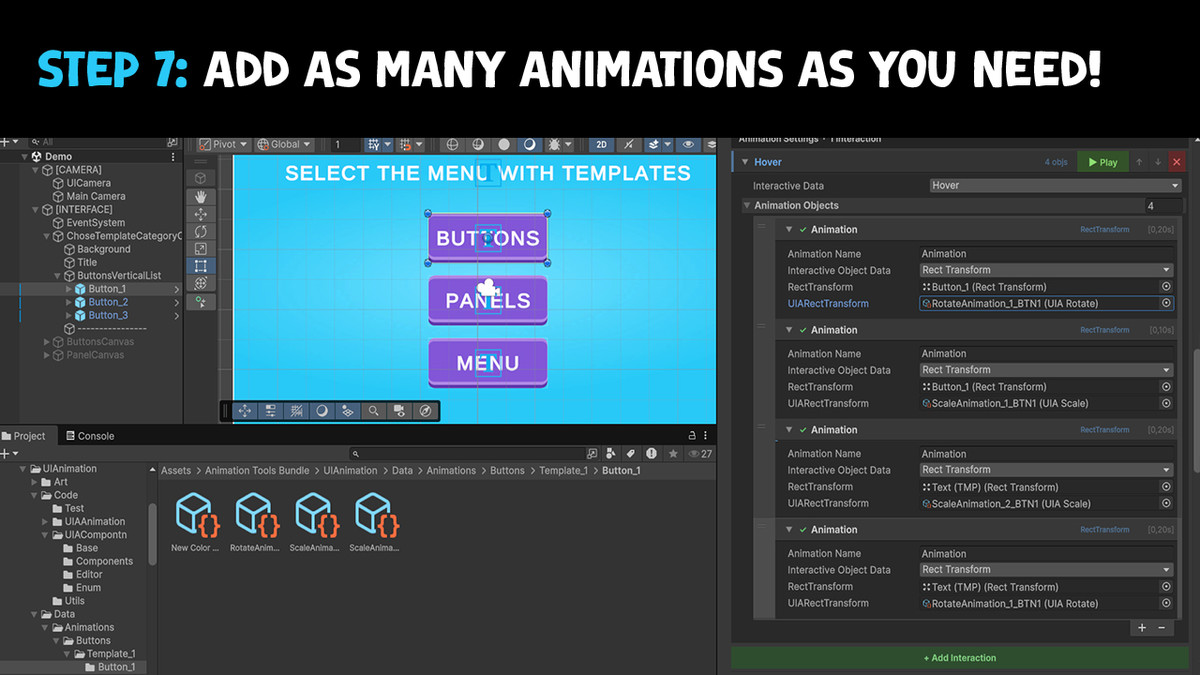
- Ability to add a huge number of animations: You can add more than 10 or 50 animations for the button, for the text that is on the button and for the icon that is also on the button. Which will work simultaneously.
- Flexible Customization: Customize animations using Scriptable Objects with a wide range of parameters, including duration, easing, and randomization.
- Component-Based System: Use UIAButton and UIAPanel components to easily add animations to your UI elements.
─────────────────────────────────────
🔥 OTHER ASSETS:
─────────────────────────────────────
- Top Down - Rogue-like Engine
- Mesh Animation for Unity
- Variable Scout - Hierarchy Search & Inspector Tool
- GUI Fantasy | Casual
- GUI Fantasy | Casual + [PSD]
- GUI Fantasy | Casual + [PSD] + UIAnimation
⭐️ Feedback and feature requests are always welcome.
All questions in email: [email protected]
From the publisher's Asset Store listing.
Technical details
- Types of animation: There are 10 types of animation in total: Rotate, Scale, Translate, FillAmount, Canvas Gropu, Image Color, Sprite Change, Animator, Activate Object. And each of them has its own modes. For example, Image Color has 7 different modes such as ripple, random colour and others, which makes the setting more flexible. You can find more information in the documentation!
- Ability to add a huge number of animations: You can add more than 10 or 50 animations for the button, for the text that is on the button and for the icon that is also on the button. Which will work simultaneously.
- Flexible Customization: Customize animations using Scriptable Objects with a wide range of parameters, including duration, easing, and randomization.
- No Coding Needed: Create complex animations without writing any code.
- Component-Based System: Use UIAButton and UIAPanel components to easily add animations to your UI elements.
- 35 Ready-to-Use Prefabs: Save time with prefabs that are fully configured and ready to be dropped into your scene.
- Demo Scene Included: Explore the demo scene to see all 35 animation templates in action.
Compatibility
| Unity version | Built-in | URP | HDRP | Custom |
|---|---|---|---|---|
| 6000.0.62f1 | Compatible | Compatible | Compatible | Compatible |
As listed on the Asset Store.