
 View on Asset Store (opens in new tab)
Package details
- Latest version
- 1.1
- Last updated
- First released
- Unity version
- 2021.3.16 or later
- Package size
- 1.5 MB
- Files
- 105
- Favorites
- 58
- Views in the past week
- 42
Price tracking
- Last checked
- Tracked since
- Lowest recorded
- Free on
Keywords
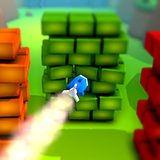
Rocket Smash 3D - Free Game Template
Take control of a rocket launched from a tank to destroy brick walls and conquer the final fortress. This game template offers dynamic physics and immersive gameplay for an exciting experience.
Affiliate link · Purchases support this site
Price history
Last 6 months
USDAsset preview
1 / 6

Rocket Smash 3D - Free Game Template screenshot 1


About this asset
🚀 Guide the Rocket to Victory!
Take control of a rocket launched from a tank to smash through brick walls and ultimately destroy the final fortress! Experience astonishing physics and immersive gameplay in this action-packed game template.
🎮Check out the demo:
📂 Project Highlights
- 🎨 Art Assets:19 customizable materials, 10 PNG textures, 7 FBX 3D models, and 4 UI PNG sprites.
- 🧩 Prefabs:22 ready-to-use prefabs for seamless integration.
- 🌍 Scene:A fully prepared gameplay-ready scene.
- 💻 Scripts:16 clean, performance-optimized scripts.
- 🖋 Scriptable Objects:Easily manage level data and progression.
🎮 Customization
Effortlessly modify assets or introduce new ones to create your own unique gameplay experience.
🔗 Dependencies
Requires Unity UI/TextMeshPro and Post Process packages. Easily install them via the Unity Package Manager.
📧 Need Help?
For support or inquiries, reach out via our website: blackrosedevelopers.com
From the publisher's Asset Store listing.
Technical details
1.Art
Art folder is subdivided into four folders.
A. Materials
Contains 19 various materials used in the game, which can be customized with different colours or sprites.
B. Models:
Contains 7 unique 3D models of objects in the game (FBX)
C. Textures:
Contains 10 textures of models that can be applied to materials (PNG)
D. Sprites:
Contains 4 UI buttons that can be used in different game menus (PNG)
2. Prefabs
The Prefabs folder includes four main categories:
- Gameplay: 8 prefabs of different objects in gameplay for level design.
- Particles: 5 unique particle effects with different materials.
- Nature: 4 prefabs that can be used in the scene
- UI: 5 Prefabs of the game menus.
3. Scenes
- Scene-1: the sample level of the game.
4. Scriptable Objects
- 4 different Scriptable Objects (Contents, Gameplay Data, DataStorage and UIData) to save coins, gems or level info.
5. Scripts
16 Scripts are categorized into three folders, with clear names and functions to ensure easy understanding.
Compatibility
| Unity version | Built-in | URP | HDRP |
|---|---|---|---|
| 2021.3.16f1 | Compatible | Compatible | Compatible |
As listed on the Asset Store.