
 View on Asset Store (opens in new tab)
Package details
- Latest version
- 1.0
- Last updated
- First released
- Unity version
- 6000.0.24 or later
- Package size
- 5.9 MB
- Files
- 30
- Favorites
- 7
- Views in the past week
- 17
Price tracking
- Last checked
- Tracked since
- Lowest recorded
- $8.99 on
Keywords
- Search for compass navigator
- Search for shooter minimap
- Search for compass navigation
- Search for shooter map
- Search for minimap flat
- Search for shooter template compass
- Search for spaceship compass
- Search for Minimap System
- Search for compass shooter system
- Search for minimap
- Search for minima
- Search for cardinal compass
Compass Navigator Professional | Compass System/ Minimap System & Framework
A dynamic horizontal compass system for Unity, featuring customizable POI markers, cardinal directions, smooth transitions, offsets, and visibility control for immersive navigation
Affiliate link · Purchases support this site
Price history
Last 6 months
USDAsset preview
1 / 5

Compass Navigator Professional | Compass System/ Minimap System & Framework screenshot 1


About this asset
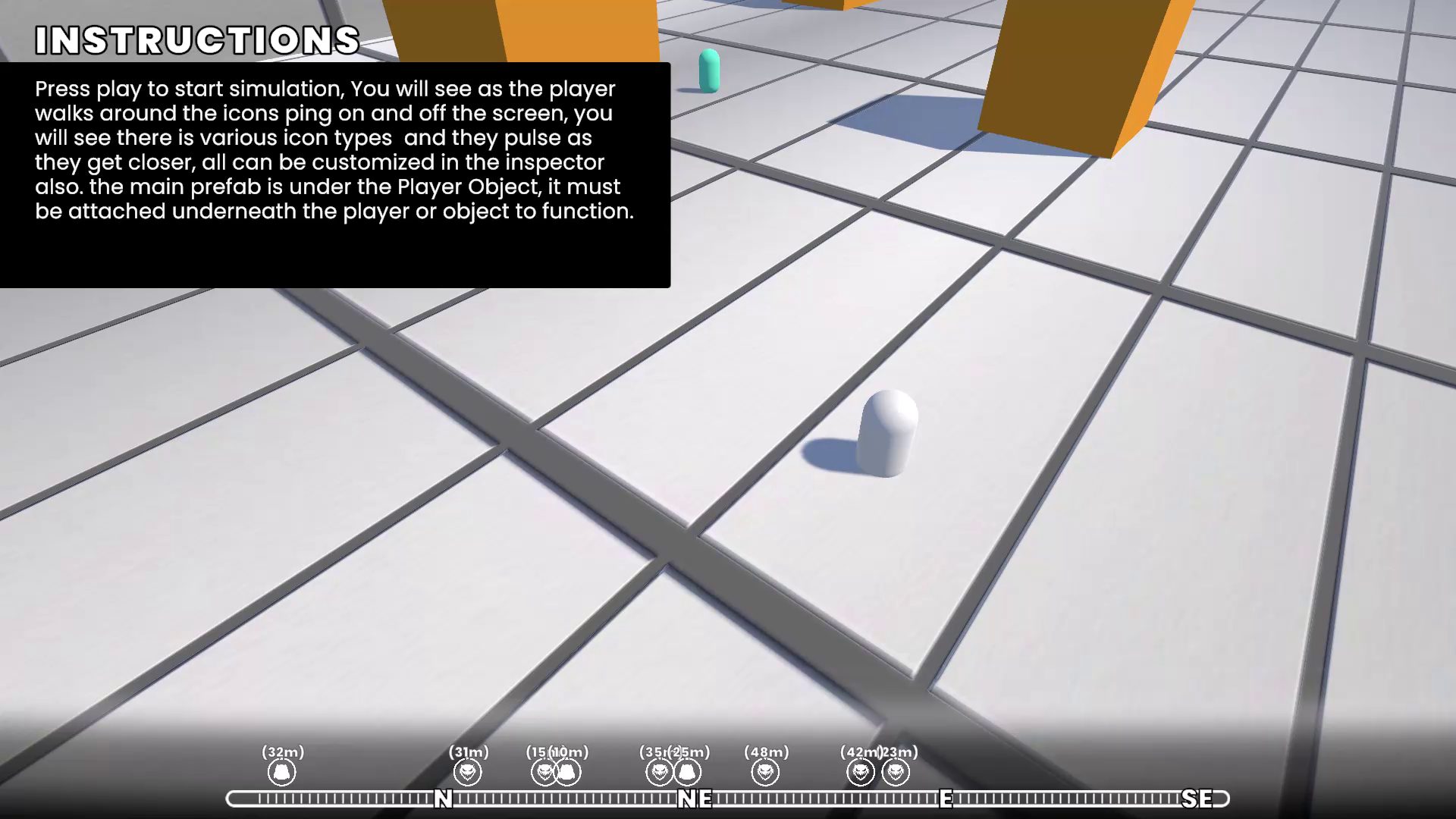
A versatile horizontal compass system for Unity, ideal for adding immersive navigation to your game. Whether you’re creating an open-world adventure, a survival sandbox, or a fast-paced racing game, Compass Navigator equips you with all the tools needed to display Points of Interest (POIs), cardinal directions, and dynamic player markers with smooth transitions and customizable visuals. Perfect for both static and dynamic environments, this system ensures a professional and polished navigation experience.
Key Features:
- Dynamic POI Markers: Add and track Points of Interest with customizable icons, labels, and distance-based updates.
- Smooth Transitions: Eliminate snapping and jumping with fluid marker transitions across the compass bar.
- Cardinal Directions: Accurately display cardinal markers (N, E, S, W) with adjustable count and spacing.
- Visibility Control: POI markers fade out and deactivate cleanly when out of the compass span.
- Custom Offsets: Position markers with precise horizontal and vertical offsets for tailored UI design.
- Distance-Based Fading: Dynamically fade POIs based on their proximity to the player.
- Static and Dynamic POIs: Supports both fixed world positions and moving targets like NPCs, vehicles, or collectibles.
- Optimized Performance: Engineered for smooth performance even in complex or large-scale scenes.
- Unity UI Integration: Fully compatible with Unity’s UI and TextMeshPro for sharp, customizable text elements.
- Easy-to-Use Editor Tools: Intuitive Unity Editor controls for compass customization, POI management, and settings configuration.
Example Games That Can Benefit:
- The Legend of Zelda: Breath of the Wild: Display key shrines, quests, and waypoints in open-world exploration.
- Elder Scrolls V: Skyrim: Guide players with markers for towns, caves, and objectives on a horizontal compass.
- The Forest: Highlight survival resources, enemy locations, and landmarks.
- Forza Horizon Series: Showcase checkpoints, rival positions, and waypoints in racing gameplay.
- PUBG or Fortnite: Indicate loot drops, enemies, or safe zones for tactical navigation.
- Minecraft Mods: Provide navigation aids for complex modded worlds or RPG-like gameplay.
Why Choose Compass Navigator?
With its robust feature set and easy integration, Compass Navigator empowers developers to create polished navigation systems that feel intuitive and professional. Perfect for genres like exploration, survival, racing, or tactical shooters, this asset saves development time and enhances your game’s UI experience.
Elevate your project with Compass Navigator and deliver an exceptional navigation experience to your players!
From the publisher's Asset Store listing.
Technical details
Key Features:
- Dynamic POI Markers: Add and track Points of Interest with customizable icons, labels, and distance-based updates.
- Smooth Transitions: Eliminate snapping and jumping with fluid marker transitions across the compass bar.
- Cardinal Directions: Accurately display cardinal markers (N, E, S, W) with adjustable count and spacing.
- Visibility Control: POI markers fade out and deactivate cleanly when out of the compass span.
- Custom Offsets: Position markers with precise horizontal and vertical offsets for tailored UI design.
- Distance-Based Fading: Dynamically fade POIs based on their proximity to the player.
- Static and Dynamic POIs: Supports both fixed world positions and moving targets like NPCs, vehicles, or collectibles.
- Optimized Performance: Engineered for smooth performance even in complex or large-scale scenes.
- Unity UI Integration: Fully compatible with Unity’s UI and TextMeshPro for sharp, customizable text elements.
- Easy-to-Use Editor Tools: Intuitive Unity Editor controls for compass customization, POI management, and settings configuration.
Compatibility
| Unity version | Built-in | URP | HDRP |
|---|---|---|---|
| 6000.0.24f1 | Compatible | Not listed | Not listed |
As listed on the Asset Store.